AWS SCS-C03 Study Plan
Exam Overview
| Item | Detail |
|---|---|
| Exam | AWS Certified Security - Specialty (SCS-C03) |
| Previous Score | 646 / 750 |
| Passing Score | 750 / 1000 (scaled) |
| Gap | ~104 points (~9-10 more correct answers needed) |
| Questions | 65 scored + 15 unscored = 80 total |
| Time | 170 minutes |
| Format | Multiple choice & multiple response (scenario-based) |
Domain Weights & Study Priority
| Domain | Name | Exam Weight | Questions (~) | Study Priority |
|---|---|---|---|---|
| 4 | Identity & Access Management | 20% | 13 | HIGHEST |
| 3 | Infrastructure Security | 18% | 12 | HIGH |
| 5 | Data Protection | 18% | 12 | HIGH |
| 1 | Threat Detection & Incident Response | 16% | 10 | MEDIUM |
| 2 | Security Logging & Monitoring | 14% | 9 | MEDIUM |
| 6 | Management & Security Governance | 14% | 9 | MEDIUM |
4-Week Study Plan
Week 1: IAM & Data Protection (38% of Exam)
Day 1-2: IAM Policy Fundamentals
- IAM policy structure: Effect, Action, Resource, Condition
- Identity-based vs Resource-based policies
- Managed policies vs Inline policies — when to use each
- Practice: Write policies from scratch, read and interpret JSON policies
Day 3: IAM Policy Evaluation Logic (CRITICAL)
- Single-account evaluation flow: Explicit Deny > SCP > Resource Policy > Permission Boundary > Identity Policy
- Cross-account evaluation: BOTH accounts must allow
- Key Rule: Any explicit deny = final deny (0 multiplied by anything = 0)
- Practice scenarios: "Can User X in Account A access S3 bucket in Account B?"
Day 4: SCPs, Permission Boundaries & Organizations
- SCPs restrict maximum permissions for an OU/account (they don't grant)
- Permission boundaries restrict maximum permissions for a user/role
- SCP + Permission Boundary + Identity Policy = effective permissions (intersection)
- OU hierarchy and SCP inheritance
- Allow-list vs Deny-list SCP strategies
Day 5: STS, Federation & Identity Center
- AssumeRole, AssumeRoleWithSAML, AssumeRoleWithWebIdentity
- External ID — why it's needed (confused deputy problem)
- SAML 2.0 federation flow (IdP → SAML assertion → STS → temp credentials)
- IAM Identity Center (SSO) — permission sets, multi-account access
- Amazon Cognito — User Pools (authentication) vs Identity Pools (authorization)
Day 6: KMS Deep Dive
- Customer Managed Keys vs AWS Managed vs AWS Owned
- Key policies: default policy enables IAM policies, without it = locked out
- Grants: temporary, scoped access to KMS keys
- Cross-account KMS: key policy must allow + IAM policy must allow
- Key rotation: automatic (every year) vs manual (create new key, re-encrypt)
- Importing key material: you manage expiration, no auto-rotation
- Multi-region keys: replicas share key material
- ViaService condition: restrict key usage to specific AWS services
Day 7: Encryption Services
- S3 encryption: SSE-S3, SSE-KMS (audit trail), SSE-C (you manage keys), client-side
- EBS encryption: default encryption, encrypted snapshots, cross-account sharing
- RDS encryption: encrypt at creation, cannot encrypt existing DB (snapshot → copy encrypted → restore)
- CloudHSM vs KMS: CloudHSM = dedicated hardware, FIPS 140-2 Level 3, you manage keys
- Secrets Manager: auto-rotation with Lambda, cross-region replication
- ACM: managed certificates, auto-renewal, cannot export private key
Week 2: Infrastructure Security & Threat Detection (34% of Exam)
Day 8-9: VPC Security
- Security Groups (stateful) vs NACLs (stateless) — know the differences cold
- VPC Endpoints: Gateway (S3, DynamoDB - free, route table entry) vs Interface (ENI, most services, costs money)
- VPC Endpoint policies: restrict what can be accessed through the endpoint
- VPC Flow Logs: capture IP traffic, stored in CloudWatch Logs or S3
- DNS resolution in VPC: enableDnsHostnames, enableDnsSupport
- PrivateLink: expose services privately across VPCs/accounts
Day 10: Network Security Services
- AWS WAF: Web ACLs → Rule Groups → Rules, rate-based rules, geo-blocking, IP sets
- AWS Shield: Standard (free, layer 3/4) vs Advanced (paid, layer 7, DRT support, cost protection)
- AWS Network Firewall: stateful/stateless rules, Suricata-compatible, deep packet inspection
- IDS/IPS architecture in AWS
- CloudFront: OAC for S3, signed URLs/cookies, field-level encryption, managed prefix lists
Day 11: Connectivity & Network Architecture
- Site-to-Site VPN: VGW/TGW, two tunnels for HA
- Client VPN: OpenVPN-based, split tunneling
- Direct Connect: dedicated connection, MACsec encryption, not encrypted by default
- Transit Gateway: hub-and-spoke, centralized routing
- VPC Peering: non-transitive, no overlapping CIDR
Day 12: Systems Manager
- Session Manager: no SSH/RDP needed, no bastion host, all sessions logged
- Run Command: execute commands across fleet without SSH
- Parameter Store: Standard (free, 10K) vs Advanced (paid, 100K, policies), SecureString uses KMS
- Patch Manager: patch baselines, maintenance windows, compliance reporting
- Automation: runbooks for remediation, can run in context of service role
Day 13-14: Threat Detection & Incident Response
- GuardDuty: ML-based, analyzes CloudTrail/VPC Flow Logs/DNS logs, malware protection, trusted IP lists, suppression rules, multi-account with delegated admin
- Security Hub: CSPM, aggregates findings (ASFF format), CIS/PCI standards, custom actions → EventBridge
- Amazon Inspector: vulnerability scanning for EC2/Lambda/ECR, CVSS scoring, auto-scan on deploy
- Amazon Detective: investigate findings from GuardDuty, analyze with graph models
- Incident Response workflows:
- Compromised EC2: isolate (forensic SG) → snapshot EBS → investigate in isolated VPC
- Compromised IAM keys: disable key → attach deny-all policy → revoke temp sessions → check CloudTrail
- Compromised S3: deny bucket policy → check access logs → check Macie findings
Week 3: Logging, Monitoring & Governance (28% of Exam)
Day 15-16: CloudTrail
- Management events (default on), Data events (must enable, cost extra), Insights events
- Network activity events (new): API calls through VPC endpoints
- Log file integrity validation: SHA-256 hash, digest files
- Organizational trail: all accounts, all regions
- Integration: S3 → Athena for querying, EventBridge for real-time alerts
Day 17: CloudWatch & EventBridge
- CloudWatch Logs: log groups, metric filters (pattern → metric → alarm → SNS/Lambda)
- CloudWatch Logs Insights: query language for log analysis
- CloudWatch Anomaly Detection: ML-based, 2 weeks training data needed
- Subscription filters: real-time log streaming to Lambda/Kinesis/OpenSearch
- EventBridge: rules match events → targets (Lambda, SNS, SQS, Step Functions)
- EventBridge patterns: source, detail-type, detail fields
Day 18: AWS Config & Compliance
- Config rules: managed rules vs custom rules (Lambda)
- Detective rules (after-the-fact) vs Proactive rules (before deployment)
- Remediation: SSM Automation runbooks, auto or manual
- Config Aggregator: multi-account, multi-region view
- Conformance packs: collection of rules + remediation actions
Day 19: Other Monitoring & Logging Services
- Amazon Macie: ML to discover and protect sensitive data (PII) in S3
- VPC Flow Logs: accepted/rejected traffic, source/dest IP, ports
- S3 Access Logs vs CloudTrail S3 data events (know the difference)
- Amazon Kinesis: Data Streams (real-time), Firehose (delivery), Analytics
- Amazon OpenSearch: log analysis, dashboards (like ELK)
- Centralized logging architecture: multiple accounts → S3 bucket in log account
Day 20: Governance & Management
- AWS Organizations: SCPs, OUs, tag policies, AI opt-out policies
- AWS Control Tower: landing zone, guardrails (preventive=SCP, detective=Config rules)
- AWS RAM: share resources across accounts (subnets, Transit GW, etc.)
- Firewall Manager: centrally manage WAF rules, Shield Advanced, Security Groups across org
- AWS Audit Manager: automated evidence collection for compliance frameworks
- Service Catalog: standardized CloudFormation stacks for end users
- Trusted Advisor: checks for security, cost, performance, fault tolerance
Day 21: Review Day
- Review all flashcards
- Re-read notes on weakest topics
- Review all "Points to Note" from KPLabs course
Week 4: Practice Exams & Final Review
Day 22-23: Practice Exam 1
- Take a full 65-question practice exam (Tutorials Dojo or WhizLabs)
- Time yourself: 170 minutes
- Review EVERY question — both correct and incorrect
- For wrong answers: write down why the correct answer is right
Day 24-25: Targeted Review
- Identify weak domains from practice exam results
- Re-study those specific topics
- Focus on services you keep getting wrong
Day 26-27: Practice Exam 2
- Take another full practice exam
- Target score: 80%+ before sitting for the real exam
- Review all wrong answers again
Day 28: Final Day Before Exam
- Light review only — don't cram
- Review your wrong-answer notes
- Review the "exam favorites" list below
- Get good sleep
Exam Favorites — Topics That Come Up Repeatedly
IAM (Know These Cold)
- Policy evaluation logic (single-account AND cross-account)
- SCP + Permission Boundary + Identity Policy interaction
- AssumeRole workflow and trust policies
- Condition keys: aws:SourceIp, aws:SourceVpc, aws:PrincipalOrgID, aws:SecureTransport
- Resource-based policies for cross-account (S3, KMS, SNS, SQS, Lambda)
- Service-linked roles vs Service roles vs PassRole
KMS (Very Heavily Tested)
- Key policy is the PRIMARY access control (not IAM policies alone)
- Default key policy: enables IAM policies to control access
- Cross-account: key policy ALLOW + caller's IAM policy ALLOW = access
- Envelope encryption: data key encrypts data, KMS key encrypts data key
- When to use SSE-S3 vs SSE-KMS vs SSE-C vs client-side encryption
- GenerateDataKey vs Encrypt vs Decrypt API calls
Incident Response (Scenario Questions)
- Compromised EC2 instance: exact step-by-step workflow
- Exposed IAM access keys on GitHub: exact step-by-step workflow
- Unauthorized S3 access: how to investigate and contain
- Know the difference between GuardDuty/Detective/Inspector/Security Hub roles
Network Security
- Security Group vs NACL comparison table
- VPC Endpoint types and use cases
- CloudFront OAC vs OAI (OAC is the new recommended way)
- WAF rule evaluation order: priority-based, first match wins
Encryption
- S3 bucket key: reduces KMS API calls and cost
- Cross-region encrypted snapshot copy: need to specify KMS key in destination region
- Cross-account encrypted RDS snapshot: cannot use default KMS key, must use CMK
- EFS: mount helper with TLS for in-transit encryption
Exam Day Strategies
Time Management
- 170 minutes / 65 questions = ~2.6 minutes per question
- First pass: answer easy questions, flag hard ones (aim for 45-50 minutes remaining)
- Second pass: return to flagged questions with fresh eyes
- Never leave a question blank — no penalty for guessing
Answer Elimination Technique
- Read the question stem carefully — identify what they're REALLY asking
- Look for keywords: "MOST secure", "LEAST operational overhead", "MOST cost-effective"
- Eliminate obviously wrong answers (usually 2 are clearly wrong)
- Between remaining 2: pick the more AWS-native, managed-service solution
Common Traps
- "Use a Lambda function to..." is often a distractor when a managed service does it natively
- "Create an IAM user with access keys" is usually wrong — prefer IAM roles
- "Use a custom solution" is usually wrong when an AWS managed service exists
- Watch for "DENY" in bucket policies — they override allows
- "All regions" — CloudTrail trails can be single-region or all-regions
Resources
Practice Exams (Essential)
- Tutorials Dojo (Jon Bonso) — Most recommended for SCS-C03 practice exams
- WhizLabs — Large question bank with explanations
- AWS Skill Builder — Free official practice questions
AWS Documentation (Reference)
- AWS Security Best Practices whitepaper
- AWS KMS Developer Guide — Key Policies section
- IAM Policy Evaluation Logic documentation
- AWS Well-Architected Framework — Security Pillar
Your Study Materials
- Study Guide Website: http://localhost:8082
- Word Document: AWS-SCS-C03-Study-Guide-v2.docx
- Sources: Chad Smith crash course + KPLabs Udemy course + AWS documentation
*Study Plan prepared for Dr. Thiru Pandian | Target: AWS Certified Security - Specialty (SCS-C03)*
Week 1 — Day 1-2: IAM Policy Fundamentals
Learning Objectives
By the end of Day 1-2, you should be able to:
- Write IAM policies from scratch using all JSON elements
- Distinguish between identity-based and resource-based policies
- Choose the correct policy type for any given scenario
- Understand managed vs inline policies and their limits
- Recognize common policy misconfigurations that lead to breaches
Part 1: IAM Policy Structure — The JSON Anatomy
Every IAM permission in AWS is expressed as a JSON policy document. Understanding this structure is fundamental — the exam will present policy JSON and ask you to evaluate what it allows or denies.
The Complete Policy Structure
{
  "Version": "2012-10-17",
  "Id": "optional-policy-identifier",
  "Statement": [
    {
      "Sid": "HumanReadableStatementId",
      "Effect": "Allow",
      "Principal": {"AWS": "arn:aws:iam::123456789012:role/MyRole"},
      "Action": ["s3:GetObject", "s3:PutObject"],
      "Resource": "arn:aws:s3:::my-bucket/*",
      "Condition": {
        "StringEquals": {
          "aws:PrincipalOrgID": "o-xxxxxxxxxxx"
        }
      }
    }
  ]
}
Element-by-Element Deep Dive
1. Version (Required)
"Version": "2012-10-17"- Always use
"2012-10-17"— this is the current version - The older
"2008-10-17"does NOT support policy variables like${aws:username} - If you omit Version, it defaults to
2008-10-17— never omit it
Exam Trap: If a policy uses ${aws:username} but has "Version": "2008-10-17" (or no Version), the variable will be treated as a literal string, not resolved.
2. Effect (Required)
"Effect": "Allow" // or "Deny"Only two values: Allow or Deny.
The Golden Rule: An explicit Deny ALWAYS overrides any Allow. Think of it as multiplication — 0 (Deny) multiplied by anything = 0.
Default behavior: Everything is implicitly denied unless explicitly allowed. You don't need to write Deny statements for things not mentioned — they are already denied by default.
When to use explicit Deny:
- Override broader Allow statements (e.g., deny
s3:DeleteBucketeven ifs3:*is allowed) - Enforce guardrails in SCPs (deny specific dangerous actions)
- Conditional restrictions (deny if MFA is not present)
3. Principal (Required in resource-based policies ONLY)
The Principal specifies WHO the policy applies to. This element is:
- Required in resource-based policies (S3 bucket policies, KMS key policies, SQS policies, role trust policies)
- NOT used in identity-based policies (the principal is implicitly the entity the policy is attached to)
┌─────────────────────────────────────────────────┐
│              Principal Types                     │
├─────────────────┬───────────────────────────────┤
│ AWS Account     │ "AWS": "123456789012"         │
│ IAM User        │ "AWS": "arn:aws:iam::1234..   │
│                 │   :user/Alice"                │
│ IAM Role        │ "AWS": "arn:aws:iam::1234..   │
│                 │   :role/MyRole"               │
│ AWS Service     │ "Service": "ec2.amazonaws.com"│
│ Federated User  │ "Federated": "cognito-        │
│                 │   identity.amazonaws.com"     │
│ Everyone        │ "*"                           │
└─────────────────┴───────────────────────────────┘
Critical Exam Points:
"Principal": "*"= everyone (anonymous access) — this is a red flag in security reviews- IAM groups CANNOT be used as principals
"NotPrincipal"with"Effect": "Deny"= deny everyone EXCEPT the specified principal (used for lockdown policies)
Dangerous Pattern — Open Principal:
{
  "Effect": "Allow",
  "Principal": "*",
  "Action": "s3:GetObject",
  "Resource": "arn:aws:s3:::my-bucket/*"
}
This makes your S3 bucket publicly accessible. Always add conditions to restrict open principals.
Safe Pattern — Organization-restricted:
{
  "Effect": "Allow",
  "Principal": "*",
  "Action": "s3:GetObject",
  "Resource": "arn:aws:s3:::my-bucket/*",
  "Condition": {
    "StringEquals": {
      "aws:PrincipalOrgID": "o-xxxxxxxxxxx"
    }
  }
}
4. Action / NotAction (Required)
Specifies WHAT API operations are allowed or denied.
"Action": ["s3:GetObject", "s3:PutObject"]     // specific actions
"Action": "s3:Get*"                              // wildcard - all Get actions
"Action": "s3:*"                                 // all S3 actions
"Action": "*"                                    // ALL actions on ALL services
NotAction — Matches everything EXCEPT the listed actions:
{
  "Effect": "Deny",
  "NotAction": [
    "iam:ChangePassword",
    "iam:CreateVirtualMFADevice",
    "iam:EnableMFADevice",
    "sts:GetSessionToken"
  ],
  "Resource": "*",
  "Condition": {
    "BoolIfExists": {"aws:MultiFactorAuthPresent": "false"}
  }
}
This denies everything EXCEPT MFA-related actions when MFA is not present — a common pattern for enforcing MFA.
Exam Warning: NotAction with Allow is dangerous — it allows EVERY action except the listed ones, which could grant unintended access across all services.
5. Resource / NotResource (Required in identity-based policies)
Specifies WHICH AWS resources the statement applies to.
"Resource": "arn:aws:s3:::my-bucket"           // the bucket itself
"Resource": "arn:aws:s3:::my-bucket/*"          // objects IN the bucket
"Resource": [                                    // BOTH (common pattern)
  "arn:aws:s3:::my-bucket",
  "arn:aws:s3:::my-bucket/*"
]
"Resource": "*"                                  // all resources
ARN Format:
arn:aws:service:region:account-id:resource-type/resource-idCommon mistake: Forgetting that S3 bucket operations (ListBucket) need the bucket ARN, while object operations (GetObject) need the object ARN with /*.
┌─────────────────────────────────────────────────────────┐
│  S3 ARN Patterns — Know These!                          │
├─────────────────────────────────────────────────────────┤
│ Bucket-level operations (ListBucket, CreateBucket):     │
│   Resource: "arn:aws:s3:::my-bucket"                    │
│                                                         │
│ Object-level operations (GetObject, PutObject):         │
│   Resource: "arn:aws:s3:::my-bucket/*"                  │
│                                                         │
│ All objects in a prefix:                                 │
│   Resource: "arn:aws:s3:::my-bucket/documents/*"        │
│                                                         │
│ User-specific folder (policy variable):                 │
│   Resource: "arn:aws:s3:::my-bucket/${aws:username}/*"  │
└─────────────────────────────────────────────────────────┘
6. Condition (Optional but Critical for Security)
Conditions add WHEN a statement takes effect. This is where security policies become powerful.
Structure:
"Condition": {
  "ConditionOperator": {
    "ConditionKey": "ConditionValue"
  }
}
Multiple conditions in the same block use AND logic (all must be true).
Multiple values for the same key use OR logic (any can match).
Condition Operators Reference Table
| Category | Operator | Description |
|---|---|---|
| String | StringEquals |
Exact match, case-sensitive |
StringNotEquals |
Does not match | |
StringEqualsIgnoreCase |
Case-insensitive match | |
StringLike |
Wildcard match (*, ?) |
|
StringNotLike |
Wildcard non-match | |
| Numeric | NumericEquals |
Equal |
NumericLessThan |
Less than | |
NumericGreaterThan |
Greater than | |
| Date | DateEquals |
Exact date match |
DateLessThan |
Before date | |
DateGreaterThan |
After date | |
| Boolean | Bool |
True/false comparison |
| IP | IpAddress |
IP or CIDR match |
NotIpAddress |
Not in IP range | |
| ARN | ArnEquals / ArnLike |
ARN match (wildcards supported) |
| Null | Null |
Check if key exists |
| Set | ForAllValues: |
ALL request values must match |
ForAnyValue: |
At least ONE must match |
IfExists Modifier: Append to any operator (except Null). The condition evaluates as TRUE when the key is absent from the request context.
Top Security Condition Keys (Exam Favorites)
┌──────────────────────────────────────────────────────┐
│  HIGH-FREQUENCY EXAM CONDITION KEYS                   │
├──────────────────────────────────────────────────────┤
│                                                       │
│  NETWORK RESTRICTIONS                                 │
│  ├─ aws:SourceIp ........... Restrict by IP/CIDR     │
│  ├─ aws:SourceVpc .......... Restrict to VPC         │
│  ├─ aws:SourceVpce ......... Restrict to VPC endpoint│
│  └─ aws:SecureTransport .... Require HTTPS (TLS)     │
│                                                       │
│  IDENTITY RESTRICTIONS                                │
│  ├─ aws:PrincipalOrgID ..... Restrict to Org members │
│  ├─ aws:PrincipalTag/key ... ABAC tag-based access   │
│  ├─ aws:PrincipalAccount ... Restrict by account     │
│  └─ aws:PrincipalType ...... User, Role, Federated   │
│                                                       │
│  MFA ENFORCEMENT                                      │
│  ├─ aws:MultiFactorAuthPresent .. Is MFA active?     │
│  └─ aws:MultiFactorAuthAge ..... MFA token freshness │
│                                                       │
│  SERVICE & ENCRYPTION                                 │
│  ├─ aws:RequestedRegion .... Restrict to regions     │
│  ├─ aws:CalledVia .......... Which service called    │
│  ├─ kms:ViaService ......... KMS via specific service│
│  └─ s3:x-amz-server-side-encryption ... Require SSE │
│                                                       │
│  TAGGING                                              │
│  ├─ aws:RequestTag/key ..... Tag in the request      │
│  ├─ aws:ResourceTag/key .... Tag on the resource     │
│  └─ aws:TagKeys ............ Which tag keys present  │
│                                                       │
└──────────────────────────────────────────────────────┘
Critical Exam Point: aws:SourceIp does NOT work when requests come through a VPC endpoint. Use aws:SourceVpc or aws:SourceVpce instead.
Common Condition Patterns for the Exam
Pattern 1 — Enforce MFA:
{
  "Effect": "Deny",
  "NotAction": ["iam:ChangePassword", "iam:CreateVirtualMFADevice",
                "iam:EnableMFADevice", "sts:GetSessionToken"],
  "Resource": "*",
  "Condition": {
    "BoolIfExists": {"aws:MultiFactorAuthPresent": "false"}
  }
}
Use BoolIfExists (not Bool) — long-term access keys don't include the MultiFactorAuthPresent key, so Bool would fail to match.
Pattern 2 — Enforce HTTPS on S3:
{
  "Effect": "Deny",
  "Principal": "*",
  "Action": "s3:*",
  "Resource": ["arn:aws:s3:::bucket", "arn:aws:s3:::bucket/*"],
  "Condition": {
    "Bool": {"aws:SecureTransport": "false"}
  }
}
Pattern 3 — Restrict to Organization:
{
  "Condition": {
    "StringEquals": {
      "aws:PrincipalOrgID": "o-xxxxxxxxxxx"
    }
  }
}
Pattern 4 — Enforce Encryption on S3 Upload:
{
  "Effect": "Deny",
  "Principal": "*",
  "Action": "s3:PutObject",
  "Resource": "arn:aws:s3:::bucket/*",
  "Condition": {
    "StringNotEquals": {
      "s3:x-amz-server-side-encryption": "aws:kms"
    }
  }
}
Pattern 5 — Restrict by VPC Endpoint:
{
  "Effect": "Deny",
  "Principal": "*",
  "Action": "s3:*",
  "Resource": ["arn:aws:s3:::bucket", "arn:aws:s3:::bucket/*"],
  "Condition": {
    "StringNotEquals": {
      "aws:SourceVpce": "vpce-1234567890abcdef0"
    }
  }
}Part 2: Identity-Based vs Resource-Based Policies
The Two Approaches to Granting Access
┌─────────────────────────────────────────────────────────────────────┐
│                 AWS Permission Model                                │
│                                                                     │
│   IDENTITY-BASED POLICY              RESOURCE-BASED POLICY          │
│   (Attached to WHO)                  (Attached to WHAT)             │
│                                                                     │
│   ┌──────────┐                       ┌──────────────┐               │
│   │ IAM User │──policy──►            │  S3 Bucket   │◄──policy      │
│   │ IAM Role │  "I can access        │  KMS Key     │  "They can    │
│   │ IAM Group│   this resource"      │  SQS Queue   │   access me"  │
│   └──────────┘                       │  SNS Topic   │               │
│                                      │  Lambda Func │               │
│   - No Principal element             │  ECR Repo    │               │
│   - Can be managed or inline         └──────────────┘               │
│   - Attached to IAM entities                                        │
│                                      - HAS Principal element        │
│                                      - Always inline                │
│                                      - Attached to resources        │
│                                                                     │
└─────────────────────────────────────────────────────────────────────┘
Identity-Based Policies
What they are: JSON policies attached to IAM users, groups, or roles that define what that identity can do.
Key characteristics:
- No
Principalelement (the principal is the attached entity) - Can be managed (standalone, reusable) or inline (embedded)
- Control what actions the identity can perform on which resources
Example — Allow a role to read S3 and DynamoDB:
{
  "Version": "2012-10-17",
  "Statement": [
    {
      "Effect": "Allow",
      "Action": [
        "s3:GetObject",
        "s3:ListBucket"
      ],
      "Resource": [
        "arn:aws:s3:::data-bucket",
        "arn:aws:s3:::data-bucket/*"
      ]
    },
    {
      "Effect": "Allow",
      "Action": [
        "dynamodb:GetItem",
        "dynamodb:Query"
      ],
      "Resource": "arn:aws:dynamodb:us-east-1:123456789012:table/Users"
    }
  ]
}
Resource-Based Policies
What they are: JSON policies attached directly to AWS resources. They specify who can access the resource.
Services that support resource-based policies:
| Service | Policy Name |
|---|---|
| S3 | Bucket Policy |
| KMS | Key Policy |
| SQS | Queue Policy |
| SNS | Topic Policy |
| Lambda | Function Policy |
| ECR | Repository Policy |
| Secrets Manager | Resource Policy |
| API Gateway | Resource Policy |
| IAM Role | Trust Policy |
| CloudWatch Logs | Resource Policy |
| EventBridge | Resource Policy |
Key characteristics:
- MUST include
Principalelement - Always inline (no managed resource-based policies)
- Enable cross-account access WITHOUT requiring role assumption
- The only IAM-specific resource-based policy is the role trust policy
Example — S3 Bucket Policy allowing cross-account access:
{
  "Version": "2012-10-17",
  "Statement": [
    {
      "Sid": "CrossAccountRead",
      "Effect": "Allow",
      "Principal": {
        "AWS": "arn:aws:iam::999888777666:root"
      },
      "Action": ["s3:GetObject", "s3:ListBucket"],
      "Resource": [
        "arn:aws:s3:::shared-data",
        "arn:aws:s3:::shared-data/*"
      ]
    }
  ]
}
Same-Account vs Cross-Account — The Critical Difference
┌──────────────────────────────────────────────────────────────┐
│  SAME-ACCOUNT ACCESS EVALUATION                              │
│                                                              │
│  Identity Policy  ──┐                                        │
│                     ├──► UNION (OR) ──► Access Granted       │
│  Resource Policy  ──┘    Either one is sufficient             │
│                                                              │
│  Example: Role has no S3 permissions, but bucket policy      │
│  grants access to the role → ACCESS ALLOWED                  │
│                                                              │
├──────────────────────────────────────────────────────────────┤
│  CROSS-ACCOUNT ACCESS EVALUATION                             │
│                                                              │
│  Account A                    Account B                      │
│  (Requester)                  (Resource Owner)               │
│                                                              │
│  Identity Policy ──┐          ┌── Resource Policy            │
│                    ├──► AND ◄─┤                               │
│  Must ALLOW        │          │   Must ALLOW                  │
│                    └──────────┘                               │
│                                                              │
│  BOTH sides must explicitly allow access                     │
│                                                              │
│  Exception: If resource policy grants access directly to     │
│  a specific IAM user/role ARN (not account root), the        │
│  identity-based policy is still needed in Account A          │
│                                                              │
└──────────────────────────────────────────────────────────────┘
Exam Scenario: User in Account A tries to access an S3 bucket in Account B.
| Account A (Identity Policy) | Account B (Bucket Policy) | Result |
|---|---|---|
Allows s3:GetObject on Account B bucket |
Allows Account A's user | ALLOWED |
Allows s3:GetObject on Account B bucket |
No mention of Account A | DENIED |
| No S3 permissions | Allows Account A's user | DENIED |
| No S3 permissions | No mention of Account A | DENIED |
Critical Exception — Resource-Based Policy and Permissions Boundaries:
If a resource-based policy in the SAME account grants access directly to a principal, permissions boundaries do NOT restrict it. This is a frequently tested concept.
┌─────────────────────────────────────────────────────┐
│  Permissions Boundary Exception (Same Account)       │
│                                                      │
│  User has:                                           │
│  - Identity Policy: allows S3                        │
│  - Permissions Boundary: allows only DynamoDB        │
│                                                      │
│  Bucket Policy grants access to this user directly   │
│                                                      │
│  Result:                                             │
│  - Via Identity Policy: DENIED (boundary blocks)     │
│  - Via Bucket Policy:   ALLOWED (boundary ignored!)  │
│                                                      │
└─────────────────────────────────────────────────────┘Part 3: Managed Policies vs Inline Policies
Three Types of Policies
┌──────────────────────────────────────────────────────────────┐
│                     Policy Types                              │
│                                                              │
│  ┌─────────────────┐  ┌──────────────────┐  ┌────────────┐  │
│  │ AWS MANAGED      │  │ CUSTOMER MANAGED  │  │ INLINE     │  │
│  ├─────────────────┤  ├──────────────────┤  ├────────────┤  │
│  │ Created by AWS   │  │ Created by you    │  │ Embedded   │  │
│  │ Shared globally  │  │ In your account   │  │ in entity  │  │
│  │ Cannot modify    │  │ Fully editable    │  │ 1:1 only   │  │
│  │ Auto-updated     │  │ Up to 5 versions  │  │ No sharing │  │
│  │                  │  │ Reusable          │  │ Auto-delete│  │
│  │ "AmazonS3Read    │  │ "CompanyS3Policy" │  │ with entity│  │
│  │  OnlyAccess"     │  │                   │  │            │  │
│  └─────────────────┘  └──────────────────┘  └────────────┘  │
│                                                              │
│  ◄───── Recommended ─────────────────── Use sparingly ─────► │
│                                                              │
└──────────────────────────────────────────────────────────────┘
Size and Attachment Limits (Exam Favorites)
| Limit | Value |
|---|---|
| Managed policy max size | 6,144 characters |
| Inline policy max size (user) | 2,048 characters |
| Inline policy max size (role) | 10,240 characters |
| Inline policy max size (group) | 5,120 characters |
| Role trust policy max size | 2,048 characters (adjustable to 4,096) |
| Managed policies per user | 10 (adjustable to 20) |
| Managed policies per role | 10 (adjustable to 25) |
| Managed policies per group | 10 (not adjustable) |
| Customer managed policies per account | 1,500 (adjustable to 5,000) |
| Managed policy versions | 5 (not adjustable) |
When to Use Each — Decision Framework
┌─────────────────────────────────────────────────────────────┐
│  DECISION: Managed vs Inline?                                │
│                                                              │
│  Need to share the policy across multiple entities?          │
│  ├─ YES → Customer Managed Policy                            │
│  └─ NO ↓                                                     │
│                                                              │
│  Need strict 1:1 binding (policy MUST stay with entity)?     │
│  ├─ YES → Inline Policy                                      │
│  └─ NO ↓                                                     │
│                                                              │
│  Need version history of policy changes?                     │
│  ├─ YES → Customer Managed Policy                            │
│  └─ NO ↓                                                     │
│                                                              │
│  Want policy deleted when entity is deleted?                  │
│  ├─ YES → Inline Policy                                      │
│  └─ NO → Customer Managed Policy (default recommendation)    │
│                                                              │
└─────────────────────────────────────────────────────────────┘
Managed Policy Versioning
- Up to 5 versions of a customer managed policy
- One version is the default version (the active one)
- Older versions are kept for rollback
- If you create a 6th version, you must delete one of the existing versions first
- AWS managed policies also use versioning, but you cannot control it
Part 4: What Can Go Wrong — Security Failures and Misconfigurations
The Top 5 IAM Misconfigurations
1. Wildcard Permissions — The #1 Cloud Security Mistake
{
  "Effect": "Allow",
  "Action": "*",
  "Resource": "*"
}
What goes wrong: This is essentially AdministratorAccess. If attached to an EC2 instance role and that instance is compromised (via SSRF, RCE, etc.), the attacker has full access to your entire AWS account.
Real-world example: The Capital One breach (2019) — An EC2 instance had an overly permissive IAM role. An attacker exploited an SSRF vulnerability in the WAF to access the EC2 metadata service, retrieve the role's temporary credentials, and exfiltrate 100 million credit card applications from S3.
How to detect:
- IAM Access Analyzer: Flags policies granting broad access
- AWS Config Rule:
iam-policy-no-statements-with-admin-access - Security Hub: CIS Benchmark check for admin policies
How to protect:
- Apply least privilege — grant only specific actions on specific resources
- Use permissions boundaries to cap maximum permissions
- Use SCPs to deny dangerous actions organization-wide
2. Public S3 Bucket Policies
{
  "Effect": "Allow",
  "Principal": "*",
  "Action": "s3:GetObject",
  "Resource": "arn:aws:s3:::customer-data/*"
}
What goes wrong: All objects in the bucket are accessible to anyone on the internet without authentication.
How to detect:
- S3 Block Public Access: Account-level and bucket-level setting
- IAM Access Analyzer: Detects external access to S3 buckets
- AWS Config Rule:
s3-bucket-public-read-prohibited,s3-bucket-public-write-prohibited - Amazon Macie: Discovers sensitive data in publicly accessible buckets
- Security Hub: Multiple S3 public access findings
How to protect:
- Enable S3 Block Public Access at the account level
- Use
aws:PrincipalOrgIDcondition to restrict to organization - Apply SCP to deny
s3:PutBucketPolicywith"Principal": "*"without conditions
3. Missing Condition Keys — Absent Guardrails
A policy that allows s3:* without any conditions allows access from anywhere — any IP, any network, without MFA, without encryption.
Common missing conditions:
| Missing Condition | Risk |
|---|---|
aws:SecureTransport |
Data sent over HTTP (unencrypted) |
aws:SourceIp or aws:SourceVpc |
Access from any network |
aws:MultiFactorAuthPresent |
No MFA required for sensitive actions |
s3:x-amz-server-side-encryption |
Objects stored unencrypted |
aws:PrincipalOrgID |
Access from outside organization |
How to detect:
- IAM Access Analyzer: Policy validation checks for missing conditions
- Custom AWS Config Rule: Lambda function to evaluate policies
- Security Hub: Checks for missing security conditions
How to protect:
- Add defense-in-depth conditions to all sensitive policies
- Use deny policies with conditions rather than relying on allow conditions
- Template your policies with mandatory conditions
4. Exposed Access Keys
Long-term IAM access keys accidentally committed to GitHub, embedded in application code, or stored in config files.
What goes wrong: Automated bots scan GitHub for AWS access keys within minutes of them being pushed. They spin up crypto miners, exfiltrate data, or plant backdoors.
How to detect:
- GuardDuty: Finding type
UnauthorizedAccess:IAMUser/InstanceCredentialExfiltrationdetects credentials used outside of EC2 - CloudTrail: Monitor
CreateAccessKey,GetAccessKeyLastUsed - AWS Config:
iam-user-unused-credentials-check - Git secrets scanning: Prevent commits with keys
How to protect:
- Never create long-term access keys — use IAM roles and temporary credentials
- Rotate access keys regularly (90-day maximum)
- Use IAM Roles Anywhere for on-premises workloads
- Enable GuardDuty to detect credential misuse
Incident Response Steps:
1. DISABLE the access key (do NOT delete yet — need for investigation)
2. Attach explicit Deny-all policy to the user
3. Revoke active sessions: aws iam put-role-policy (inline deny with date condition)
4. Review CloudTrail logs for unauthorized actions
5. Determine blast radius — what did the attacker access?
6. Remediate — fix what was affected
7. DELETE the access key
8. Create new credentials if needed
5. Overly Permissive Role Trust Policies
{
  "Effect": "Allow",
  "Principal": {"AWS": "*"},
  "Action": "sts:AssumeRole"
}
What goes wrong: ANY AWS account can assume this role. An attacker with any AWS account can call AssumeRole and get credentials in your account.
How to detect:
- IAM Access Analyzer: Flags roles with external access
- AWS Config Rule:
iam-role-no-external-access - CloudTrail: Monitor
AssumeRoleevents from unknown accounts
How to protect:
- Always restrict trust policies to specific accounts:
"AWS": "arn:aws:iam::123456789012:root" - Use
aws:PrincipalOrgIDto restrict to your organization - Use
sts:ExternalIdcondition for third-party cross-account access (prevents confused deputy) - Monitor
AssumeRoleCloudTrail events
Part 5: Detection and Monitoring — Your IAM Security Arsenal
Detection Services Overview
┌─────────────────────────────────────────────────────────────────────┐
│              IAM Security Detection Stack                            │
│                                                                      │
│  ┌──────────────┐   ┌──────────────┐   ┌──────────────────────┐     │
│  │  IAM Access   │   │  AWS Config   │   │  CloudTrail           │    │
│  │  Analyzer     │   │  Rules        │   │                       │    │
│  ├──────────────┤   ├──────────────┤   ├──────────────────────┤     │
│  │ External and  │   │ Continuous    │   │ API call logging      │    │
│  │ unused access │   │ compliance    │   │ Who did what, when    │    │
│  │ findings      │   │ evaluation    │   │ Digest validation     │    │
│  └──────┬───────┘   └──────┬───────┘   └───────────┬──────────┘    │
│         │                  │                        │                │
│         ▼                  ▼                        ▼                │
│  ┌──────────────────────────────────────────────────────────┐       │
│  │              AWS Security Hub                              │      │
│  │   Aggregates findings, CIS/PCI standards, ASFF format     │      │
│  └──────────────────────────────────────────────────────────┘       │
│         │                                                           │
│         ▼                                                           │
│  ┌──────────────────────────────────────────────────────────┐       │
│  │           Amazon EventBridge → Lambda / SNS               │      │
│  │           Automated alerts and remediation                │      │
│  └──────────────────────────────────────────────────────────┘       │
│                                                                      │
└─────────────────────────────────────────────────────────────────────┘
IAM Access Analyzer — Key for SCS-C03
Two analysis types:
| Analyzer Type | What It Finds | Zone of Trust |
|---|---|---|
| External Access | Resources shared with principals outside your zone of trust | Account or Organization |
| Unused Access | Unused roles, unused access keys, unused permissions | Account |
Supported resources for external access analysis:
S3, IAM Roles, KMS Keys, Lambda Functions, SQS Queues, Secrets Manager, SNS Topics, EBS Snapshots, RDS Snapshots, ECR Repositories, EFS File Systems
Policy Validation: Checks policies against IAM best practices, reports warnings, errors, and suggestions.
Policy Generation: Generates least-privilege policies based on actual CloudTrail activity (last 90 days of access).
AWS Config Rules for IAM
| Config Rule | What It Checks |
|---|---|
iam-policy-no-statements-with-admin-access |
No *:* admin policies |
iam-root-access-key-check |
Root has no access keys |
iam-user-mfa-enabled |
MFA enabled for all users |
root-account-mfa-enabled |
MFA on root account |
iam-user-unused-credentials-check |
Stale credentials (configurable days) |
iam-password-policy |
Password complexity requirements |
iam-user-no-policies-check |
No policies directly on users (use groups) |
iam-group-has-users-check |
Groups are not empty |
access-keys-rotated |
Access keys rotated within period |
GuardDuty IAM-Related Findings
| Finding Type | Description |
|---|---|
UnauthorizedAccess:IAMUser/InstanceCredentialExfiltration.OutsideAWS |
EC2 credentials used from outside AWS |
UnauthorizedAccess:IAMUser/InstanceCredentialExfiltration.InsideAWS |
EC2 credentials used from another account |
UnauthorizedAccess:IAMUser/ConsoleLoginSuccess.B |
Console login from unusual IP |
Discovery:IAMUser/AnomalousBehavior |
Unusual API calls |
Persistence:IAMUser/AnomalousBehavior |
Attacker establishing persistence |
Impact:IAMUser/AnomalousBehavior |
Unusual high-impact API activity |
CredentialAccess:IAMUser/AnomalousBehavior |
Unusual credential-access API calls |
Part 6: Protection Strategies — Defense in Depth
Layer 1: SCPs — Organization-Wide Guardrails
{
  "Version": "2012-10-17",
  "Statement": [
    {
      "Sid": "DenyRootActions",
      "Effect": "Deny",
      "Action": "*",
      "Resource": "*",
      "Condition": {
        "StringLike": {
          "aws:PrincipalArn": "arn:aws:iam::*:root"
        }
      }
    },
    {
      "Sid": "DenyLeavingOrg",
      "Effect": "Deny",
      "Action": "organizations:LeaveOrganization",
      "Resource": "*"
    },
    {
      "Sid": "DenyDisablingSecurityServices",
      "Effect": "Deny",
      "Action": [
        "guardduty:DeleteDetector",
        "guardduty:DisassociateFromMasterAccount",
        "config:StopConfigurationRecorder",
        "config:DeleteConfigurationRecorder",
        "cloudtrail:StopLogging",
        "cloudtrail:DeleteTrail"
      ],
      "Resource": "*"
    }
  ]
}
Layer 2: Permissions Boundaries — Delegated Admin Control
Use case: Allow developers to create IAM roles but prevent privilege escalation.
{
  "Version": "2012-10-17",
  "Statement": [
    {
      "Effect": "Allow",
      "Action": [
        "s3:*",
        "dynamodb:*",
        "lambda:*",
        "logs:*"
      ],
      "Resource": "*"
    },
    {
      "Effect": "Deny",
      "Action": [
        "iam:CreateUser",
        "iam:CreateRole",
        "organizations:*",
        "account:*"
      ],
      "Resource": "*"
    }
  ]
}
The developer's effective permissions = Identity Policy INTERSECTION Permissions Boundary. They can never exceed the boundary, even if their identity policy allows *.
Layer 3: Condition Keys — Defense in Depth
Apply multiple conditions to critical resources:
{
  "Version": "2012-10-17",
  "Statement": [
    {
      "Effect": "Deny",
      "Principal": "*",
      "Action": "s3:*",
      "Resource": ["arn:aws:s3:::critical-data", "arn:aws:s3:::critical-data/*"],
      "Condition": {
        "Bool": {"aws:SecureTransport": "false"}
      }
    },
    {
      "Effect": "Deny",
      "Principal": "*",
      "Action": "s3:*",
      "Resource": ["arn:aws:s3:::critical-data", "arn:aws:s3:::critical-data/*"],
      "Condition": {
        "StringNotEquals": {
          "aws:PrincipalOrgID": "o-xxxxxxxxxxx"
        }
      }
    }
  ]
}
Summary: The Defense-in-Depth Model
┌─────────────────────────────────────────────────────────┐
│                  DEFENSE IN DEPTH                        │
│                                                          │
│  ┌─────────────────────────────────────────────────┐    │
│  │ Layer 1: SCPs                                    │    │
│  │   Organization-wide guardrails                   │    │
│  │   Deny dangerous actions, restrict regions       │    │
│  │                                                  │    │
│  │  ┌───────────────────────────────────────────┐  │    │
│  │  │ Layer 2: Permissions Boundaries            │  │    │
│  │  │   Maximum permissions for delegated roles  │  │    │
│  │  │                                            │  │    │
│  │  │  ┌─────────────────────────────────────┐  │  │    │
│  │  │  │ Layer 3: Identity-Based Policies     │  │  │    │
│  │  │  │   Specific allow for each role/user  │  │  │    │
│  │  │  │                                      │  │  │    │
│  │  │  │  ┌──────────────────────────────┐   │  │  │    │
│  │  │  │  │ Layer 4: Resource Policies    │   │  │  │    │
│  │  │  │  │   Bucket policies, KMS key    │   │  │  │    │
│  │  │  │  │   policies with conditions    │   │  │  │    │
│  │  │  │  └──────────────────────────────┘   │  │  │    │
│  │  │  └─────────────────────────────────────┘  │  │    │
│  │  └───────────────────────────────────────────┘  │    │
│  └─────────────────────────────────────────────────┘    │
│                                                          │
│  Effective Permission = SCP ∩ Boundary ∩ Identity ∩ ...  │
│                                                          │
└─────────────────────────────────────────────────────────┘Quick Review — Exam Cheat Sheet
Policy Evaluation Summary
- Explicit Deny → DENY (always wins)
- SCP must allow (if in Organization) → otherwise implicit DENY
- Resource-based policy allows? → ALLOW (same account, bypasses boundary)
- Identity policy allows? → check boundary and session
- Permissions boundary must allow → otherwise implicit DENY
- Session policy must allow (if assumed role) → otherwise implicit DENY
- Nothing allows → implicit DENY
Key Formulas
- Same-account: Identity OR Resource = ALLOW
- Cross-account: Identity AND Resource = both must ALLOW
- With Boundary: Identity AND Boundary = ALLOW
- With SCP: Identity AND SCP = ALLOW
- Explicit Deny: ALWAYS WINS regardless of any Allow
Identity-Based vs Resource-Based Quick Reference
| Feature | Identity-Based | Resource-Based |
|---|---|---|
| Attached to | Users, Groups, Roles | Resources (S3, KMS, etc.) |
| Principal element | No | Yes (required) |
| Managed policy option | Yes | No (always inline) |
| Cross-account without role | No | Yes |
| Limited by boundary | Yes | No (same-account) |
| Limited by SCP | Yes | Yes (for principal) |
Managed vs Inline Quick Reference
| Feature | AWS Managed | Customer Managed | Inline |
|---|---|---|---|
| Reusable | Yes (all accounts) | Yes (your account) | No |
| Editable | No | Yes | Yes |
| Versioning | Yes (AWS controls) | Yes (5 versions) | No |
| Max size | 6,144 chars | 6,144 chars | 2,048–10,240 |
| Auto-delete with entity | No | No | Yes |
| Recommended | Starting point | Best practice | Special cases |
AWS Skill Builder - Learning
How to Use This Section
This section captures key lessons from practice quizzes and exam questions. Each entry includes the scenario, correct answer, WHY it's correct, and a cheat sheet of patterns to remember.
Cheat Sheet: Exam Decision Tables
"Least Operational Overhead" — Always Pick This Order
1. Built-in feature (snapshot retention, auto-scan, OAC, DNS Firewall)
   └─ "Least operational overhead"

2. Managed/declarative service (Security Hub, StackSets, metric filter)
   └─ "No custom code needed"

3. EventBridge → Lambda (for custom automation)
   └─ "Automated response needed"

4. EventBridge → SNS (for notifications)
   └─ "Alert the team"

5. CloudWatch Alarm → SNS
   └─ Only for metric-based alerts, NOT event-based

6. Custom solution (Lambda + Step Functions, NGINX, SSM scripts)
   └─ Only when no managed option exists
Service Selection — "Which AWS Service?"
| Need | Answer | NOT |
|---|---|---|
| Centralized security findings | Security Hub | GuardDuty alone, Config alone |
| Threat detection (ML-based) | GuardDuty | Config, CloudTrail alone |
| Resource compliance tracking | AWS Config | GuardDuty, Security Hub |
| SSO to multiple AWS accounts | IAM Identity Center | Cognito, Simple AD |
| App user authentication (B2C) | Cognito | IAM Identity Center |
| Cross-account role deployment | StackSets + auto-deploy | CloudTrail + Lambda |
| Add HTTP security headers | CloudFront Response Header Policy | Lambda@Edge, WAF |
| Filter DNS queries by domain | Route 53 DNS Firewall | NACLs, Security Groups |
| Scalable cross-account KMS access | KMS Grants | Key policy edits, RAM |
| WORM storage (not even root) | S3 Object Lock compliance | SCPs, bucket policies |
| Secure EC2 shell access | Session Manager | SSH, bastion hosts |
| Cost anomaly per service | Cost Anomaly Detection (Services monitor) | Linked Account monitor |
| Automated remediation | SSM Automation runbooks | Lambda + Step Functions |
| Restrict S3 origin to CloudFront | OAC | Bucket policy alone, OAI (legacy) |
Monitoring & Logging — "Which Log Source?"
| What to Monitor | Service/Log | Why |
|---|---|---|
| Root console login failures | CloudTrail → CW Metric Filter | Precise pattern, no code |
| Lambda invocations (data plane) | CloudTrail Data Events | Management events ≠ invocations |
| Filter by function name prefix | Advanced Event Selectors | Basic selectors can't prefix-filter |
| Lateral movement (same VPC) | VPC Flow Logs | Instance-to-instance traffic |
| DNS covert channels | Route 53 Resolver Logs | DNS tunneling, C2 callbacks |
| Cross-VPC traffic via hub | Transit Gateway Flow Logs | Inter-network traffic |
| Full EC2 session keystrokes | Session Manager → S3/CW | CloudTrail only logs API call |
| Who created/deleted resources | CloudTrail Management Events | Always on by default |
| Effective IAM permissions | IAM Access Analyzer | Attached ≠ effective |
Encryption & Key Management — "Which KMS Approach?"
| Scenario | Answer |
|---|---|
| Rotate KMS-generated keys | Automatic rotation (365-day) |
| Rotate imported key material | Manual: new key + alias swap |
| Scalable cross-account decrypt | KMS Grants (not key policy edits) |
| Key policy size limit hit | Use Grants instead (32 KB limit on policies) |
| Share KMS key via RAM | NOT possible — RAM doesn't support KMS |
Network Security — "Which Control Layer?"
| Need | Answer | Why NOT Others |
|---|---|---|
| Filter by domain name | DNS Firewall | NACLs/SGs = IP/port only |
| Filter by IP/port | Security Group or NACL | DNS Firewall = domain only |
| Least permissive SG (web server) | Inbound 443 only, no outbound | SG is stateful — return traffic auto-allowed |
| Least permissive NACL | Inbound 443 + outbound 1024-65535 | NACL is stateless — must allow ephemeral ports |
| Restrict S3 to CloudFront only | OAC + bucket policy | Bucket policy alone can't identify CF |
Data Protection — "Not Even Root Can Delete"
| Control | Root Can Bypass? |
|---|---|
| S3 Object Lock — Compliance mode | NO (immutable) |
| S3 Object Lock — Governance mode | Yes (with bypass permission) |
| SCP deny delete | Yes (admin can modify SCP) |
| Bucket policy deny | Yes (root bypasses policies) |
| IAM deny policy | Yes (root bypasses IAM) |
Multi-Account Patterns
| Task | Best Approach |
|---|---|
| Deploy IAM roles to all accounts | StackSets + auto-deploy |
| Centralize security findings | Security Hub + Organizations |
| Centralize GuardDuty (standalone) | Enable → Designate admin → Invite members → Assume roles |
| Cost monitoring per service | Cost Anomaly Detection (Services monitor + individual alerts) |
| Automated remediation across accounts | Security Hub → EventBridge → SSM Automation |
Incident Response Workflow — Compromised EC2
1. ISOLATE  → Swap SG to forensic isolation SG (do NOT terminate)
2. PRESERVE → EBS snapshots (GuardDuty snapshot retention)
3. METADATA → Capture instance metadata, tags, VPC info
4. CONTAIN  → Remove from ASG/target group, detach from ELB
5. INVESTIGATE → Memory dump, analyze EBS in isolated VPC, check logs
6. ERADICATE → Terminate instance, launch clean from known-good AMI
7. RECOVER  → Restore from clean backups, verify security controls
8. LESSONS  → Document, update runbooks, improve detection
Top Exam Traps
| Trap | Why Wrong | Right Answer |
|---|---|---|
| Lambda to create snapshots | Built-in GuardDuty feature exists | Enable snapshot retention |
| Cognito for enterprise SSO | Cognito = app users (B2C) | IAM Identity Center |
| Config for login monitoring | Config = resource state, not auth events | CloudTrail + metric filter |
| RAM to share KMS keys | RAM doesn't support KMS | KMS Grants |
| NACL outbound port 443 | Responses use ephemeral ports | Outbound 1024-65535 |
| "Daily summary" for immediate action | Up to 24hr delay | Individual alerts |
| CloudTrail for session content | CT logs API calls only | Session Manager logs |
| Governance mode = immutable | Governance CAN be bypassed | Compliance mode |
| Key policy for 100+ customers | 32 KB size limit | KMS Grants |
| VPC Flow Logs for DNS attacks | Flow logs = IP/port, not DNS | Resolver Logs |
| Attached policy = effective | SCPs/boundaries can restrict | IAM Access Analyzer |
Quick Reference: AWS Security Services Ecosystem
┌──────────────────────────────────────────────────────────────────────┐
│                    AWS Security Services Map                          │
│                                                                       │
│  DETECTION & MONITORING                                               │
│  ┌──────────────┐  ┌──────────────┐  ┌──────────────┐               │
│  │  GuardDuty   │  │  Security    │  │  AWS Config  │               │
│  │  Threat      │  │  Hub         │  │  Compliance  │               │
│  │  Detection   │──►  Aggregator  │◄──  Tracking    │               │
│  │  (ML-based)  │  │  (central)   │  │  (resource   │               │
│  │              │  │              │  │   state)     │               │
│  └──────┬───────┘  └──────┬───────┘  └──────────────┘               │
│         │                 │                                           │
│         │           ┌─────▼──────┐                                   │
│         │           │ EventBridge│──► SSM Automation (remediation)   │
│         │           └────────────┘──► Lambda (custom response)      │
│         │                         ──► SNS (notifications)           │
│         ▼                                                             │
│  ┌──────────────┐                                                     │
│  │  Detective   │  Investigation & root cause analysis               │
│  └──────────────┘                                                     │
│                                                                       │
│  IDENTITY & ACCESS                                                    │
│  ┌──────────────┐  ┌──────────────┐  ┌──────────────┐               │
│  │ IAM Identity │  │   Cognito    │  │ IAM Access   │               │
│  │ Center (SSO) │  │  (App Auth)  │  │  Analyzer    │               │
│  │ • SAML/ADFS  │  │ • User Pools │  │ • Effective  │               │
│  │ • SCIM sync  │  │ • Social     │  │   permissions│               │
│  │ • Permission │  │   login      │  │ • External   │               │
│  │   Sets       │  │ • B2C apps   │  │   access     │               │
│  └──────────────┘  └──────────────┘  └──────────────┘               │
│                                                                       │
│  ENCRYPTION & KEY MANAGEMENT                                          │
│  ┌──────────────────────────────────────────────────┐                │
│  │  AWS KMS                                          │                │
│  │  ├─ Key Policy (32 KB limit, core admin access)   │                │
│  │  ├─ IAM Policy (same-account principals)          │                │
│  │  ├─ Grants (cross-account, scalable, revocable)   │                │
│  │  ├─ Auto-rotation (KMS-generated keys, 365 days)  │                │
│  │  └─ Manual rotation (imported keys, alias swap)   │                │
│  └──────────────────────────────────────────────────┘                │
│                                                                       │
│  NETWORK SECURITY                                                     │
│  ┌──────────────┐  ┌──────────────┐  ┌──────────────┐               │
│  │ Security     │  │ Network ACL  │  │ DNS Firewall │               │
│  │ Groups       │  │ (Stateless)  │  │ (Domain      │               │
│  │ (Stateful)   │  │ • Ephemeral  │  │  filtering)  │               │
│  │ • No outbound│  │   ports for  │  │ • Allow/block│               │
│  │   needed for │  │   responses  │  │   by domain  │               │
│  │   responses  │  │ • Subnet     │  │ • VPC-level  │               │
│  │ • ENI level  │  │   level      │  │              │               │
│  └──────────────┘  └──────────────┘  └──────────────┘               │
│                                                                       │
│  LOGGING SOURCES                                                      │
│  ┌──────────────┐  ┌──────────────┐  ┌──────────────┐               │
│  │ CloudTrail   │  │ VPC Flow     │  │ Route 53     │               │
│  │ • Mgmt events│  │ Logs         │  │ Resolver Logs│               │
│  │   (default)  │  │ • Within-VPC │  │ • DNS queries│               │
│  │ • Data events│  │   traffic    │  │ • Covert     │               │
│  │   (extra $)  │  │ • Lateral    │  │   channels   │               │
│  │ • Advanced   │  │   movement   │  │ • C2 detect  │               │
│  │   selectors  │  │              │  │              │               │
│  └──────────────┘  └──────────────┘  └──────────────┘               │
│        │                                                              │
│        │           ┌──────────────┐  ┌──────────────┐               │
│        │           │ TGW Flow     │  │ Session Mgr  │               │
│        │           │ Logs         │  │ Logs         │               │
│        │           │ • Cross-VPC  │  │ • Full       │               │
│        │           │   traffic    │  │   keystroke  │               │
│        │           │ • Hub-spoke  │  │   recording  │               │
│        │           └──────────────┘  └──────────────┘               │
│        │                                                              │
│        └──► Athena (query CloudTrail logs in S3)                     │
│        └──► CW Metric Filter (pattern match, e.g., root login)      │
│                                                                       │
│  DATA PROTECTION                                                      │
│  ┌──────────────────────────────────────────────────┐                │
│  │  S3 Object Lock                                   │                │
│  │  ├─ Compliance mode (immutable, not even root)    │                │
│  │  ├─ Governance mode (bypassable with permission)  │                │
│  │  └─ Legal hold (no expiry, until removed)         │                │
│  │                                                    │                │
│  │  CloudFront OAC                                    │                │
│  │  ├─ Replaces OAI (legacy)                          │                │
│  │  ├─ Associated with distribution (not buckets)     │                │
│  │  └─ Supports SSE-KMS                               │                │
│  └──────────────────────────────────────────────────┘                │
│                                                                       │
│  MULTI-ACCOUNT MANAGEMENT                                             │
│  ┌──────────────┐  ┌──────────────┐  ┌──────────────┐               │
│  │StackSets     │  │Organizations │  │Cost Anomaly  │               │
│  │• Auto-deploy │  │• SCPs        │  │Detection     │               │
│  │• Existing +  │  │• Delegated   │  │• Services    │               │
│  │  new accounts│  │  admin       │  │  monitor     │               │
│  │• Declarative │  │• Centralized │  │• Individual  │               │
│  │              │  │  management  │  │  alerts      │               │
│  └──────────────┘  └──────────────┘  └──────────────┘               │
│                                                                       │
└──────────────────────────────────────────────────────────────────────┘
Exam Keyword → Service Mapping
| When You See This in a Question... | The Answer Is... |
|---|---|
| "Least operational overhead" + automation | Built-in feature or managed service |
| "Not even root user" | S3 Object Lock compliance mode |
| "SSO + Active Directory + multiple accounts" | IAM Identity Center |
| "Centralized security findings" | Security Hub |
| "Lateral movement" / "same segment" | VPC Flow Logs |
| "Covert channel" / "DNS tunneling" | Route 53 Resolver Logs |
| "Central routing hub" / "isolated networks" | Transit Gateway Flow Logs |
| "Filter by domain name" | Route 53 DNS Firewall |
| "Without updating key policy" / "scalable KMS" | KMS Grants |
| "Imported key material" + rotation | Manual: new key + alias swap |
| "Hundreds of accounts" + deploy roles | StackSets + auto-deploy |
| "Immediate action" + cost | Individual alerts (not daily summary) |
| "No inbound ports" + EC2 access | Session Manager |
| "Detailed session audit" | Session Manager logs (not CloudTrail) |
| "Minimize noise" + root logins | CW Metric Filter (precise pattern) |
| "Advanced event selectors" / "prefix filter" | CloudTrail Data Events (Custom template) |
| "Stateful" | Security Group |
| "Stateless" / "ephemeral ports" | Network ACL |
| "Effective permissions" / "attached ≠ working" | IAM Access Analyzer |
| "Standalone accounts" (no Org) | Manual IAM roles + trust |
Q2: GuardDuty Malware Protection & Incident Response
Question Summary
Scenario: Implement automated malware scanning and EC2 instance isolation using GuardDuty Malware Protection. When malware is detected, store evidence in EBS volumes.
Correct Answers: B (Enable snapshot retention) + E (EventBridge → Lambda for isolation)
Concept: GuardDuty Malware Protection
GuardDuty Malware Protection provides agentless malware scanning for EC2 instances. It works by scanning EBS volumes attached to EC2 instances without requiring any software installation on the instances.
How It Works
┌─────────────────────────────────────────────────────────────┐
│           GuardDuty Malware Protection Flow                  │
│                                                              │
│  1. GuardDuty detects suspicious behavior                    │
│     (e.g., crypto mining, C&C communication)                 │
│              │                                               │
│              ▼                                               │
│  2. Automatically creates EBS snapshot of affected volume    │
│              │                                               │
│              ▼                                               │
│  3. Creates encrypted replica volume from snapshot           │
│     (in GuardDuty service account — NOT your account)        │
│              │                                               │
│              ▼                                               │
│  4. Scans replica volume for malware                         │
│     (files, executables, scripts, etc.)                      │
│              │                                               │
│              ▼                                               │
│  5. Generates finding if malware detected                    │
│     Finding type: Execution:EC2/MaliciousFile                │
│              │                                               │
│              ▼                                               │
│  6. Deletes replica volume (cleanup)                         │
│     Original instance is NOT modified                        │
│                                                              │
└─────────────────────────────────────────────────────────────┘
Key Features
| Feature | Detail |
|---|---|
| Scanning trigger | Automatically triggered by GuardDuty findings (on-demand also available) |
| Agent required? | No — agentless, scans EBS snapshots |
| Scan scope | EBS volumes attached to EC2 instances |
| Encryption support | Scans both encrypted and unencrypted volumes |
| Snapshot retention | Built-in setting to keep snapshots when malware is found |
| Cost | Pay per GB scanned |
| Multi-account | Supports delegated administrator in Organizations |
Snapshot Retention — The Key Feature
- One setting in GuardDuty Malware Protection to enable
- When malware is detected, the EBS snapshot is automatically retained in your account
- Without this setting, GuardDuty deletes snapshots after scanning
- Retained snapshots serve as forensic evidence for investigation
- Tagged with GuardDuty finding ID for traceability
Why this matters for the exam: If a question asks about "preserving evidence" or "storing evidence in EBS" with "least operational overhead," the answer is snapshot retention — NOT a custom Lambda function.
Concept: Automated Instance Isolation
When malware is detected, you need to isolate the instance to prevent lateral movement. The standard AWS pattern:
┌─────────────────────────────────────────────────────────────┐
│        Automated Instance Isolation Pattern                  │
│                                                              │
│  GuardDuty Finding                                           │
│       │                                                      │
│       ▼                                                      │
│  Amazon EventBridge Rule                                     │
│  (matches: source = "aws.guardduty",                         │
│   detail-type = "GuardDuty Malware Protection Finding")      │
│       │                                                      │
│       ▼                                                      │
│  AWS Lambda Function                                         │
│       │                                                      │
│       ├──► Replace security group with "Forensic SG"         │
│       │    (deny all inbound/outbound except forensic team)  │
│       │                                                      │
│       ├──► Remove from Auto Scaling Group (if applicable)    │
│       │                                                      │
│       ├──► Tag instance: "Status: Isolated"                  │
│       │                                                      │
│       ├──► Create EBS snapshot (additional evidence)          │
│       │                                                      │
│       └──► Send SNS notification to security team            │
│                                                              │
└─────────────────────────────────────────────────────────────┘
Forensic Security Group
Forensic-Isolation-SG:
  Inbound:  DENY ALL (or allow only forensic team IP)
Outbound: DENY ALLCritical: Do NOT terminate the instance — you need it for forensic investigation. Isolate it by swapping the security group.
Concept: EventBridge Rule for GuardDuty
EventBridge event pattern for GuardDuty Malware Protection:
{
  "source": ["aws.guardduty"],
  "detail-type": ["GuardDuty Finding"],
  "detail": {
    "type": [{
      "prefix": "Execution:EC2/MaliciousFile"
    }]
  }
}
For ALL GuardDuty findings (broader):
{
  "source": ["aws.guardduty"],
  "detail-type": ["GuardDuty Finding"]
}
GuardDuty Malware Finding Types
| Finding Type | Description |
|---|---|
Execution:EC2/MaliciousFile |
Malicious file detected on EC2 instance |
Execution:ECS/MaliciousFile |
Malicious file detected on ECS container |
Execution:Kubernetes/MaliciousFile |
Malicious file on Kubernetes pod |
Execution:Container/MaliciousFile |
Malicious file in standalone container |
Execution:EC2/SuspiciousFile |
Suspicious (but not confirmed malicious) file |
Execution:Runtime/MaliciousFile |
Runtime malware detection |
Q3: IAM Identity Center — SSO with Active Directory
Question Summary
Scenario: Implement SSO using SAML with on-premises Active Directory. Developers need access to multiple AWS accounts with role-based permissions. Temporary credentials required. No custom development.
Correct Answer: A — IAM Identity Center + ADFS + SCIM provisioning
Concept: IAM Identity Center (formerly AWS SSO)
IAM Identity Center is the managed service for centralized SSO access to multiple AWS accounts and applications. Whenever you see "SSO + Active Directory + multiple AWS accounts" in a question, the answer is IAM Identity Center.
┌─────────────────────────────────────────────────────┐
│         IAM Identity Center SSO Flow                 │
│                                                      │
│  On-Premises                        AWS              │
│  ┌──────────┐    SAML    ┌────────────────────┐     │
│  │  Active   │◄─────────►│  IAM Identity      │     │
│  │ Directory │           │  Center            │     │
│  │  + ADFS   │   SCIM    │                    │     │
│  │           │──────────►│  Auto-sync users   │     │
│  └──────────┘  (auto     │  & groups          │     │
│                 sync)    └────────┬───────────┘     │
│                                   │                  │
│                          Permission Sets             │
│                           ┌───────┼───────┐         │
│                           ▼       ▼       ▼         │
│                        Acct A  Acct B  Acct C       │
│                        DevRole AdminR  ReadOnly     │
│                                                      │
│  Developer logs in → SSO portal → picks account     │
│  → gets TEMPORARY credentials for that role         │
│                                                      │
└─────────────────────────────────────────────────────┘
Key Components
| Component | Purpose |
|---|---|
| ADFS | Active Directory Federation Services — translates AD authentication to SAML assertions |
| SCIM | System for Cross-domain Identity Management — auto-syncs users/groups from AD to AWS |
| Permission Sets | Define what permissions a user gets in which account |
| SSO Portal | Web portal where users pick which account/role to access |
| Temporary Credentials | STS credentials generated automatically — no long-term keys |
SCIM Provisioning — Exam Point
- Auto-syncs users and groups from AD to IAM Identity Center
- No manual user creation needed in AWS
- Changes in AD (new hire, termination) automatically reflected
- Eliminates custom Lambda provisioning scripts
Permission Sets
- Define what permissions a user gets in which account
- Map to AD groups (e.g., "Developers" group → DevOps permission set → Accounts A, B, C)
- Generate temporary STS credentials — no long-term keys
- One permission set can apply to multiple accounts
- Based on AWS managed policies or custom policies
Identity Federation Decision Table
| Scenario | Answer |
|---|---|
| SSO to multiple AWS accounts | IAM Identity Center (always) |
| Web/mobile app user authentication | Cognito User Pools |
| Federate to a single AWS account | IAM SAML 2.0 federation (direct) |
| Existing on-prem AD, need AWS access | IAM Identity Center + ADFS |
| Auto-sync AD users/groups to AWS | SCIM (Identity Center supports this) |
| Temporary credentials for federated users | STS (Identity Center handles automatically) |
| Social login (Google, Facebook, Amazon) | Cognito User Pools |
| Machine-to-machine on-prem to AWS | IAM Roles Anywhere |
Why Wrong Answers Fail
| Option | Why Wrong |
|---|---|
| Cognito | For customer/app authentication, NOT enterprise SSO to AWS accounts |
| Simple AD | Basic AD compatibility only. No SAML federation. No trust relationships |
| Lambda provisioning | Custom development. Nightly sync = not real-time. No built-in SSO |
| IAM users per account | Long-term credentials. No SSO. Manual management per account |
Cognito vs Identity Center — Know the Difference
┌───────────────────────────┬───────────────────────────┐
│     Amazon Cognito         │   IAM Identity Center     │
├───────────────────────────┼───────────────────────────┤
│ For: App users (B2C)       │ For: Employees (B2B/B2E)  │
│ Auth to: Your app/API      │ Auth to: AWS accounts     │
│ Users: Sign up themselves   │ Users: Managed by IT/AD   │
│ Social login: Yes           │ Social login: No          │
│ User Pools: Authentication  │ Permission Sets: AuthZ    │
│ Identity Pools: Temp creds  │ Built-in temp creds       │
│ Multi-account AWS: No       │ Multi-account AWS: Yes    │
└───────────────────────────┴───────────────────────────┘Q4: CloudFront Security Headers — Response Header Policies
Question Summary
Scenario: S3-hosted website with CloudFront distribution. Need to add security headers to all HTTPS responses with least operational overhead.
Correct Answer: D — Create a CloudFront response header policy
The Rule: Built-in Feature > WAF > Lambda@Edge
When adding HTTP security headers to CloudFront responses, there are three technically feasible options. The exam always picks the one with least operational overhead:
┌─────────────────────────────────────────────────────────┐
│  Adding Security Headers — Overhead Comparison           │
│                                                          │
│  LEAST overhead                                          │
│  ┌────────────────────────────────────────────────┐     │
│  │ D. CloudFront Response Header Policy            │     │
│  │    Built-in feature. No code. Just configure.   │     │
│  └────────────────────────────────────────────────┘     │
│                     ▼                                    │
│  ┌────────────────────────────────────────────────┐     │
│  │ B. AWS WAF Web ACL                              │     │
│  │    Works but requires WAF setup + rule mgmt     │     │
│  └────────────────────────────────────────────────┘     │
│                     ▼                                    │
│  ┌────────────────────────────────────────────────┐     │
│  │ C. Lambda@Edge                                  │     │
│  │    Works but requires code + deployment + mgmt  │     │
│  └────────────────────────────────────────────────┘     │
│  MOST overhead                                           │
│                                                          │
│  A. S3 tags — DOES NOT WORK (tags ≠ HTTP headers)       │
│                                                          │
└─────────────────────────────────────────────────────────┘
CloudFront Response Header Policy
A managed feature to add, remove, or override HTTP headers in responses sent to viewers.
Common security headers you can add:
| Header | Purpose |
|---|---|
Strict-Transport-Security (HSTS) |
Force HTTPS connections |
Content-Security-Policy (CSP) |
Prevent XSS, code injection |
X-Content-Type-Options |
Prevent MIME-type sniffing |
X-Frame-Options |
Prevent clickjacking |
X-XSS-Protection |
Enable browser XSS filter |
Referrer-Policy |
Control referrer information |
How to apply:
- Create a response header policy in CloudFront console
- Add desired security headers
- Attach the policy to a CloudFront behavior (or the default behavior)
- No invalidation needed — applies to new responses immediately
CloudFront Feature Decision Table
| Need | Answer | NOT |
|---|---|---|
| Add security headers to responses | Response Header Policy | Lambda@Edge, WAF |
| Custom request/response logic | Lambda@Edge or CloudFront Functions | Response Header Policy |
| Block malicious traffic (SQLi, XSS) | AWS WAF | Response Header Policy |
| Geo-blocking | CloudFront geo-restriction or WAF | Lambda@Edge |
| URL rewriting/redirects | CloudFront Functions | Lambda@Edge (overkill) |
| Auth at edge (JWT validation) | Lambda@Edge | CloudFront Functions (limited) |
CloudFront Functions vs Lambda@Edge
┌──────────────────────┬──────────────────────────┐
│ CloudFront Functions  │ Lambda@Edge              │
├──────────────────────┼──────────────────────────┤
│ Viewer request/resp   │ All 4 event types        │
│ JavaScript only       │ Node.js or Python        │
│ < 1ms execution       │ Up to 30s execution      │
│ No network access     │ Network access allowed   │
│ Max 10 KB code        │ Up to 50 MB package      │
│ Millions of req/sec   │ Thousands of req/sec     │
│ Cheaper               │ More expensive           │
│ Simple transforms     │ Complex logic            │
└──────────────────────┴──────────────────────────┘
Exam Trap: S3 Tags ≠ HTTP Headers
S3 object tags are metadata for categorization, billing, and lifecycle policies. They are NOT exposed through HTTP/HTTPS access. If an answer suggests using S3 tags to set response headers, it is always wrong.
Q5: Systems Manager Session Manager — Secure EC2 Access
Question Summary
Scenario: Secure command line access to EC2 Linux instances (Amazon Linux 2023). Must have detailed audit logs, no inbound ports, and enforce least privilege.
Correct Answer: D — AmazonSSMManagedInstanceCore role on instances + Session Manager logging to S3 and CloudWatch + tag-based IAM policies for developers
Concept: Session Manager Architecture
Session Manager provides browser-based or CLI shell access to EC2 instances without opening any inbound ports. The SSM Agent (pre-installed on Amazon Linux 2023) communicates outbound over HTTPS (443).
┌─────────────────────────────────────────────────────┐
│         Session Manager — No Inbound Ports           │
│                                                      │
│  Developer                          EC2 Instance     │
│  ┌──────────┐                      ┌──────────────┐ │
│  │ Console  │                      │ SSM Agent    │ │
│  │ or CLI   │                      │ (pre-installed│ │
│  └────┬─────┘                      │  on AL2023)  │ │
│       │                            └──────┬───────┘ │
│       │    HTTPS (443) outbound only      │         │
│       │         ┌──────────┐              │         │
│       └────────►│ Systems  │◄─────────────┘         │
│                 │ Manager  │                         │
│                 │ Service  │                         │
│                 └────┬─────┘                         │
│                      │                               │
│              Logs to S3 + CloudWatch                 │
│              (full session recording)                │
│                                                      │
│  Security Group: NO inbound rules needed             │
│  VPC Endpoints: Optional (for private subnets)       │
│                                                      │
└─────────────────────────────────────────────────────┘
Session Manager Feature Reference
| Feature | Detail |
|---|---|
| Ports required | NONE inbound. Agent uses outbound HTTPS (443) |
| SSM Agent | Pre-installed on Amazon Linux 2023, AL2, Ubuntu 16.04+ |
| Instance role | Must have AmazonSSMManagedInstanceCore policy |
| Logging | S3 (full session recording), CloudWatch Logs (searchable), or both |
| Encryption | KMS encryption supported for session data |
| Port forwarding | Supported (e.g., RDP through Session Manager) |
| No bastion host | Eliminates bastion host management entirely |
| Audit | Who connected, when, full keystroke logging |
Why Wrong Answers Fail
| Option | Fatal Flaw |
|---|---|
| A — SSH as backup | Allows inbound SSH → violates "no inbound ports" |
| B — CloudTrail + EventBridge | CloudTrail logs API calls (StartSession) but NOT session content (keystrokes). No instance role or VPC endpoints mentioned |
| C — SCP + bastion hosts | SSH through bastion requires inbound ports. SCPs cannot attach IAM roles — they only restrict permissions |
Least Privilege — Tag-Based Session Manager Access
Restrict developers to only their team's instances:
{
  "Effect": "Allow",
  "Action": "ssm:StartSession",
  "Resource": "arn:aws:ec2:*:*:instance/*",
  "Condition": {
    "StringEquals": {
      "ssm:resourceTag/Environment": "Development",
      "ssm:resourceTag/Team": "${aws:PrincipalTag/Team}"
    }
  }
}
Logging: CloudTrail vs Session Manager Logs
| Log Type | What It Captures |
|---|---|
| CloudTrail | API call only — who called StartSession, when, from where |
| Session Manager → CloudWatch | Full session content — every keystroke and output, searchable |
| Session Manager → S3 | Full session recording — stored for long-term audit |
Exam Point: If the question asks for "detailed audit logs of sessions," CloudTrail alone is NOT enough. You need Session Manager logging to S3 and/or CloudWatch.
EC2 Access Methods Decision Table
| Method | Inbound Port | Session Audit | Least Privilege | Exam Answer? |
|---|---|---|---|---|
| Session Manager | None | Full recording | Tag-based IAM | YES |
| SSH + bastion | 22 | Only if configured | Key management | NO |
| SSH direct | 22 | Only if configured | IP-based SG | NO |
| EC2 Instance Connect | 22 (temporary) | CloudTrail only | Limited | Rarely |
VPC Endpoints for Session Manager
Required only for instances in private subnets without NAT gateway. Three endpoints needed:
| Endpoint | Service |
|---|---|
com.amazonaws.region.ssm |
Systems Manager service |
com.amazonaws.region.ssmmessages |
Session Manager messages |
com.amazonaws.region.ec2messages |
EC2 messages |
Exam Traps
- "SSH as backup method" — If question says "no inbound ports," any SSH option is wrong
- CloudTrail ≠ session logs — CloudTrail logs the API call, NOT keystrokes
- SCPs cannot attach roles — SCPs restrict permissions, they don't provision resources
- VPC endpoints — Only needed for private subnets. Not required for public subnets with internet access
Q6: CloudTrail Data Events — Advanced Event Selectors
Question Summary
Scenario: Lambda functions with shared prefix UpdProdCount are changing DynamoDB data unexpectedly. Need a report of how often and when these functions are invoked.
Correct Answer: B — CloudTrail data events + advanced event selectors (custom template) + Athena for reporting
Concept: CloudTrail Event Types
┌─────────────────────────────────────────────────────────┐
│           CloudTrail Event Types                         │
│                                                          │
│  MANAGEMENT EVENTS (control plane)                       │
│  ├─ CreateFunction, DeleteFunction, UpdateFunction       │
│  ├─ CreateBucket, PutBucketPolicy                        │
│  ├─ RunInstances, TerminateInstances                     │
│  └─ Enabled by DEFAULT in CloudTrail                     │
│                                                          │
│  DATA EVENTS (data plane)                                │
│  ├─ Lambda: Invoke (function execution)                  │
│  ├─ S3: GetObject, PutObject, DeleteObject               │
│  ├─ DynamoDB: GetItem, PutItem, Query                    │
│  └─ NOT enabled by default (extra cost)                  │
│                                                          │
│  INSIGHTS EVENTS                                         │
│  ├─ Unusual API activity patterns                        │
│  └─ NOT enabled by default                               │
│                                                          │
└─────────────────────────────────────────────────────────┘
Basic vs Advanced Event Selectors
| Feature | Basic Selectors | Advanced Selectors |
|---|---|---|
| Filtering | All or specific ARNs | StartsWith, Equals, NotEquals |
| Prefix matching | Cannot filter by prefix | CAN filter by prefix |
| Templates | Limited | Custom, log all, readOnly, writeOnly |
| Flexibility | Low | High (exam answer for "most flexible") |
| Approach | Legacy | Recommended |
Advanced Event Selector — Prefix Filter Example
{
  "Name": "UpdProdCount-Lambda-Invocations",
  "FieldSelectors": [
    {
      "Field": "eventCategory",
      "Equals": ["Data"]
    },
    {
      "Field": "resources.type",
      "Equals": ["AWS::Lambda::Function"]
    },
    {
      "Field": "resources.ARN",
      "StartsWith": [
        "arn:aws:lambda:us-east-1:123456789012:function:UpdProdCount"
      ]
    }
  ]
}
Log Selector Templates
| Template | What It Does | When to Use |
|---|---|---|
| Custom | You define filter criteria | Prefix matching, targeted logging |
| Log all events | Every data event for resource type | Need everything (expensive) |
| Log readOnly events | Only read operations | Audit reads only |
| Log writeOnly events | Only write operations | Audit writes only |
Why Wrong Answers Fail
| Option | Fatal Flaw |
|---|---|
| A — Management events | Management = control plane (CreateFunction). Does NOT log Invoke calls |
| C — Basic selectors | Cannot filter by prefix — only all functions or one specific ARN |
| D — Log all events | Logs ALL Lambda invocations account-wide — expensive, noisy, not targeted |
CloudTrail + Athena Reporting Pattern
CloudTrail logs → S3 bucket → Athena query:
SELECT eventtime, useridentity.arn, requestparameters
FROM cloudtrail_logs
WHERE eventsource = 'lambda.amazonaws.com'
  AND eventname = 'Invoke'
  AND resources[1].arn LIKE '%UpdProdCount%'
ORDER BY eventtime DESC;
Exam Decision Table: CloudTrail Event Selection
| Need | Event Type | Selector |
|---|---|---|
| Who created/deleted resources | Management events | Default (always on) |
| Lambda invocation tracking | Data events | Advanced selectors |
| S3 object-level access | Data events | Advanced selectors |
| DynamoDB item-level access | Data events | Advanced selectors |
| Filter by resource name prefix | Data events | Advanced + Custom |
| Unusual API call patterns | Insights events | Enable separately |
Exam Traps
- Management events ≠ invocations —
CreateFunctionis management,Invokeis data event - Basic selectors can't filter by prefix — only all-or-one-ARN
- "Log all events" template — works but logs everything (expensive, not "most flexible")
- Data events cost extra — not enabled by default
Q7: Root User Console Login Monitoring
Question Summary
Scenario: Security team needs notifications of failed root user console login attempts with source IP and login data. Must minimize noise from other login attempts. CloudTrail, Config, and GuardDuty are enabled.
Correct Answer: B — CloudTrail → CloudWatch Logs metric filter → CloudWatch alarm → SNS
Concept: CloudTrail ConsoleLogin Events + CloudWatch Metric Filters
CloudTrail captures all AWS Management Console sign-in events as ConsoleLogin events. By forwarding CloudTrail logs to CloudWatch Logs, you can create metric filters that match precise patterns — no code required.
CloudTrail ConsoleLogin Event Flow:
┌──────────┐    ┌────────────┐    ┌──────────────┐    ┌───────┐    ┌─────┐
│CloudTrail│───▶│CloudWatch  │───▶│Metric Filter │───▶│Alarm  │───▶│ SNS │
│  Logs    │    │Logs Group  │    │(root+failure)│    │       │    │     │
└──────────┘    └────────────┘    └──────────────┘    └───────┘    └─────┘
Metric Filter Pattern
{
  "filterPattern": "{ $.eventName = \"ConsoleLogin\" && $.userIdentity.type = \"Root\" && $.responseElements.ConsoleLogin = \"Failure\" }"
}
This pattern matches only root user failed logins — no noise from IAM users or successful logins.
ConsoleLogin Event Structure
{
  "eventName": "ConsoleLogin",
  "eventSource": "signin.amazonaws.com",
  "userIdentity": {
    "type": "Root",                    // ← Filter: Root only
    "arn": "arn:aws:iam::123456789012:root"
  },
  "sourceIPAddress": "203.0.113.50",   // ← Security team needs this
  "responseElements": {
    "ConsoleLogin": "Failure"          // ← Filter: failures only
  },
  "additionalEventData": {
    "MFAUsed": "No",
    "LoginTo": "https://console.aws.amazon.com/..."
  }
}
Why Wrong Answers Fail
| Option | Why It's Wrong |
|---|---|
| A - AWS Config custom rule | Config evaluates resource configurations, not login events. Custom rules need Lambda = more overhead |
| C - EventBridge for all failed logins | Monitors all failed logins, not just root. Doesn't minimize noise |
| D - GuardDuty + Lambda | GuardDuty detects anomalies, not every failed login. Lambda adds operational overhead vs declarative metric filter |
Login Monitoring Decision Table
| Monitoring Goal | Best Service | Why |
|---|---|---|
| Root failed logins (specific) | CloudTrail + CW Metric Filter | Precise pattern match, no code |
| All console login anomalies | GuardDuty | Behavioral ML detection |
| Specific API call patterns | EventBridge + CloudTrail | Event-driven, flexible rules |
| Resource config changes | AWS Config | Configuration state tracking |
| Brute force attacks | GuardDuty | UnauthorizedAccess:IAMUser/ConsoleLoginSuccess.B |
CloudWatch Metric Filter vs EventBridge vs GuardDuty
| Feature | CW Metric Filter | EventBridge | GuardDuty |
|---|---|---|---|
| Code required | No (declarative) | No (rules) | No (managed) |
| Pattern precision | Exact field match | Event pattern | ML-based |
| Root login filtering | Yes (filter pattern) | Yes (but must configure) | Limited findings |
| Operational overhead | Lowest | Low | Low |
| Real-time | Near real-time | Near real-time | Minutes delay |
| Custom noise control | Full control | Full control | AWS-managed |
Exam Traps
- Config ≠ login monitoring — Config tracks resource state, not authentication events
- EventBridge "all failed logins" — watch for "all" vs "root only" in the question. If answer says "all", it doesn't minimize noise
- GuardDuty ≠ every failed login — GuardDuty flags anomalous patterns, not individual login failures
- "Least operational overhead" — metric filter (declarative) beats Lambda (code to maintain) every time
- CloudTrail must forward to CloudWatch Logs — metric filters work on CloudWatch Logs, not directly on CloudTrail S3 files
Q8: AWS Cost Anomaly Detection — Monitor Types & Alerts
Question Summary
Scenario: 50 AWS accounts in Organizations. EC2 data exfiltration caused increased EC2 expenditure. Security team needs to identify similar expenditure fluctuations per service so admins can take immediate action.
Correct Answer: B — Cost Anomaly Detection with AWS services monitor type in each member account + individual alerts
Concept: Cost Anomaly Detection
AWS Cost Anomaly Detection uses machine learning to continuously monitor cost and usage patterns and detect unusual spends — no threshold configuration needed.
Cost Anomaly Detection Architecture:
┌──────────────────────────────────────────────┐
│           AWS Cost Anomaly Detection         │
│                                              │
│  ┌─────────────────┐  ┌──────────────────┐   │
│  │ AWS Services    │  │ Linked Account   │   │
│  │ Monitor         │  │ Monitor          │   │
│  │                 │  │                  │   │
│  │ EC2 ──► ✓      │  │ Account Total    │   │
│  │ S3  ──► ✓      │  │ Spend ──► ✓      │   │
│  │ RDS ──► ✓      │  │                  │   │
│  │ (each separate) │  │ (single total)   │   │
│  └────────┬────────┘  └────────┬─────────┘   │
│           │                    │              │
│     Detects EC2          Might miss EC2      │
│     spike alone          spike if other       │
│                          services offset      │
└───────────┼────────────────────┘              │
            ▼                                   │
  ┌──────────────────┐                          │
  │ Alert Subscription│                         │
  ├──────────────────┤                          │
  │ Individual: ASAP │ ◄── Immediate action     │
  │ Daily Summary: 1x│ ◄── Delayed response     │
  └──────────────────┘
Monitor Types Comparison
| Monitor Type | Scope | Granularity | Best For |
|---|---|---|---|
| AWS Services | Each AWS service independently | Per-service anomaly | Detecting spike in one service (e.g., EC2) |
| Linked Account | Total spend per account | Account-level total | Overall budget anomaly across an account |
| Cost Category | Custom groupings | By category | Business-unit or project cost tracking |
| Cost Allocation Tag | Tagged resources | By tag | Environment (prod/dev) cost tracking |
Alert Types Comparison
| Alert Type | Delivery | Latency | Use Case |
|---|---|---|---|
| Individual | One alert per anomaly, as detected | Near real-time | Immediate incident response |
| Daily Summary | One email/day with all anomalies | Up to 24 hours | Routine cost review, non-urgent |
Why Wrong Answers Fail
| Option | Why Wrong |
|---|---|
| A - Services monitor + daily summary | Daily summary = delayed notification. Admins can't take "immediate action" |
| C - Linked Account + daily summary | Two problems: monitors total spend (misses per-service), AND daily = delayed |
| D - Linked Account + individual | Monitors total account spend, not per-service. Could miss EC2-specific spike |
Exam Traps
- "Linked Account" sounds right for Organizations — but it monitors total spend, not individual services. An EC2 spike could be masked by lower spend elsewhere
- "Daily summary" sounds efficient — but fails any requirement with "immediate" or "quick" action language
- Two-axis decision: always check BOTH the monitor type AND the alert type separately
- Per-service detection needs AWS Services monitor — this is the only type that evaluates each service independently
- Cost Anomaly Detection ≠ AWS Budgets — Budgets uses fixed thresholds; Cost Anomaly Detection uses ML baselines
Q9: CloudFormation StackSets — Cross-Account Role Deployment
Question Summary
Scenario: Hundreds of accounts in AWS Organizations. Security engineer needs an IAM role created in every account (existing + future) for cross-account access to review resources.
Correct Answer: C — CloudFormation StackSets with automatic deployment enabled
Concept: StackSets with Automatic Deployment
CloudFormation StackSets let you deploy a CloudFormation template across multiple accounts and regions from a single management account. With automatic deployment, new accounts added to the Organization automatically receive the stack.
StackSets Automatic Deployment:
┌─────────────────────────────────────┐
│     Management Account              │
│  ┌───────────────────────────┐      │
│  │ CloudFormation StackSet   │      │
│  │ (IAM Role template)      │      │
│  │ Auto-deploy: ON          │      │
│  └─────────┬─────────────────┘      │
│            │ Deploys to ALL accounts│
└────────────┼────────────────────────┘
             ▼
  ┌──────┐ ┌──────┐ ┌──────┐ ┌──────┐
  │Acct 1│ │Acct 2│ │Acct 3│ │NEW   │ ◄── auto on join
  │ Role │ │ Role │ │ Role │ │ Role │
  └──────┘ └──────┘ └──────┘ └──────┘
StackSets Key Features
| Feature | Description |
|---|---|
| Automatic deployment | Deploys to new accounts when they join the org/OU |
| Service-managed permissions | No need to create admin roles manually — Organizations handles trust |
| Drift detection | Detect if someone modifies or deletes the deployed role |
| Concurrent deployment | Deploy to multiple accounts/regions simultaneously |
| Retain stacks on removal | Option to keep resources if account leaves the OU |
Multi-Account Role Deployment Options
| Approach | Existing Accounts | New Accounts | Code Required | Effort |
|---|---|---|---|---|
| StackSets + auto-deploy | Yes | Yes (auto) | No | Lowest |
| CloudTrail + Lambda | No | Yes | Yes | Medium |
| AssumeRole error + Lambda | No (reactive) | No (reactive) | Yes | High |
| StackSets + Lambda | Yes | Yes (auto) | Yes | Medium |
Why Wrong Answers Fail
| Option | Fatal Flaw |
|---|---|
| A — CloudTrail CreateAccount + Lambda | Misses existing accounts. Lambda code to maintain |
| B — AssumeRole error + Lambda | Reactive, unreliable, timing issues, could miss accounts |
| D — StackSets deploying Lambda | Unnecessary complexity — deploy the role directly, not a function |
Exam Traps
- "Hundreds of accounts" = must be automated, not manual per-account solutions
- CloudTrail + Lambda sounds automated — but only catches
CreateAccountevents (future accounts only) - Automatic deployment ≠ default — you must explicitly enable it when creating the stack set
- StackSets can deploy IAM roles directly — no need for Lambda intermediary
- "Least operational effort" = always prefer declarative/managed over code-based
- Service-managed vs self-managed StackSets: service-managed (Organizations integration) is lower effort
Q10: Security Hub — Centralizing GuardDuty Findings (Standalone Accounts)
Question Summary
Scenario: Multiple standalone AWS accounts (no Organizations). Centralize GuardDuty findings into Security Hub using a designated security account. Order the setup steps.
Correct Order:
- Enable Security Hub in the designated security account
- Configure it as the Security Hub administrator account
- Enable Security Hub + GuardDuty in member accounts + create IAM trust roles
- Configure admin account to assume member roles
Concept: Security Hub Multi-Account Setup (Standalone)
Without AWS Organizations, Security Hub cross-account setup requires manual IAM role trust and explicit invitation flow.
Setup Dependency Chain:
Step 1: Enable Security Hub     ← Foundation
              │
              ▼
Step 2: Designate as Admin      ← Needs Security Hub running
              │
              ▼
Step 3: Enable in Members +     ← Admin must exist to accept invites
        Create IAM Trust Roles     Roles trust the admin account
              │
              ▼
Step 4: Admin Assumes Roles     ← Roles must exist first (Step 3)
Organizations vs Standalone Setup
| Feature | With Organizations | Standalone |
|---|---|---|
| Admin designation | Delegated admin (org settings) | Manual after enabling |
| Member enrollment | Auto or invite | Manual invite + accept |
| Cross-account access | Service-linked roles (auto) | Manual IAM roles + trust |
| GuardDuty → Security Hub | Auto-forwarded | Enable both per account |
| Operational effort | Lower | Higher |
Exam Traps
- Order matters — you can't designate an admin before enabling Security Hub in that account
- Standalone = manual IAM roles — Organizations would handle this automatically with service-linked roles
- Step 3 before Step 4 — you can't assume roles that don't exist yet
- GuardDuty findings auto-flow to Security Hub once both are enabled — no extra integration needed within the same account
Q11: Security Groups vs NACLs — Stateful vs Stateless
Question Summary
Scenario: EC2 web server on HTTPS (TCP 443), public access. Need least permissive security group + network ACL configuration.
Correct Answer: D — SG: inbound 443, no outbound rules. NACL: inbound 443, outbound 1024-65535.
Concept: Stateful vs Stateless Filtering
          STATEFUL (Security Group)        STATELESS (Network ACL)
Request:  Inbound rule checked  ✓          Inbound rule checked   ✓
Response: Auto-allowed (tracked) ✓         Outbound rule checked  ✓
(ephemeral ports needed!)| Feature | Security Group | Network ACL |
|---|---|---|
| Type | Stateful | Stateless |
| Return traffic | Automatic | Must explicitly allow |
| Outbound for responses | Not needed | Required (ephemeral 1024-65535) |
| Default | Deny in, allow out | Allow all |
| Operates at | ENI (instance) level | Subnet level |
HTTPS Response Traffic Flow
Client                              EC2 Server
port 52847 ◄──── response ──────── port 443
(ephemeral)   outbound traffic      (listening)
              dest port 1024-65535
NACL must allow outbound to ephemeral ports (1024-65535) for responses.
Least Permissive Configuration
| Layer | Direction | Rule | Why |
|---|---|---|---|
| SG | Inbound | TCP 443 from 0.0.0.0/0 | Accept HTTPS requests |
| SG | Outbound | None | Stateful = return traffic auto-allowed |
| NACL | Inbound | TCP 443 from 0.0.0.0/0 | Accept HTTPS requests |
| NACL | Outbound | TCP 1024-65535 to 0.0.0.0/0 | Must allow return traffic (stateless) |
Exam Traps
- SG with no outbound rules = most restrictive for SG — stateful handles responses automatically
- NACL outbound port 443 ≠ response traffic — responses go to client's ephemeral port, not 443
- "Least permissive" — eliminate any answer with unnecessary outbound rules on the SG
- Ephemeral port range — Linux uses 32768-60999, but 1024-65535 covers all OS ranges
Q12: S3 Object Lock — Compliance vs Governance Mode
Question Summary
Scenario: Retain S3 objects for 7 years. No principal — not even root — can delete before retention expires. Regulatory compliance requirement.
Correct Answer: A — S3 Object Lock in compliance mode with 7-year retention period
Concept: S3 Object Lock (WORM Storage)
S3 Object Lock provides Write-Once-Read-Many (WORM) protection. Two modes with very different enforcement levels:
┌─────────────────────────┬────────────────────────────┐
│    GOVERNANCE Mode      │    COMPLIANCE Mode         │
│                         │                            │
│  Special permission     │  NO ONE can delete         │
│  can bypass:            │  • Not root user           │
│  s3:BypassGovernance-   │  • Not AWS support         │
│    Retention            │  • Not account owner       │
│                         │                            │
│  Root CAN bypass        │  Retention is IMMUTABLE    │
│  Soft protection        │  Hard protection           │
│  Testing / flexibility  │  Regulatory / legal        │
└─────────────────────────┴────────────────────────────┘
Object Lock Features
| Feature | Description |
|---|---|
| Retention period | Fixed duration — no deletion until expiry |
| Legal hold | No expiry — stays until explicitly removed (needs s3:PutObjectLegalHold) |
| Compliance mode | Immutable — can't be shortened or removed by anyone |
| Governance mode | Can be bypassed with special IAM permission |
| Versioning | Required — Object Lock needs versioning enabled |
Why Other Approaches Fail for "Not Even Root"
| Approach | Root Can Bypass? | Why It Fails |
|---|---|---|
| SCP deny delete | Yes — root/admin can modify SCP | SCPs are mutable |
| Bucket policy deny | Yes — root bypasses bucket policies | Root has full account control |
| IAM deny policy | Yes — root bypasses IAM | Root is unrestricted |
| Event notification + Lambda | N/A | Reactive — object already deleted |
| S3 Object Lock compliance | No | Immutable until retention expires |
Exam Traps
- "Not even root user" = always compliance mode, never governance
- Object Lock must be enabled at bucket creation — can't add to existing bucket
- Governance mode ≠ compliance — governance has a bypass permission
- Legal hold vs retention period — legal hold has no expiry date, retention does
- SCPs are mutable — management account admins can change or remove them
Q13: Network Logging — VPC Flow Logs vs Resolver Logs vs TGW Flow Logs
Question Summary
Scenario: Match monitoring use cases to the correct log source: lateral movement detection, DNS covert channel detection, cross-network traffic auditing.
Correct Matching:
- Lateral movement between EC2 instances → VPC Flow Logs
- DNS covert channels / malicious comms → Route 53 Resolver Logs
- Traffic between isolated networks via hub → Transit Gateway Flow Logs
Concept: Network Logging Layers
┌─────────┐    ┌─────────┐    ┌─────────┐
│  VPC A  │────│ Transit │────│  VPC B  │
│ EC2↔EC2 │    │ Gateway │    │ EC2↔EC2 │
└────┬────┘    └────┬────┘    └────┬────┘
     │              │              │
VPC Flow       TGW Flow       VPC Flow
Logs           Logs           Logs

Route 53 Resolver Logs ← DNS queries from all VPCs
Log Source Comparison
| Log Source | Captures | Granularity | Detects |
|---|---|---|---|
| VPC Flow Logs | IP traffic at ENI/subnet/VPC | Instance-to-instance | Lateral movement, port scanning |
| Route 53 Resolver Logs | DNS queries & responses | Per query | DNS tunneling, C2 callbacks, exfil via DNS |
| Transit Gateway Flow Logs | Traffic through TGW | Cross-VPC/VPN/DX | Unauthorized inter-network traffic |
Exam Keyword Signals
| Keywords in Question | Answer |
|---|---|
| "Lateral movement," "same segment," "between instances" | VPC Flow Logs |
| "Query patterns," "covert channel," "DNS," "malicious domains" | Route 53 Resolver Logs |
| "Central hub," "isolated networks," "connected environments" | Transit Gateway Flow Logs |
Exam Traps
- VPC Flow Logs ≠ Transit Gateway Flow Logs — VPC captures within-VPC traffic; TGW captures between-VPC traffic
- "Covert channel" = DNS — DNS tunneling is the most common covert channel technique on the exam
- "Central routing hub" = Transit Gateway — the exam won't say "Transit Gateway" directly, look for the hub-and-spoke pattern
Q14: KMS Key Rotation — Automatic vs Manual (Imported Keys)
Question Summary
Scenario: Customer managed keys, some with imported key material. Must rotate annually. Which two methods?
Correct Answers: A (automatic rotation for KMS-generated keys) + D (manual: new key + import material + alias swap)
Concept: Two Rotation Paths
| Key Type | Rotation Method | How |
|---|---|---|
| KMS-generated material | Automatic | Enable auto-rotation (365-day cycle) |
| Imported key material | Manual | Create new key → import material → update alias |
Manual Rotation with Alias Swap
Before:  alias/app-key ──► Key-OLD (imported material A)
After:   alias/app-key ──► Key-NEW (imported material B)
         Key-OLD still active for decrypting old data
Applications reference the alias — no code changes needed after rotation.
Why Wrong Answers Fail
| Option | Problem |
|---|---|
| B — Import new material to existing key | Cannot replace material on an existing key |
| C — CLI/Console rotate command | No direct "rotate" command exists |
| E — Delete key → new default | Deleting a key doesn't create anything. Loses access to encrypted data |
Exam Traps
- Imported keys cannot use automatic rotation — must manually create new key + alias swap
- Cannot replace key material on existing key — must create a brand new key
- Old key must remain active — needed to decrypt data encrypted with old material
- Alias is the abstraction layer — makes manual rotation transparent to applications
- Automatic rotation keeps old material — AWS KMS retains all previous versions for decryption
Q15: KMS Grants — Scalable Cross-Account Key Access
Question Summary
Scenario: Multi-tenant SaaS, SSE-KMS encrypted S3. Each customer in its own AWS account with a designated role. Need scalable access without modifying the key policy repeatedly.
Correct Answer: D — KMS grants with GranteePrincipal per customer role, allowing kms:Decrypt
Concept: KMS Grants
Grants extend KMS key access without modifying the key policy. Each grant is an independent authorization "ticket" issued to a specific principal.
KMS Key Policy (STATIC — never changes)
        │
        ├── Grant → Customer A role → kms:Decrypt
        ├── Grant → Customer B role → kms:Decrypt
        └── Grant → Customer N role → kms:Decrypt
            (add/revoke grants programmatically)
KMS Access Control Methods
| Method | Best For | Scales? | Modifies Key Policy? |
|---|---|---|---|
| Key Policy | Core admin, account-level | No (32 KB limit) | Yes |
| IAM Policy | Same-account principals | Yes | No |
| Grants | Cross-account, per-principal | Yes (no limit) | No |
Grant API
# Onboard customer
aws kms create-grant \
  --key-id arn:aws:kms:region:primary:key/key-id \
  --grantee-principal arn:aws:iam::CustomerID:role/CustomerDataReaderRole \
  --operations Decrypt

# Offboard customer
aws kms revoke-grant --key-id ... --grant-id ...
Why Wrong Answers Fail
| Option | Fatal Flaw |
|---|---|
| A — Modify key policy per customer | Violates "no repeated updates." 32 KB policy size limit |
| B — Intermediate IAM role | Trust policy still needs updating per customer |
| C — RAM share KMS key | RAM cannot share KMS keys |
Exam Traps
- "Without updating key policy" = grants (not key policy modifications)
- "Scalable" = key policy has 32 KB limit — won't scale to hundreds of customers
- RAM ≠ KMS sharing — RAM supports VPC subnets, TGW, Route 53 — NOT KMS keys
- Grants are revocable — instant access removal on customer offboarding
Q16: Security Hub — Centralized Findings + Automated Remediation
Question Summary
Scenario: Automated security incident response across multiple accounts in Organizations. Need centralized findings AND automated remediation with least operational overhead.
Correct Answer: A — Security Hub + EventBridge + SSM Automation runbooks + Organizations aggregation
Concept: Security Hub as the Central Aggregator
Security Hub aggregates findings from multiple security services AND enables automated remediation through EventBridge + SSM Automation.
Management Account:
Security Hub ──► EventBridge ──► SSM Automation Runbooks
(all findings)   (rules)         (pre-built remediation)
     ▲
     │ Organizations auto-aggregation
┌────┴────┐ ┌─────────┐ ┌─────────┐
│Member 1 │ │Member 2 │ │Member N │
│GuardDuty│ │Config   │ │Inspector│
└─────────┘ └─────────┘ └─────────┘
"Least Overhead" Component Selection
| Need | Best Choice | Why NOT Alternatives |
|---|---|---|
| Centralized findings | Security Hub | Config alone = compliance only. GuardDuty = threats only |
| Multi-account | Organizations | StackSets = more setup. Manual = doesn't scale |
| Event monitoring | EventBridge | CloudWatch alarms = not designed for findings |
| Remediation | SSM Automation | Lambda/Step Functions = custom code to maintain |
Why Wrong Answers Fail
| Option | Fatal Flaw |
|---|---|
| B — Config + Lambda + SNS | No centralized findings. Lambda = custom code. SNS = notify only |
| C — GuardDuty only | Threats only — no compliance, no Config, no Inspector findings |
| D — Lambda + Step Functions | Custom orchestration code = high operational overhead |
Exam Traps
- GuardDuty ≠ centralized findings — it's one source, Security Hub aggregates many sources
- SSM Automation runbooks ≠ Run Command — Automation has pre-built remediation; Run Command is ad-hoc
- Lambda + Step Functions sounds powerful — but "least overhead" means managed/declarative beats custom code
- Security Hub custom actions — native feature for triggering specific remediation, no extra service needed
Q17: Route 53 Resolver DNS Firewall — Domain-Level DNS Filtering
Question Summary
Scenario: Lambda in private subnet uses Route 53 Resolver outbound endpoint. Must limit DNS lookups to only the specific partner domain. Least operational overhead.
Correct Answer: D — Route 53 Resolver DNS Firewall to filter outbound DNS traffic
Concept: DNS Firewall
Route 53 Resolver DNS Firewall provides domain-level filtering of DNS queries originating from your VPC.
Lambda → DNS Query → DNS Firewall → Outbound Endpoint → External DNS
                     ALLOW: partner.com
                     BLOCK: * (everything else)
Route 53 Resolver Components
| Component | Direction | Purpose |
|---|---|---|
| Outbound endpoint | VPC → external DNS | Resolve external domains |
| Inbound endpoint | External → VPC DNS | Let on-prem resolve your private zones |
| DNS Firewall | Filter queries | Block/allow specific domains |
DNS Firewall vs Other Controls
| Control | Layer | Can Filter by Domain? | Overhead |
|---|---|---|---|
| DNS Firewall | DNS (Layer 7) | Yes | Lowest (managed) |
| Network ACL | Network (Layer 3-4) | No (IP/port only) | Low |
| Security Group | Network (Layer 3-4) | No (IP/port only) | Low |
| NGINX proxy | Application (Layer 7) | Yes | High (EC2 to manage) |
Exam Traps
- NACLs/SGs cannot filter by domain name — only IPs and ports
- Inbound ≠ Outbound — inbound lets external resolve YOUR DNS; outbound resolves EXTERNAL DNS
- "Domain lookup" / "DNS" in the question = DNS Firewall, not network-layer controls
- NGINX works but fails "least overhead" — managed service always wins for overhead questions
Q18: CloudFront OAC — Origin Access Control with S3 Bucket Policies
Question Summary
Scenario: CloudFront with two S3 origins. Bucket 1 needs CloudFront + other AWS resources access. Bucket 2 needs CloudFront-only access. Restrict access properly.
Correct Answer: D — Single OAC for CloudFront distribution. Bucket 1 policy allows OAC + AWS resources. Bucket 2 policy allows OAC only.
Concept: Origin Access Control (OAC)
OAC is a CloudFront identity that authenticates requests to S3 origins, replacing the legacy OAI.
CloudFront (single OAC)
    │           │
    ▼           ▼
 BUCKET 1    BUCKET 2
 Policy:     Policy:
 • OAC ✓     • OAC ✓ (only)
 • Other AWS
   resources ✓
OAC Key Facts
| Feature | Detail |
|---|---|
| Associated with | CloudFront distribution (not buckets or resources) |
| Replaces | OAI (legacy, deprecated) |
| One per distribution | Standard — same OAC for all S3 origins |
| Access granted via | S3 bucket policy referencing the OAC |
Why Wrong Answers Fail
| Option | Fatal Flaw |
|---|---|
| A — No OAC, bucket policies only | No secure way to identify CloudFront requests |
| B — OAC on Bucket 2 only | OAC is associated with the distribution, not per-bucket |
| C — Two OACs (one for AWS resources) | OAC is CloudFront-only — can't associate with other AWS resources |
Exam Traps
- OAC belongs to CloudFront, not to buckets — one OAC, multiple origins
- Bucket policy handles both OAC + other principals — they coexist in the same policy
- Without OAC, no secure CloudFront-to-S3 — bucket policies alone can't identify CloudFront
- OAC ≠ OAI — OAC supports SSE-KMS, all S3 regions, and is the current best practice
Q19: Lambda Logging Failures — Log Group Config + IAM Access Analyzer
Question Summary
Scenario: Lambda functions stopped logging to CloudWatch. Execution roles have AWSLambdaBasicExecutionRole. No recent role/policy changes. Find root cause and restore logging.
Correct Answers: A (check Lambda log group config) + E (IAM Access Analyzer for effective permissions)
Concept: Why Logging Can Break Despite Correct Policy
Attached policy ≠ Effective permissions

AWSLambdaBasicExecutionRole (attached)
        │
        ▼
  Effective permissions reduced by:
  • SCPs (organization level)
  • Permissions boundaries (role level)
  • Resource policies (CloudWatch Logs)
  • Session policies
Two Investigation Paths
| Check | What It Reveals |
|---|---|
| A — Lambda log group config | Log group deleted, renamed, misconfigured, or logging disabled |
| E — IAM Access Analyzer | Effective permissions — SCP, boundary, or resource policy blocking logs:* actions |
Why Wrong Answers Fail
| Option | Problem |
|---|---|
| B — Security Hub insights | Monitors security findings, not logging diagnostics |
| C — Config for changes | Question says no recent changes — nothing to find |
| D — CloudWatch Logs Insights | Can't query logs that don't exist — the very problem is no new logs |
Exam Traps
- "No policy changes" ≠ permissions are fine — SCPs or boundaries could restrict at a different level
- Can't query missing logs — Logs Insights only works on existing log data
- Attached policy ≠ effective permissions — Access Analyzer shows what the role can actually do
- Log group config is often overlooked — Lambda can be configured to write to a specific log group that may not exist
Q20: Trusted Advisor + Security Hub Admin — End-of-Support Microsoft Software
Question Summary
Scenario: 300 EC2 instances running Microsoft Windows/SQL Server across multiple accounts in Organizations. Need end-of-support info for Microsoft software + alerts to all member accounts. Business Support Plan.
Correct Answer: B — Trusted Advisor (integrated with Security Hub) + Security Hub administrator account for centralized alerting
Concept: Trusted Advisor End-of-Support Checks
Trusted Advisor has specific built-in checks for EC2 instances running end-of-support Microsoft software:
- Amazon EC2 instances running Microsoft Windows Server end of support
- Amazon EC2 instances running Microsoft SQL Server end of support
These checks are available with Business Support Plan or higher — and the question explicitly says the company has Business Support.
Trusted Advisor vs Patch Manager for EOL Detection
| Tool | EOL Detection | Agent Required? | Overhead |
|---|---|---|---|
| Trusted Advisor | Built-in checks for Windows/SQL Server EOL | No | Lowest |
| Patch Manager | Manages patches, not designed for EOL reporting | Yes (SSM Agent on all 300 instances) | Higher |
Security Hub — Admin Account vs Per-Account
| Approach | Setup | Effort |
|---|---|---|
| Admin account (Organizations) | Auto-enrolls all members | Lowest |
| Per-account configuration | Manual setup in each account | Higher |
Trusted Advisor + Security Hub Integration
Trusted Advisor ──► Security Hub ──► All Member Accounts
(EOL checks)       (admin account)   (auto-enrolled via Org)
                        │
                        ▼
                   Alerts to all
                   member accounts
Why Wrong Answers Fail
| Option | Fatal Flaw |
|---|---|
| A — Patch Manager + per-account Security Hub | Patch Manager = more overhead (agent on 300 instances). Per-account = manual |
| C — Trusted Advisor + per-account Security Hub | Correct tool but per-account = manual, doesn't use admin account |
| D — Patch Manager + admin account | Patch Manager = more overhead than built-in TA checks. Correct alerting approach though |
Exam Traps
- Trusted Advisor HAS EOL checks for Microsoft software — don't assume TA is only for billing/limits
- Business Support Plan is the key signal — unlocks all TA checks including EOL detection
- Patch Manager works but is more overhead — requires SSM Agent setup vs TA's built-in checks
- "Each member account" = manual — always prefer admin/delegated admin approach with Organizations
- TA + Security Hub integration — TA findings flow directly into Security Hub as findings
User Login Process to AWS Resource
Full Traffic Flow — User to AWS Resource
When a user accesses a resource deployed in AWS (e.g., a web application), the request passes through multiple layers of networking and security components. Each component inspects or processes the traffic at a specific layer.
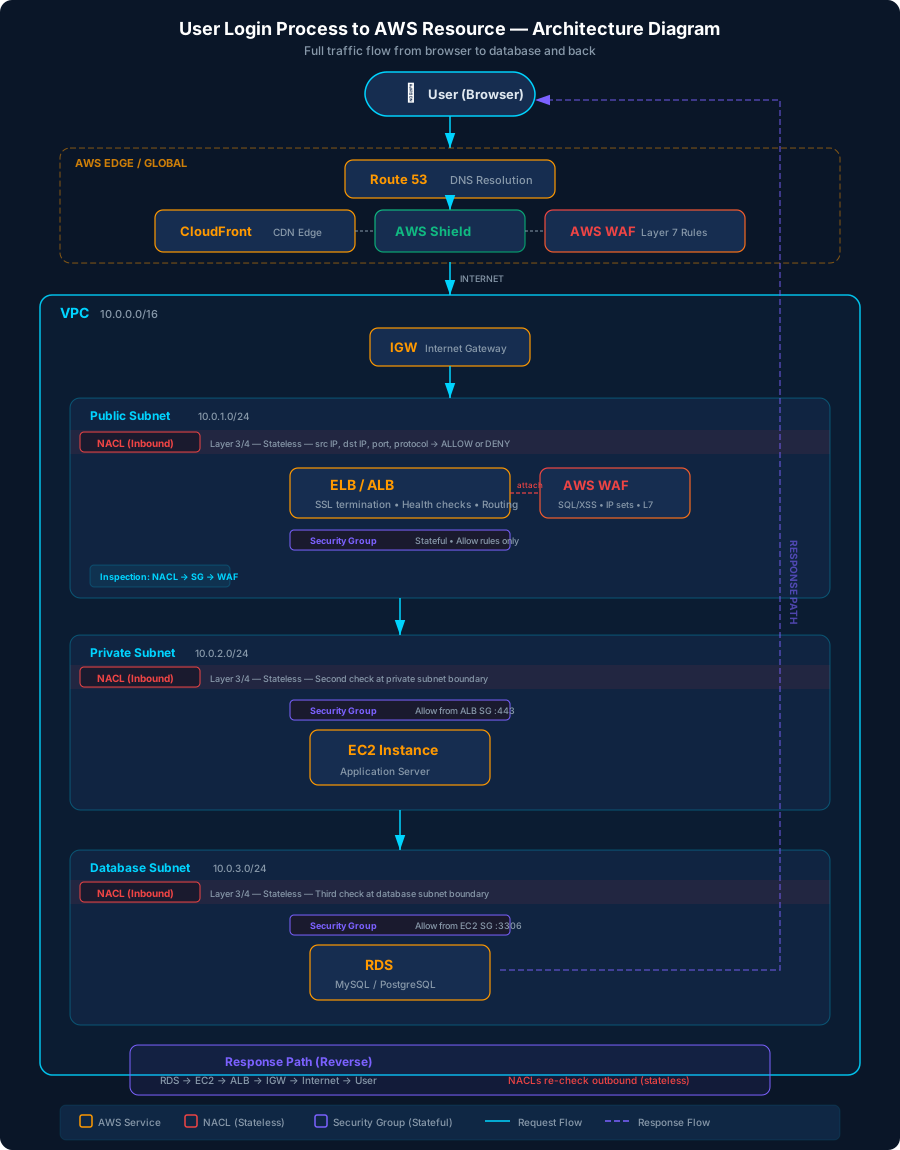
View as text (copy-friendly)
USER (browser)
  │
  ▼
[DNS Resolution] ── Route 53
  │                  → Returns IP of CloudFront or ELB
  ▼
[Internet]
  │
  ▼
[CloudFront] (if using CDN)
  │  → Edge location closest to user
  │  → AWS WAF can attach here
  │  → SSL/TLS termination
  ▼
[AWS Shield] ── Always on (Standard)
  │  → DDoS protection at network edge
  │  → Absorbs volumetric attacks (Layer 3/4)
  ▼
[Internet Gateway]
  │  → Entry point into your VPC
  │  → 1:1 NAT for public IPs
  ▼
[NACL ─ inbound] ── Public Subnet boundary
  │  → Layer 3/4, stateless
  │  → Evaluates src IP, dst IP, port, protocol
  │  → ALLOW or DENY
  ▼
[ELB / ALB] ── Public Subnet
  │  → AWS WAF attaches here (if no CloudFront)
  │  → WAF inspects Layer 7 (HTTP body, headers, URI)
  │  → SSL/TLS termination
  │  → Health checks on targets
  │  → Routes to healthy target
  ▼
[NACL ─ inbound] ── Private Subnet boundary
  │  → If EC2 is in a different subnet from ELB
  │  → Layer 3/4 check again
  ▼
[Security Group] ── On EC2 instance
  │  → Layer 3/4, stateful
  │  → "Allow inbound from ALB security group on port 443"
  │  → No explicit deny — just allow rules
  ▼
[EC2 / Application] ── Private Subnet
  │  → App receives request
  │  → Needs to query database
  ▼
[Security Group] ── On RDS instance
  │  → "Allow inbound from EC2 security group on port 3306"
  ▼
[NACL] ── Database Subnet boundary
  │  → Layer 3/4 check
  ▼
[RDS] ── Private/Database Subnet
  │  → IAM authentication or username/password
  │  → Returns data
  ▼
[Response travels back ─ reverse path]
  RDS → EC2 → ALB → IGW → Internet → User
  (NACLs check outbound too — they're stateless)
(Security Groups DON'T re-check — they're stateful)What Each Component Does
| Layer | Component | What It Checks | Blocks? | Stateful? |
|---|---|---|---|---|
| DNS | Route 53 | Domain → IP resolution | Routing policies only | N/A |
| Edge | CloudFront | Caches content, closest edge location | No | N/A |
| Edge | AWS Shield | Volumetric DDoS patterns | Yes (automatic) | N/A |
| Layer 7 | AWS WAF | HTTP body, headers, SQL injection, XSS, IP sets | Yes | N/A |
| VPC Entry | Internet Gateway | Has public IP? | No (routes only) | N/A |
| Layer 3/4 | NACL | IP, port, protocol | Yes | No (stateless) |
| Layer 3/4 | Security Group | IP, port, protocol, SG references | Yes | Yes (stateful) |
| Application | EC2 / App | Application logic, authentication | Yes | N/A |
| Data | RDS | Queries, IAM auth | Yes | N/A |
Inspection Order — NACL vs WAF vs Security Group
A common exam question: which component inspects first? The answer follows the physical path of the packet:
1. NACL (inbound)     → Layer 3/4, subnet edge, stateless
2. Security Group     → Layer 3/4, attached to ELB ENI, stateful
3. ELB receives       → TCP connection established
4. AWS WAF            → Layer 7, inspects HTTP request content
5. ELB forwards       → To target EC2 instance
6. NACL (target subnet) → If EC2 is in a different subnet
7. Security Group     → On the EC2 instance
8. Application        → Processes the request
Key Takeaway
- NACL inspects first — it sits at the subnet boundary (Layer 3/4). If the NACL denies the IP range, the packet is dropped immediately and never reaches the ELB or WAF.
- WAF inspects after ELB — WAF is attached to the ELB (or CloudFront). It only sees traffic that has already passed through the NACL.
- NACL = cheap, fast, blunt — blocks at the perimeter, no compute cost.
- WAF = smart, expensive — inspects content, but the packet already traveled further into your infrastructure.
- Using both is defense in depth.
Stateful vs Stateless — Why It Matters on the Return Trip
Security Group (stateful): If inbound traffic was allowed, the response is automatically allowed out. No outbound rule needed for return traffic.
NACL (stateless): It forgets. Even if it allowed the request inbound, it checks outbound rules separately on the response. You must have explicit outbound allow rules, including ephemeral ports (1024-65535) for return traffic.
Inbound request:   NACL checks inbound rules ✓  →  SG checks inbound rules ✓
Response back:     SG auto-allows (stateful) ✓  →  NACL checks OUTBOUND rules (stateless) ✓?
This is why a misconfigured NACL outbound rule can break things even when inbound works fine.
| Feature | Security Group | NACL |
|---|---|---|
| Operates at | Instance (ENI) level | Subnet boundary |
| Stateful? | Yes — return traffic auto-allowed | No — must explicitly allow return traffic |
| Rules | Allow only (implicit deny) | Allow AND Deny (explicit) |
| Rule evaluation | All rules evaluated | Rules evaluated in number order, first match wins |
| Ephemeral ports | Not needed (stateful) | Must allow outbound 1024-65535 |
| Default | Deny all inbound, allow all outbound | Allow all inbound and outbound |
Assuming Roles in AWS
What Is Assuming a Role?
"Assuming a role" means temporarily becoming someone else. You trade your current identity and permissions for a completely different set of permissions — like putting on a different uniform to enter a restricted area.
When you assume a role, AWS gives you temporary credentials (access key + secret key + session token) that expire after a set time (15 minutes to 12 hours).
Why Roles Exist
IAM Users have permanent credentials (password, access keys). This creates problems:
- You can't give temporary access easily
- You can't grant access across AWS accounts without sharing credentials
- AWS services (like EC2, Lambda) need permissions too — you can't embed user credentials in code safely
Roles solve all of these problems.
The Two Parts of Every Role
Every IAM role has two policies that work together:
1. Trust Policy — WHO Can Assume This Role?
{
  "Effect": "Allow",
  "Principal": {
    "AWS": "arn:aws:iam::111111111111:root"
  },
  "Action": "sts:AssumeRole"
}
This is like the guest list at a door. It defines who is allowed to "put on this uniform."
2. Permission Policy — WHAT Can the Role Do?
{
  "Effect": "Allow",
  "Action": ["ec2:StopInstances", "ec2:TerminateInstances"],
  "Resource": "*"
}
This defines what powers the uniform gives you. Once you assume the role, you can ONLY do what this policy allows — your original permissions are gone for the duration.
How It Works — Step by Step
  Account A (your account)            Account B (target account)
  ┌────────────────────────┐          ┌──────────────────────────────┐
  │                        │          │                              │
  │  IAM User: Alice       │──Step 1─►│  Role: IncidentResponder     │
  │  Has policy:           │          │                              │
  │  sts:AssumeRole        │◄─Step 2──│  Trust: Account A allowed    │
  │                        │          │  Permissions: ReadOnly       │
  │  Alice now operates    │          │                              │
  │  with temp credentials │          └──────────────────────────────┘
  │  (ReadOnly only)       │
  └────────────────────────┘
Step 1: Alice Calls sts:AssumeRole
Alice's application or CLI calls sts:AssumeRole targeting the role ARN in Account B.
Step 2: AWS Checks Both Sides
- Does Alice have an IAM policy allowing
sts:AssumeRole? (checked in her account) - Does the role's trust policy allow Alice's account? (checked in target account)
Step 3: Temporary Credentials Returned
If both checks pass, AWS returns temporary credentials:
{
  "AccessKeyId": "ASIA...",
  "SecretAccessKey": "wJalr...",
  "SessionToken": "FwoGZX...",
  "Expiration": "2026-03-18T23:00:00Z"
}
Step 4: Alice Operates as the Role
Alice uses these temp credentials. She now operates as the role with ONLY the role's permissions. Her original IAM user permissions are completely inactive during this session.
Real-World Analogy
Think of it like a hospital badge system:
| Hospital | AWS |
|---|---|
| You're a hospital administrator | IAM User in Account A |
| You need to access the surgical wing | Resources in Account B |
| You show your ID at the front desk | Call sts:AssumeRole |
| Desk checks: "Are you on the approved list?" | Trust Policy evaluation |
| You receive a visitor badge: "Surgical Observer Only" | Temporary credentials with scoped permissions |
| Badge expires in 1 hour | Session duration (15 min – 12 hours) |
| While wearing visitor badge, you can ONLY observe | Your original admin powers don't carry over |
Three Common Use Cases
1. Cross-Account Access
Management Account  ──AssumeRole──►  Dev Account
   (admin user)                      (role: StopResources)
An admin temporarily gets permission to stop EC2 instances in the Dev account. The role in Dev is scoped to only stop/terminate actions — the admin cannot do anything else in that account.
2. AWS Service Roles (EC2, Lambda, etc.)
EC2 Instance  ──AssumeRole──►  EC2 Instance Role
                               (role: ReadS3Bucket)
The EC2 instance automatically assumes its attached role. No credentials are stored on the instance — AWS handles rotation of the temporary credentials via the instance metadata service.
3. Federation (External Users)
Corporate SSO (Okta/AD)  ──AssumeRoleWithSAML──►  AWS Role
                                                   (role: DeveloperAccess)
Employees log in with their corporate credentials and get temporary AWS access. No IAM users need to be created for each employee.
Key Exam Points
| Concept | Detail |
|---|---|
| Credentials are temporary | 15 min to 12 hours, then they expire automatically |
| Original permissions are dropped | You operate with ONLY the role's permissions during the session |
| Trust policy lives in the TARGET account | The account being accessed controls who can enter |
| Both sides must agree | Caller needs sts:AssumeRole permission AND the trust policy must allow them |
:root means the whole account | NOT the literal root user — any IAM principal in that account can assume the role |
| Consolidated Billing ≠ access | Billing linkage grants zero IAM permissions across accounts |
| MFA can be required | Trust policy can include aws:MultiFactorAuthPresent: true condition |
| No Organization required | Cross-account roles work between ANY two AWS accounts |
Common Misconceptions
- "Permissions are inherited from the source account" — FALSE. When you assume a role, you get ONLY the role's permissions. Your original user permissions do not carry over.
- "The role must be created in the source account" — FALSE. The role is created in the target account (where the resources are). The source account only needs an
sts:AssumeRolepolicy. - "Consolidated Billing gives cross-account access" — FALSE. Billing and IAM are completely separate. Linking accounts for billing does not create any trust relationships.
- "
:rootin a trust policy means only the root user" — FALSE. It means the entire account. Any IAM user or role in that account can assume the role (if they havests:AssumeRolepermission).
Domain 1: Threat Detection and Incident Response (14%)
1.1 Design and Implement an Incident Response Plan
AWS Incident Response Framework
- Preparation -> Detection -> Containment -> Eradication -> Recovery -> Lessons Learned
- Automate response with AWS Systems Manager Automation runbooks
- Use AWS Step Functions for orchestrating multi-step IR workflows
Key Services for Incident Response
| Service | Role in IR |
|---|---|
| AWS Systems Manager | Run automation runbooks, patch, quarantine instances |
| AWS Lambda | Automated response actions (revoke keys, isolate resources) |
| Amazon EventBridge | Event-driven triggers for security events |
| AWS Step Functions | Orchestrate complex IR workflows |
| AWS CloudFormation | Deploy IR infrastructure quickly |
Containment Strategies
- EC2 Isolation: Change security group to deny all traffic (forensic SG)
- IAM Compromise: Deactivate access keys, attach deny-all policy (don't delete user yet)
- S3 Breach: Apply bucket policy to deny all access, enable versioning
- Lambda Compromise: Set concurrency to 0, remove triggers
Forensics Best Practices
- EBS Snapshots: Take snapshot of compromised volume BEFORE stopping instance
- Memory Capture: Use SSM Run Command to capture memory dump
- Isolated Forensic VPC: Copy snapshots to separate account/VPC for analysis
- Chain of Custody: Tag resources, log all actions, use CloudTrail
Automation Examples
Compromised EC2 Instance Response:
1. GuardDuty finding → EventBridge rule
2. Lambda function triggered:
   - Tag instance as "compromised"
   - Create EBS snapshot
   - Change SG to forensic-isolation SG
   - Notify via SNS
3. Step Function orchestrates full investigation1.2 Detect Security Threats and Anomalies
Amazon GuardDuty
- ML-based threat detection analyzing:
- CloudTrail management events
- CloudTrail S3 data events
- VPC Flow Logs
- DNS logs
- EKS audit logs
- RDS login activity
- Lambda network activity
- Runtime monitoring (EC2, ECS, EKS)
- Severity Levels: Low (1-3.9), Medium (4-6.9), High (7-8.9), Critical (9-10)
- Trusted IP Lists: IPs that won't generate findings
- Threat Lists: Known malicious IPs to watch for
- Suppression Rules: Auto-archive low-priority findings
- Multi-account: Delegated administrator via AWS Organizations
Amazon Inspector
- Automated vulnerability management
- Scans: EC2 instances, Lambda functions, ECR container images
- Uses SSM Agent for EC2 scanning (agentless also available)
- Checks: CVEs, network reachability, code vulnerabilities
- Outputs: Amazon Inspector Score (enhanced CVSS)
- Integration: EventBridge for automated remediation
AWS Security Hub
- Central security findings aggregator
- Imports from: GuardDuty, Inspector, Macie, Firewall Manager, IAM Access Analyzer, 3rd party
- Security Standards:
- AWS Foundational Security Best Practices (FSBP)
- CIS AWS Foundations Benchmark
- PCI DSS
- NIST 800-53
- Automated Actions: EventBridge rules on findings
- Cross-Region Aggregation: Single pane of glass
- Insights: Grouped findings by criteria
Amazon Detective
- Root cause analysis and investigation
- Automatically builds behavior graphs from:
- CloudTrail logs
- VPC Flow Logs
- GuardDuty findings
- EKS audit logs
- Links directly from GuardDuty findings for deep investigation
AWS CloudTrail
- API activity logging for ALL AWS services
- Management Events: Control plane operations (CreateBucket, RunInstances)
- Data Events: Data plane operations (GetObject, PutItem) - NOT enabled by default
- Insights Events: Unusual API activity detection
- CloudTrail Lake: SQL-based query of events (up to 7 years retention)
- Organization Trail: All accounts in an org
- Integrity Validation: Digest files to detect log tampering
VPC Flow Logs
- Capture IP traffic information at VPC, subnet, or ENI level
- Fields: srcaddr, dstaddr, srcport, dstport, protocol, action, bytes, packets
- Custom format available for additional fields
- Publish to: CloudWatch Logs, S3, Kinesis Data Firehose
- Limitations: Does NOT capture DNS traffic, DHCP, metadata, license activation
Amazon Macie
- ML-powered sensitive data discovery in S3
- Detects: PII, financial data, credentials, custom patterns
- Automated Discovery: Samples and profiles all S3 buckets
- Sensitive Data Discovery Jobs: Targeted scans
- Policy Findings: Bucket-level security issues (public, unencrypted)
- Sensitive Data Findings: Discovered sensitive content
- Integration with Security Hub
CHEATSHEET - Domain 1
Additional Study Material (from Crash Course)
Security Service Deployment Order
The recommended order to enable security services across your accounts:
- IAM Access Analyzer - Identify cross-account shared resources, discover permissions issues
- AWS Config - Inventory resources, identify non-compliant configurations, automated mitigation
- Amazon Macie - Identify and classify S3 data at scale, alert on S3 configuration changes
- Amazon GuardDuty - ML-based threat detection across multiple event sources
- Amazon Inspector - Automated vulnerability scanning for EC2, ECR, Lambda
- AWS Security Hub - Centralized security dashboards, compliance standard checks
- Amazon Detective - Graph-based root cause analysis using GuardDuty findings
- AWS Audit Manager - Export evidence and build audit reports for compliance
- AWS Artifact - Access AWS compliance certifications, attestations, accreditations
GuardDuty Event Sources (Complete List)
- CloudTrail logs (regardless of whether a trail exists)
- VPC Flow logs (regardless of whether they're enabled)
- VPC DNS logs (regardless of resolver endpoint or firewall config)
- S3 data and event logs
- EKS workload audit log and runtime monitoring
- Malware protection on EBS volumes (attached to EC2 instances)
- Aurora analysis and profiling of login activity
- Lambda function network activity
- EC2 runtime monitoring
- ECS runtime monitoring
Inspector Scan Scopes
- EC2 instance standard inspection (system packages)
- EC2 deep inspection (programming language packages)
- ECR container images
- Lambda function standard scan
- Lambda function code scan
Inspector EC2 Architecture Details
- Requires SSM Agent on each instance
- Requires permissions via instance profile
- Instances use long-polling to continually test for new tasks
- CVE scan initiated by informing Systems Manager
- Results returned directly to Inspector (not via SSM)
GuardDuty Malware Protection
- On-demand scan: Manually trigger EBS volume scan
- Auto scan: Triggered by specific GuardDuty findings
- Creates snapshot of EBS volume for scanning (original not affected)
- Scans for: trojans, rootkits, backdoors, crypto miners, worms
- Findings include malware name, file path, EBS volume ID
GuardDuty Finding Types Deep Dive
| Prefix | Meaning | Example |
|---|---|---|
Recon: |
Reconnaissance activity | Port probe, API enumeration |
UnauthorizedAccess: |
Compromised credentials | Console login from unusual location |
Trojan: |
Malware communication | C2 callback, data exfiltration |
CryptoCurrency: |
Mining activity | Bitcoin/Monero mining |
Backdoor: |
Persistent access | Reverse shell, backdoor installation |
Stealth: |
Evasion techniques | CloudTrail logging disabled |
Impact: |
Resource abuse | DNS rebinding, resource hijacking |
CredentialAccess: |
Credential theft | IMDS credential exfiltration |
Execution: |
Suspicious execution | Container escape, suspicious process |
Incident Response - Compromised EC2 Workflow
1. CAPTURE: Take EBS snapshot + memory dump (BEFORE anything else)
2. TAG: Mark instance as "compromised" with timestamp
3. ISOLATE: Change SG to forensic-isolation (deny all except forensic access)
4. INVESTIGATE: Copy snapshot to forensic VPC in separate account
5. CONTAIN: Revoke any IAM roles attached, check lateral movement
6. ERADICATE: Terminate compromised instance
7. RECOVER: Launch clean instance from known-good AMI
8. DOCUMENT: CloudTrail + all actions taken
Incident Response - Compromised IAM Credentials
1. IDENTIFY: Which credentials? (Access keys, console password, session tokens)
2. DISABLE: Deactivate access keys (DON'T delete - need for investigation)
3. DENY: Attach explicit deny-all IAM policy
4. REVOKE: Invalidate active sessions (aws:TokenIssueTime condition)
5. INVESTIGATE: CloudTrail - what did the attacker do?
6. REMEDIATE: Delete unauthorized resources created by attacker
7. ROTATE: Create new credentials, update applications
8. STRENGTHEN: Enable MFA, review permissions (least privilege)Practice Exam Questions
Question 1:
> A company has deployed a support website which collects customer information and stores that data using encrypted S3 objects. Which of the following steps would meet the requirements with the least amount of long-term maintenance? The company would like to monitor access to these encrypted objects, to ensure only appropriate access patterns are observed.
- A. Enable Macie for the required S3 buckets, and configure alerts for any bucket policy changes.
- B. Enable a new trail using CloudTrail, which delivers to a CloudWatch log group. Create metric
- filters with appropriate alarms for log entries which indicate inappropriate access.
- C. Enable AWS Config and create rules for s3-bucket-public-read-prohibited and s3-bucket-public-
- write-prohibited. Create an EventBridge rule to capture non-compliant resources from these
- rules and deliver notifications using SNS.
- D.Enable GuardDuty, and verify that S3 data event protection is enabled. Create an EventBridge
- rule to capture GuardDuty findings related to S3 and deliver notifications using SNS.
Correct Answer: D
Why each answer is right/wrong:
- This could be a good first step, but would only capture changes which affected a bucket policy. Macie doesn't use any machine learning or analysis except to classify data, and so it cannot be used to identify abnormal access patterns.
- This is a functional solution, but can only capture events which are delivered to CloudTrail, and must include static filters to capture events known to be inappropriate behavior. This solution does not scale easily and does not handle "unknown" abnormal behavior.
- This answer is similar to A in that it only solves for specific changes, in this case making a bucket publicly readable or writable. It doesn't account for abnormal data events.
- GuardDuty will generate an ML model of normal behavior, seeded with known threat vectors, and use both CloudTrail logs and data events to identify abnormal access patterns, which can then be delivered as notifications.
Question 2:
> A security engineer is given requirements to implement security monitoring in an AWS account. What combination of steps can the security engineer take to implement the requirements? (pick two) The requirements include automated alerts for failed API calls to AWS services, and visualizing the failed call source IPs using GeoIP lookup.
- A.Enable CloudTrail in the AWS account. Create Athena queries and execute them
- on-demand to identify failed API calls in the S3 bucket destination.
- B.Enable CloudTrail in the AWS account. Create a CloudWatch Logs metric filter for
- failed API calls, and a CloudWatch alarm to deliver notifications.
- C. Enable CloudTrail in the AWS account. Create a CloudWatch Logs Insights query to
- query for failed API calls, and deliver the results to a CloudWatch dashboard.
- D.Use Detective to visualize the locations of the failed API calls.
- E. Use Security Hub to visualize the locations of the failed API calls.
Correct Answer: B
Why each answer is right/wrong:
- Failed API calls are difficult to capture without CloudTrail enabled. Once this is done, there are several options for viewing log entries, including the ability to configure and execute Athena queries.
- We've established that Cloudtrail is likely part of this solution, and this answer choice actually creates an alarm with notifications, meeting part of the scenario requirements.
- CloudTrail is required to access the failed API calls. Insights queries act as a SQL-like interface into the CloudWatch log group, with a fast and powerful query engine. However, it cannot generate actual alerts or notifications.
- Detective can be used to view service API anomalies, and does include the ability to perform GeoIP lookups to visualize the locations of the failed requests.
- Security Hub can implement a lot of checks, and ingests from several other AWS security services, but does not have the ability to directly visualize with GeoIP lookups.
Question 3:
> A security operator has discovered an anomalous TCP connection to an EC2 instance which likely indicates a compromise. The source is a remote IP, and it uses a security group rule which allows inbound TCP on that port from 0.0.0.0/0. Which of the following actions can the security operator take to contain the compromise? The security operator must contain the compromise as quickly as possible to prevent data exfiltration.
- A.Create a Network ACL rule which blocks traffic from the source IP on the
- appropriate TCP port in both directions.
- B.Change the EC2 instance security group inbound rule to allow traffic on the
- appropriate TCP port only from authorized CIDR ranges instead of 0.0.0.0/0
- C. Change the EC2 instance security group outbound rules by removing the default
- rule allowing all outbound-initiated traffic.
- D.Replace the EC2 instance security group with a newly created security group which
- has no inbound or outbound rules.
Correct Answer: A
Why each answer is right/wrong:
- Network ACLs are stateless, and take effect immediately. It would require rules created for both inbound and outbound traffic, and this would contain the compromise.
- This answer requires an understanding of security group connection tracking, recognizing that any rule using 0.0.0.0/0 is not tracked. However, changing the rule will not impact any existing connection, as the rules are stateful. The changes will only affect future connection attempts.
- This could result in a partial mitigation, assuming the compromise uses outbound connections to other destinations and on different ports. Any new outbound connection attempt will fail.
- This answer choice appears to fully mitigate the compromise. However, because security group connections are stateful, this will only mitigate for future connection attempts, and will not affect existing connections.
KPLabs Udemy Course Notes
*Source: AWS Security Specialty SCS-C03 - KPLabs (Udemy)*
Case Studies & AWS Abuse Reports
*(Slides 20-41)*
- Case Study: Hacked Systems
- Compromised servers are everywhere
- When I was learning Security during college times, our professor gave us Ubuntu CDs and asked
- us to install it in our computers.
- My First Security Class
- After a few set of classes, he told us that the Ubuntu in that CD was infected with malicious
- scripts and all of our systems were compromised.
- Lesson Learnt: Never Trust Packaged Software. Download Softwares from the Source.
- Many developers directly use some random Docker Images that fulfills their use-cases.
- This can also lead to security incidents within your organization.
- Unknown Docker Images
- Some time ago, I received an email from one of my friends requesting assistance related to security
- as their servers were hacked.
- They came to know about it from 3rd party people and through various abuse complaints from
- the hosting provider.
- Use-Case: Hacked Server
- Abuse Complaint - MegaRBL
- My friend received an Abuse complaint from MegaRBL stating that his server IP is blacklisted.
- Investigation into the Compromise
- Postfix was installed and thousands of spam emails were being sent.
- What was happening ?
- When a server is compromised, depending on the goal of an attacker, multiple approaches are
- commonly used about the future steps.
- What After Server is Compromised?
- You are mine, now!
- Original website is replaced with an attacker’s landing page to spread a message.
- Common Pattern 1 - Defacing Website
- The website code is modified so that when someone visits it, automatically a file gets downloaded
- to the browser (a malware file)
- Common Pattern 2 - Malicious Attachment
- All the files are encrypted by an attacker. Ransom is asked to decrypt the files.
- Common Pattern 3 - Encryption
- Improper firewall configuration.
- Lack of Web Application Firewall.
- Server Hardening is a must.
- File Integrity Monitoring should always be there.
- Vulnerability Assessment
- Patch Management
- Always scan code with Web Application Scanner.
- Monitor for sudden open ports and logs.
- Common Shortcomings for Compromise.
- Simple Setup for Curiosity
- A simple EC2 with open security group can teach you many things.
- Port 22 ALLOWED from 0.0.0.0/0
- Single EC2 instance running for 24 hours.
- Port 22 is open for 0.0.0.0/0
- Instance connected to Splunk for Log Management.
- 96% failure rate
- across the world.
- 616 failed attempts
- AWS Abuse Reports
- Stay within Acceptable Use Policy
- Acceptable Usage Policy
- Acceptable usage policy or fair use policy is a set of rules applied by the owner to the service
- Acceptable Use Policy for Rental Apartments:
- AWS Acceptable Use Policy
- You may not use, or facilitate or allow others to use, the Services or the AWS Site:
- for any illegal or fraudulent activity;
- to violate the rights of others;
- to violate the security, integrity, or availability of any user, networks
Amazon GuardDuty
*(Slides 42-71)*
- Basics of Threat Detection
- Threat detection is an organization's ability to monitor events in the environment
- and detect real security incidents.
- A Prod server always connects to services in US region.
- There is a communication between Prod Server & North Korea.
- One of the important requirement for Threat Detection is that appropriate level of
- logs and events are needed for analysis to work.
- Threat Detection Tool
- Understanding the Challenge
- One of the primary challenge is the implementation of threat detection solution.
- Organization have to configure appropriate set of tools and configure logging
- and create necessary level of rules for detection.
- The above point is not an issue for mid to large sized organization but difficult to
- implement for smaller organizations due to resource constraints.
- Introducing Amazon GuardDuty
- Amazon GuardDuty is a threat detection service that continuously monitors for
- malicious activity and unauthorized behavior to protect your Amazon Web
- Services accounts, workloads, and data stored in Amazon S3
- Backdoor:EC2/C&CActivity.B
- Discovery:S3/MaliciousIPCaller
- Backdoor:Lambda/C&CActivity.B
- Supported Resource Types
- A GuardDuty finding represents a potential security issue detected within your
- Following are the supported types of findings available:
- EC2 finding types
- EKS Runtime Monitoring finding types
- IAM finding types
- Kubernetes audit logs finding types
- Lambda Protection finding types
- Malware Protection finding types
- RDS Protection finding types
- S3 finding types
- Which Logs Are Analyzed By Default?
- When you enable GuardDuty in your AWS account, GuardDuty automatically
- starts to monitor these log sources.
- AWS CloudTrail event logs
- AWS CloudTrail management events
- Malware Protection in Amazon GuardDuty
- Basics of Malware Protection
- In a generic scenario, malware protection is typically handled by installing an
- agent in the server that can scan the system.
- This is referred to as a agent-based approach
- Malware Protection with GuardDuty
- GuardDuty Malware Protection offers a agentless approach to scan the system.
- Malware Scan done in
- GuardDuty Service Account
- Malware Protection offers two types of scans to detect potentially malicious
- activity in your Amazon EC2 instances and container workloads
- Pricing Perspective
- The charge for GuardDuty Malware Protection is based on the total and prorated
- GB volume of Amazon EBS data scanned each month
- Pricing at this stage: $0.03 per GB
- 540.75 GB file volume scanned x $0.03 per GB = $16.22 per month
- Guard Duty - Whitelist Alerts
- Sometimes, you may receive findings (alerts) that you consider safe for your
- environment and want to prevent them from generating repeated alerts in the
- Many organizations have requirement where Security Team must perform
- regular penetration testing on Production servers.
- This can lead to many GuardDuty alerts related port scans,brute force being
- triggered, and others.
Incident Response
*(Slides 72-98)*
- Incident Response
- Let’s Fix what is broken!
- What is an incident ?
- A security incident is any attempted or actual unauthorized access, use, disclosure,
- modification, or destruction of information.
- Example: S3 Bucket with Sensitive Data has Public Read Access.
- Sensitive S3 Bucket
- What is Incident Response ?
- Incident Response is an organized approach to address and manage the aftermath of a
- security incident in an organization.
- The goal is to handle the situation in a way that limits damage, reduces recovery time and
- Block Public Read Access
- Event Driven Security
- With an event-driven response system, a detective mechanism triggers a responsive
- mechanism to automatically remediate the event.
- Public Read Access
- Remove Public Read
- Prevention is the Best Cure
- Preventive controls protect your workloads and mitigate threats and vulnerabilities.
- AWS Provides multiple controls that can prevent threats within your organization.
- Network Firewall
- Tools for Preventive Controls
- Detective Controls
- Detective controls provide full visibility and transparency over the operation of your
- deployments in AWS.
- Tools for Detective Controls
- Scenario - IAM Access/Secret Keys Committed to GitHub
- Understanding the Basics
- It is common occurrence where a developer would commit the AWS
- Access/Secret keys to public repository.
- Steps AWS Takes to Remediate
- Whenever AWS detects that Access/Secret keys are committed to repository, a
- AWSCompromisedKeyQuarantineV2 policy is automatically attached to the IAM
- About the Qurantine Policy
- AWSCompromisedKeyQuarantine is an AWS managed policy that: Denies
- access to certain actions, applied by the AWS team in the event that an IAM
- user's credentials have been compromised or exposed publicly. Do NOT remove
- Email Notification
- You will also receive an email notification notifying you about the exposed keys
- along with steps you should take as part of remediation.
- Dealing with Exposed Access Keys
- Whenever an Access/Secret keys are compromised, there are certain steps that
- are recommended as part of the incident response plan:
- i) Determine the access associated with those keys.
- ii) Invalidating the credentials.
- iii) Invalidating any temporary credentials issued with the exposed keys.
- iv) Restore the access with new credentials.
- v) Review your AWS account.
- Root credentials, which will be listed under the Security Credentials page of the
- AWS Management Console, have full access to all of the resources in the AWS
- IAM credentials will be associated with an IAM user and you should review the
- user’s IAM policies.
- When you disable or delete credentials, any applications that are still using them
- will be affected.
- AWS recommend disabling credentials as a first step instead of deleting them,
- because disabled credentials can be restored if needed (for example, in case an
- application was affected unexpectedly).
- Temporary credentials can be generated from the access/secret keys.
- These credentials can have lifetime from 15 minutes to 36 hours.
- Because access keys were disabled / deleted in previous steps, consider
Incident Response in Cloud & Penetration Testing
*(Slides 99-112)*
- Incident Response in Cloud
- Let’s Fix what is broken!
- What is it all about ?
- AWS provides various visibility, security and automation controls that can help us overall in
- the incident response process.
- When we use cloud, many of the things related to proactively detection, reaction, recovery can
- be easier in much more faster and cost effective way.
- With help of various tools like AWS Config, CloudTrail, Guard Duty, Cloudwatch
- and many more, we can easily track, monitor, analyze security related events.
- When an incident occurs, it is important that one manages that incident properly by following
- your incident response plan.
- Incident Response plan has several steps:
- Preparation Phase
- This is one of the very important phase of the incident response plan.
- We need to make sure controls are in-place that will help us in detection of anomalies within
- the infrastructure.
- Ensure logging is enabled with help of CloudTrail, VPC Flow Logs, EC2 instances.
- Using AWS organizations to separate accounts to reduce the blast surface.
- If you don’t know if something is going wrong, you will not be able to respond to it.
- Use behavioural based rules by identifying or detecting breaches
- Lots of AWS console sign-in failures in past one hour.
- If a user is logging in at 3 AM in morning and launching new servers.
- Containment Phase
- Once we have identified that incident has occurred, prefer to use some kind of automation
- to help you contain the resource.
- Use AWS CLI or SDK’s for quick containment using the predefined security groups.
- If you have identified one server is infected with malware, quickly run predefined AWS CLI
- command that attach restrictive security group (ingress/egress) and remove earlier security
- Investigation Phase
- Once the server is isolated, determine and analyze logs as well as timelines.
- Use CloudWatch logs to determine what occured inside the server.
- Use AWS Config to see infrastructure timeline to see if anything was changed.
- In this stage, restoration process begins to recovery things back to the original state.
- Automation plays major role here to make things faster.
- Use pre-built AMI for the application to launch fresh new app server.
- Penetration Testing in AWS
- Penetration testing is a security exercise where a cyber-security expert attempts
- to find and exploit vulnerabilities in a system.
- The purpose of this simulated attack is to identify any weak spots in a system's
- defenses which attackers could take advantage of.
- Previously, submitting an “AWS Vulnerability / Penetration Testing Request Form”
- was required to obtain authorization for conducting penetration tests on AWS
- Now, AWS has removed this requirement. Customers can perform security
- assessments or penetration tests on their AWS infrastructure—without prior
- approval—as long as they are targeting permitted services.
- Permitted Services
- Following are the supported services were prior approval is not needed.
- Amazon EC2 instances, WAF, NAT Gateways, and Elastic Load Balancers
- Amazon CloudFront
- Amazon API Gateways
- AWS Lambda and Lambda Edge functions
- Amazon Lightsail resources
- Amazon Elastic Beanstalk environments
- Amazon Elastic Container Service
- Amazon OpenSearch Service
- Amazon Transit Gateway
- Customers seeking to test non approved services will need to work directly with
- AWS Support or your account representative.
- Prohibited Activities
- DNS zone walking via Amazon Route 53 Hosted Zones
OCSF & Amazon Security Lake
*(Slides 113-134)*
- Open Cybersecurity Schema Framework (OCSF)
- Understanding the Challenge
- Different technologies use different field names to represent the same concept:
- the IP address of the originator of a connection/request/event.
- This makes querying across all these log sources difficult.
- Think of OCSF as a Universal Translator for security data.
- Eg: With OCSF: Everyone agrees to call it src_endpoint.ip. You only need one
- account_identifier
- The OCSF is a collaborative, open-source effort by AWS and leading
- partners in the cybersecurity industry.
- OCSF provides a standard schema for common security events.
- Amazon Security Lake is a fully managed service and acts a central repository
- that gathers all your security logs (like VPC Flow Logs, CloudTrail,WAF logs
- etc), converts them into a standard language (OCSF), and stores them in one
- place so you can analyze them with any tool you want
- Security Lake runs extract, transform, and load (ETL) jobs on raw source
- data from various natively-supported AWS services, and converts the data
- to Apache Parquet format and the OCSF schema
- Amazon Security Lake uses OCSF as the data schema and Parquet as the
- storage format to centralize security data
- After processing, Security Lake stores source data in an Amazon Simple
- Storage Service (Amazon S3) bucket
- converts them into a standard language (OCSF), and stores them in one place
- so you can analyze them with any tool you want
- Requirement - Organizational Trail
- Prerequisite to collect CloudTrail Events with Security Lake:
- You are required to have a CloudTrail Organization Trail
- Security Lake can be configured to automatically fetch data from various AWS
- services as well as custom sources
- Custom sources should conform to OCSF schema before sending logs and
- events to Security Lake, thus reducing security data disparity.
- A subscriber is authorized to access your data based on your specifications.
- A Roll-up Region (Aggregating Region) is a designated AWS Region that
- collects and centralizes security data from multiple other regions.
- You can use rollup Regions to comply with data residency requirements and to
- allow your subscribers to have access to data from all Regions.
- You can select appropriate storage class for Security Lake data and perform
- storage class transitions as well.
- Security Lake Pricing
- Data Ingestion Charges
- Data Conversion Charges
- CloudTrail Management Events
- CloudTrail Data Events
- Security Hub Findings
- Converts to Apache Parquet
- Normalization to OCSF
- Batched with GZIP (Compression)
- Pricing Varies by AWS Data Source
- Security Lake Usage Data
- The Security Lake console allows you to see costs at the data source level as
- well as at the account level.
- There is no ingestion costs for non-AWS Logs.
- Amazon S3 storage costs and API charges are extra and are not included in
- Security Lake pricing.
- Security Lake compresses raw logs by almost 90% so it helps manage cost.
- Security Lake ingestion fee is based on raw log volume but S3 cost will be
- based on actual stored compressed size (almost 10% of ingestion volume)
AWS FIS, Step Functions & Forensics
*(Slides 135-161)*
- AWS Fault Injection Service
- Simple Analogy - Car Safety
- Imagine you are a car manufacturer (the organization). You have built a new
- car (your application) and you claim it is the safest on the road.
- How do you prove it? You don't just drive it on the highway and hope for the
- You take the car to a controlled facility and intentionally smash it into a wall to
- see what happens.
- Chaos Engineering
- Chaos engineering is a discipline of intentionally injecting controlled failures
- (like server shutdowns, resource spikes) into software systems to test their
- resilience and build confidence in their ability to withstand real-world
- challenges, proactively uncovering weaknesses before they cause actual
- Chaos Monkey by Netflix
- Chaos Monkey is Netflix's famous open-source tool responsible for randomly
- terminating instances in production to ensure that engineers implement their
- services to be resilient to instance failures.
- AWS Fault Injection Service (AWS FIS) is a managed service that enables you
- to perform fault injection experiments on your AWS workloads.
- It is based on the principles of Chaos Engineering.
- Supported Services
- AWS Fault Injection Service (FIS) supports a wide range of AWS services.
- Some of these include:
- AWS Fault Injection Service (FIS) is NOT FREE.
- Always verify the pricing before you experiment with the services.
- To use AWS FIS, you run experiments on your AWS resources to test your
- theory of how an application or system will perform under fault conditions.
- To run experiments, you first create an experiment template. An experiment
- template is the blueprint of your experiment.
- An action is an activity that AWS FIS performs on an AWS resource during an
- AWS FIS provides a set of preconfigured actions based on the type of AWS
- resource and each action runs for specified duration.
- A target is one or more AWS resources on which AWS FIS performs an action
- during an experiment.
- You can choose specific resources, or you can select a group of resources
- based on specific criteria, such as tags or state.
- A stop condition is a mechanism to stop an experiment if it reaches a threshold
- that you define as an Amazon CloudWatch alarm.
- If a stop condition is triggered while the experiment is running, AWS FIS stops
- multiple AWS services (like Lambda, ECS, SNS, DynamoDB) into serverless
- If user selects course as Terraform -> Terraform Lambda Function will be invoked.
- If user selects course as AWS -> AWS Lambda Function will be invoked.
- Use-Case: AdministratorAccess Policy
- Whenever an AdministratorAccess policy is assigned to an IAM user, it instantly
- triggers a Step Function workflow that requires approval from the Admin Team.
- Depending on their decision, the policy is either retained or automatically
- AdminAccess Policy
- Automated Forensics Orchestrator for Amazon EC2
- Understanding the Challenge
- When device is compromised, it is essential to quickly collect the forensic
- evidence and isolate that server.
- Human response time is slow; and any reboots or shutdowns destroy RAM
- Forensic workflow
- Digital forensics is a four-step process of acquisition, isolation, investigation
- Automated Forensic Orchestrator for EC2
- Automated Forensics Orchestrator for Amazon EC2 and EKS is a self-service
- Guidance that customers can deploy to quickly set up and configure a forensics
- orchestration workflow.
- You are responsible for the cost of the AWS services used to run the Automated
- Forensics Orchestrator for Amazon EC2 and EKS Guidance.
- As of the recent revision, the monthly cost for running this Guidance with the
Vulnerability, Exploit, Payload & Amazon Inspector
*(Slides 162-177)*
- Vulnerability, Exploit, Payload
- Ethical Hacking Terminology
- The simple house terminology
- Vulnerability :- Hole on the Side of the House
- Exploit :- The Robber
- Payload :- What Robber does inside the house
- Security Terminology
- Vulnerability :- Bad Software Code
- Exploit :- Program that exploits code to get inside.
- Payload :- Stealing Data, Ransomwares etc.
- Scan Result of Vulnerability Scanners
- Basics of AWS Inspector
- Amazon Inspector is an automated vulnerability management service that
- continually scans AWS workloads for software vulnerabilities and unintended
- network exposure.
- Amazon Inspector
- Supported Resource Types
- AWS Inspector can scan wide variety of AWS workloads.
- ECR Repositories
- Lambda Functions
- To provide CVE data for your EC2 instance, Amazon Inspector requires that the
- SSM agent be installed and activated.
- This agent is pre-installed on many EC2 instances, but you may need to activate
- With Amazon Inspector, you don't need to manually schedule or configure
- assessment scans. Amazon Inspector automatically discovers and begins
- scanning your eligible resources.
- CVE stands for Common Vulnerabilities and Exposures.
- CVE is simply a list of all publicly disclosed vulnerabilities that includes the CVE
- ID, a description, dates, and comments
- Can allow a local attacker to corrupt NGINX worker memory, resulting in its
- termination or potential other impact using a specially crafted audio or video
- Contains a backdoor which opens a shell on port 6200/tcp.
- Common Vulnerability Scoring System (CVSS) assesses the vulnerability in
- detail and scores it.
- High CVSS score does not always mean higher the risk of vulnerability being
- exploited in your organization.
- Read the description of CVE and overall impact as part of CVSS.
- If you are unable to upgrade a specific package even though higher impact, you
- can consider using IPS system to block the exploits.
AWS Security Hub
*(Slides 179-200)*
- AWS Security Hub collects security data from AWS accounts and services, and
- helps you analyze, identify and prioritize the security issues across your AWS
- Issues & Findings
- Firewall Manager
- IAM Access Analyser
- Security Hub CSPM
- Security Hub CSPM (Cloud Security Posture Management) is a capability of
- Security Hub offering automated security best practice checks to help you
- understand your overall security posture across your AWS accounts.
- Security Hub CSPM supports multiple security standards like CIS, PCI DSS,
- CSPM stands for Conduct Cloud Security Posture Management
- AWS Security Hub CSPM consumes and aggregates findings from integrated
- AWS services and third-party products.
- AWS Security Hub and AWS Organization
- When you use both Security Hub and AWS Organizations together, you can
- automatically enable Security Hub for all of your accounts, including new
- accounts as they are added.
- Delegated Administrator Account
- When you designate a member account as a delegated administrator for the
- organization, users and roles from that account can perform administrative
- actions for Security Hub that otherwise can be performed only by users or roles
- in the organization's management account.
- This helps you to separate management of the organization from management of
- AWS Security Hub - Custom Actions
- Custom Action is a mechanism that allows security analysts to manually trigger a
- specific response or workflow for a finding.
- To trigger a custom action in Amazon EventBridge, you must create a
- corresponding rule in EventBridge.
- The rule definition includes the Amazon Resource Name (ARN) of the custom
- AWS Security Hub - Integrations
- AWS Service Integrations
- AWS Security Hub CSPM supports integrations with several other AWS services.
- These integrations can help you get a comprehensive view of security and
- compliance across your AWS environment.
- Audit Manager Trusted Advisor
- Receive Findings
- AWS Security Hub CSPM integrates with multiple third-party partner products.
- An integration can perform one or more of the following actions:
- Send findings that it generates to Security Hub CSPM
- Receive findings from Security Hub CSPM
- Update findings in Security Hub CSPM
- 3rd Party Integrations (Send Findings)
- Security Hub supports multiple 3rd party integrations as well.
- The supported providers can send findings to Security Hub.
- 3rd Party Integrations
- 3rd Party Integrations (Receive Findings)
- Multiple 3rd party providers can receive findings from Security Hub.
- receive-findings
- Security Hub CSPM normalizes findings from all sources into a standard syntax
- and format called the AWS Security Finding Format (ASFF).
- Security Hub CSPM automatically deletes findings that haven't been updated
- recently (default 90 days)
- For longer-term retention of findings, you can export findings to an S3 bucket.
- AWS Security Hub - Cross Region Aggregation
- Understanding the Challenge
- AWS Security Hub operates as a regional service; you would have to switch your
- console view to us-east-1 to see issues there, then switch to eu-central-1 to see
- us-east-1 Region
- ap-south-1 Region
- eu-west-1 Region
Domain 2: Security Logging and Monitoring (18%)
2.1 Design and Implement Monitoring and Alerting
Amazon CloudWatch
- Metrics: CPU, network, disk (basic = 5 min, detailed = 1 min)
- Custom Metrics: Application-level data via PutMetricData API
- CloudWatch Alarms: Threshold-based alerts
- States: OK, ALARM, INSUFFICIENT_DATA
- Actions: SNS, Auto Scaling, EC2 actions, Lambda, Systems Manager
- Composite Alarms: Combine multiple alarms with AND/OR logic
- CloudWatch Agent: Install on EC2 for OS-level metrics + custom logs
- Anomaly Detection: ML-based baseline for metrics (bands)
AWS CloudTrail - Advanced Monitoring
- Organization Trail: Single trail for all accounts
- CloudTrail Lake:
- SQL-based event data store
- Query up to 7 years of events
- Cross-account event federation
- Integration with non-AWS events via Lake integrations
- Log File Integrity Validation:
- Creates SHA-256 hash digest files every hour
- Validates no log tampering occurred
aws cloudtrail validate-logsCLI command
AWS Config
- Continuous configuration recording of AWS resources
- Config Rules: Evaluate resource compliance
- AWS Managed Rules: 300+ pre-built rules
- Custom Rules: Lambda-based evaluation
- Proactive Rules: Evaluate before resource creation (CloudFormation)
- Configuration Recorder: Records resource configurations
- Configuration History: Timeline of changes per resource
- Configuration Snapshot: Point-in-time capture
- Aggregator: Multi-account, multi-region compliance view
- Remediation Actions: Auto-fix via SSM Automation documents
- Auto-remediation with retry (up to 5 attempts)
Amazon EventBridge (CloudWatch Events)
- Event-driven architecture for security automation
- Event Sources: AWS services, custom apps, SaaS
- Rules: Match events → route to targets
- Event Patterns: JSON-based matching criteria
- Targets: Lambda, SNS, SQS, Step Functions, SSM, and 20+ services
- Event Bus: Default, custom, partner, cross-account
- Archive & Replay: Store events for replay/investigation
- Schema Registry: Discover event structures
Security Automation Patterns
Pattern 1: Compliance Auto-Remediation
Config Rule (non-compliant) → EventBridge → SSM Automation → Fix resource

Pattern 2: Threat Response
GuardDuty finding → EventBridge → Lambda → Isolate + Notify

Pattern 3: Unauthorized Access
CloudTrail (ConsoleLogin without MFA) → Metric Filter → Alarm → SNS

Pattern 4: Data Protection
Macie finding (PII in S3) → EventBridge → Lambda → Apply bucket policy

Pattern 5: Certificate Expiry
ACM (cert expiring) → EventBridge → SNS notification2.2 Troubleshoot Security Monitoring and Alerting
Common Issues
| Problem | Root Cause | Solution |
|---|---|---|
| No CloudTrail events | Trail not enabled in region | Enable multi-region trail |
| Missing data events | Not configured | Enable S3/Lambda data events |
| No VPC Flow Logs | Not enabled | Enable at VPC/subnet/ENI level |
| Config rules not evaluating | Recorder off | Start configuration recorder |
| GuardDuty no findings | Service not enabled | Enable in all regions |
| CloudWatch no custom metrics | Agent not installed | Install CloudWatch Agent |
Log Centralization Architecture
All Accounts → CloudTrail → Central S3 Bucket (log archive account)
                           → CloudWatch Logs → Subscription Filter → Kinesis → OpenSearch
                           → CloudTrail Lake (query across accounts)
S3 Access Logging vs CloudTrail S3 Data Events
| Feature | S3 Access Logging | CloudTrail S3 Data Events |
|---|---|---|
| Delivery | Best-effort, delayed | Guaranteed, near real-time |
| Format | Space-delimited text | JSON (ASFF compatible) |
| Integration | S3 only | EventBridge, CloudWatch |
| Cost | Free (storage costs) | Per-event pricing |
| Use Case | Audit, historical | Real-time monitoring |
2.3 Design and Implement a Logging Solution
Centralized Logging Architecture
- Log Sources: CloudTrail, VPC Flow Logs, Config, GuardDuty, WAF, Route 53, ELB, S3
- Collection: CloudWatch Logs, Kinesis Data Firehose, S3
- Processing: Lambda, Kinesis Data Analytics
- Storage: S3 (long-term), OpenSearch (search/analysis), CloudTrail Lake
- Analysis: OpenSearch Dashboards, Athena, QuickSight
S3 Bucket for Log Storage
- Separate log archive account (best practice)
- Bucket Policy: Allow only log delivery, deny everything else
- Encryption: SSE-S3 or SSE-KMS
- Object Lock: WORM compliance (Governance or Compliance mode)
- Lifecycle Rules: Transition to Glacier after 90 days
- Versioning: Enabled
- MFA Delete: Enabled for extra protection
- Access: Only security team via IAM roles
Amazon OpenSearch Service (ElasticSearch)
- Real-time log analysis and visualization
- Fine-Grained Access Control (FGAC)
- Encryption: At rest (KMS) and in transit (TLS)
- VPC Access: Deploy in VPC for network isolation
- Cognito Integration: Dashboard authentication
- Index Policies: Auto-rotate, delete old indices
- UltraWarm/Cold Storage: Cost-effective log retention
Amazon Athena
- Serverless SQL queries on S3 data
- Query CloudTrail logs, VPC Flow Logs, ELB logs directly
- Partition Projection: Auto-manage partitions
- Federated Query: Query across data sources
CHEATSHEET - Domain 2
Additional Study Material (from Crash Course)
CloudWatch Logs Key Architecture
Log Group (retention policy, encryption)
  └── Log Stream (per source: instance, container, function)
       └── Log Events (timestamp + message)
Metric Filter Pattern Examples
# Count root account usage
{ $.userIdentity.type = "Root" }

# Count 401/403 errors
[ip, id, user, timestamp, request, status_code=4*, size]

# Count failed SSH logins
"Failed password"

# Count console login without MFA
{ $.eventName = "ConsoleLogin" && $.additionalEventData.MFAUsed != "Yes" }
CloudTrail vs Config vs CloudWatch
| Question | Answer |
|---|---|
| "Who made this API call?" | CloudTrail |
| "What changed in this resource?" | Config |
| "Is this metric above threshold?" | CloudWatch |
| "Is this resource compliant?" | Config Rules |
| "Show me unusual API patterns" | CloudTrail Insights |
| "Real-time log analysis?" | CloudWatch Logs Insights |
Log Delivery Guarantees
| Service | Delivery | Latency |
|---|---|---|
| CloudTrail | Guaranteed | 5-15 minutes |
| VPC Flow Logs | Best effort | 10-15 minutes |
| S3 Access Logs | Best effort | Hours |
| CloudWatch Logs | Guaranteed | Near real-time |
| Config | Guaranteed | Minutes |
EventBridge Security Patterns (Exam Favorites)
Pattern: Root Account Used
{
  "source": ["aws.signin"],
  "detail-type": ["AWS Console Sign In via CloudTrail"],
  "detail": { "userIdentity": { "type": ["Root"] } }
}

Pattern: Security Group Changed
{
  "source": ["aws.ec2"],
  "detail-type": ["AWS API Call via CloudTrail"],
  "detail": {
    "eventName": ["AuthorizeSecurityGroupIngress",
                   "RevokeSecurityGroupIngress"]
  }
}

Pattern: S3 Bucket Made Public
{
  "source": ["aws.s3"],
  "detail-type": ["AWS API Call via CloudTrail"],
  "detail": {
    "eventName": ["PutBucketAcl", "PutBucketPolicy"]
  }
}
Config Remediation Architecture
Resource Change → Config Rule Evaluates → NON_COMPLIANT
  → EventBridge Rule matches → SSM Automation Document
  → Auto-remediation executes → Resource becomes COMPLIANT

Example SSM Documents for remediation:
- AWS-DisablePublicAccessForSecurityGroup
- AWS-EnableCloudTrailCloudWatchLogs
- AWS-EnableS3BucketEncryption
- AWS-RevokeUnusedIAMUserCredentialsKPLabs Udemy Course Notes
*Source: AWS Security Specialty SCS-C03 - KPLabs (Udemy)*
CloudWatch - Unified Agent, Logs Insights, Metric Filters, Anomaly Detection
*(Slides 288-313)*
- Unified CloudWatch Agent
- Metrics and Logs
- Default CloudWatch Metrics
- When we launch an EC2 instance in AWS, there are certain metrics that are captured by default.
- Some of these include:
- Challenge 1 -More Metrics Are Needed
- There are various important metrics that needs to be collected in addition to the default ones.
- Disk Usage Metrics
- Netstat related.
- Challenge 2 - Log Monitoring
- A server can contain a lot of log files, from system logs to the application logs.
- During debugging, it is important to have log files at hand.
- This means in default case; you need to give access to the server to an individual who wants to
- log line 01 - GET request
- log line 02 - PUT request
- log line 03 - DELETE
- log line 04 - PATCH
- log line 05 - POST
- log line 06 - PUT request
- Disadvantage of the Approach
- Access must be given to the server to the developers.
- If the server gets terminated, the logs are lost.
- No way to set up an alarm on certain conditions or create complex filters.
- We create a Central Log Server.
- We push the log files from individual systems to Central Log Server.
- Introducing Unified CloudWatch Agent
- Unified CloudWatch Agent allows customers to capture both the internal system level
- metrics as well as logs collection.
- CloudWatch Unified Agent
- Create a IAM Role with CloudWatchAgentServer policy.
- Create EC2 using IAM Role.
- Install CloudWatch Agent.
- Run CloudWatch Agent Configuration Wizard
- Start Unified CloudWatch Agent.
- CloudWatch Logs Insights
- You can use CloudWatch Logs Insights to search log data that was sent to
- CloudWatch Logs using purpose-built query language with a few simple but
- powerful commands.
- A single request can query up to 50 log groups.
- You can perform queries to help you more efficiently and effectively respond to
- operational issues.
- If an issue occurs, you can use CloudWatch Logs Insights to identify potential
- causes and validate deployed fixes.
- CloudWatch Logs Insights queries incur charges based on the amount of data
- that is queried.
- CloudWatch Metric Filters
- You can search and filter the log data coming into CloudWatch Logs by creating
- one or more metric filters
- CloudWatch Logs uses these metric filters to turn log data into numerical
- CloudWatch metrics that you can graph or set an alarm on.
- Single-term filter pattern that returns all log events where messages contain the word
- multiple-term filter pattern that returns all log events where messages contain the words
- ERROR and ARGUMENTS.
- ?ERROR ?ARGUMENTS
- filter pattern that returns all log events where messages contain the word ERROR or the
- ERROR -ARGUMENTS
- filter pattern that returns log events where messages include the term ERROR and
- exclude the term ARGUMENTS.
- filter pattern that returns all log events.
- CloudWatch Logs Subscription Filter
Amazon EventBridge
*(Slides 315-328)*
- EventBridge delivers a stream of real-time data from event sources to targets.
- Use-Case 1: EC2 to SNS
- Whenever an EC2 instance in a production environment is stopped, the DevOps
- Team should be notified via email.
- Use-Case 2: Stop Dev EC2 Instances
- Stop all development environment EC2 instances at 8 PM on Fridays and start
- them at 9 AM on Mondays.
- EventBridge is a serverless service that uses events to connect application
- components together, making it easier for you to build scalable event-driven
- Event-driven architecture is a style of building loosely-coupled software systems
- that work together by emitting and responding to events.
- At its simplest, an EventBridge event is a JSON object.
- An event often represents an indicator of a change in a resource or environment.
- EventBridge includes two ways to process and deliver events:
- Event Bus and Event Pipe
- Event buses are routers that receive events and delivers them to zero or more
- EventBridge Pipes is intended for point-to-point integrations; each pipe receives
- events from a single source for processing and delivery to a single target.
- A rule receives incoming events and sends them as appropriate to targets for
- A target is a resource or endpoint to which EventBridge sends an event when the
- event matches the event pattern defined for a rule.
- You might not want to process every single event that gets delivered to a given
- event bus or pipe.
- Rather, you'll likely want to select a subset of all the events delivered, based on
- the source of the event, the event type, and/or attributes of those events.
- Event Bridge Scheduler
- Amazon EventBridge Scheduler is a serverless scheduler that enables you to
- schedule tasks and events at scale.
- Every AWS account has a default event bus created.
- event from default bus to custom bus as needed.
Amazon Athena
*(Slides 329-331)*
- Query Logs from S3
- Getting the basics right
- Amazon Athena is service that allows us to analyze various log files from a data source using
- Approach Before Athena
- You have CloudTrail logs in S3 and you want to see who has logged in, in the past 10 days.
- Create EC2 instances.
- Deploy monitoring stack like Splunk, ELK or others.
- Add the data source from S3 to import CloudTrail logs.
- Begin Analyzing.
AWS Config - Rules, Aggregator, Remediation
*(Slides 332-355)*
- AWS Config continuously monitors and records changes to resource
- configurations and allows you to see timeline of changes.
- AWS Config helps organizations automatically detect policy violations by
- analyzing the resource changes.
- A conformance pack is a collection of AWS Config rules and remediation actions
- that is built using a common framework.
- Integration with EventBridge
- Amazon EventBridge can capture AWS Config rule evaluation events and route
- them to various AWS services or custom targets for automated responses.
- Example: Send an Email when specific compliance to a rule fails.
- With AWS Config, you are charged based on the number of configuration items
- recorded, the number of active AWS Config rule evaluations, and the number of
- conformance pack evaluations in your account
- AWS Config and AWS CloudTrail
- AWS CloudTrail records API activity and events in your AWS account, including
- who made the call (user/role), what action was taken (e.g., CreateInstance),
- when it happened, and details like IP address or response status.
- AWS Config records point-in-time configuration details for your AWS resources.
- You can use a Config to answer, “What did my AWS resource look like?” at a
- point in time. You can use CloudTrail to answer “Who made an API call to modify
- AWS Config Rules - Detective vs Proactive
- Revising Basics of Config Rules
- AWS Config rules are used to evaluate whether your AWS resources comply
- with common best practices.
- Rule Evaluation Mode
- Detective Rules: These evaluate resources after a change has occurred. They
- detect issues in the existing setup.
- Proactive Rules: These evaluate configurations before resources are created or
- updated, preventing issues from happening.
- Understanding the Basics
- An aggregator is an AWS Config resource type that collects AWS Config
- configuration and compliance data from the following:
- Multiple accounts and multiple regions.
- Single account and multiple regions.
- An organization in AWS Organizations and all the accounts in that
- organization which have AWS Config enabled.
- Config Aggregator can collection Config Data from multiple external accounts.
- Config Aggregator
- In the external accounts, you need to allow a specified aggregator account and
- Region to collect AWS Config configuration and compliance data from your
- current account.
- External AWS Account
- Remediate Non-Compliant Config Rules with SSM Automation
- AWS Config Rules can be created to audit the compliance of your environment.
- Automation, a capability of AWS System manager, simplifies common
- maintenance, deployment, and remediation tasks for AWS services like Amazon
- EC2, RDS,S3 and many more.
- Let’s be Friends!
- AWS Config Rule has identified that a specific S3 bucket does not have S3
- Encryption enabled.
- S3 Bucket without Encryption
- Dude, this bucket has no
- Encryption enabled!
- Enable S3 Encryption
- Automations can be initiated under the context of a service role (or assume
- This allows the service to perform actions on your behalf.
- Remediation Action in AWS Config
- Change Manager, a capability of AWS Systems Manager for requesting,
- approving, implementing, and reporting on operational changes to your
- application configuration and infrastructure
AWS CloudTrail - Event Types, Log Integrity
*(Slides 357-376)*
- Installing surveillance systems allows us to monitor activities round the clock and
- provides lots of benefits.
- Recording at AWS Level
- It is VERY important for organizations to record the activities that happen within
- the Infrastructure, as well as on the servers.
- Show me the activities that Alice did on July 25, 2025, between 10 AM and 2 PM.
- Tools for Recording
- Depending on the type of resource you use, the tools for recording might also
- Record AWS events
- Record Linux events
- Introduction to CloudTrail
- CloudTrail records AWS account activity, giving you insight into actions taken by
- users, roles, or AWS services.
- CloudTrail is enabled by default for your AWS account and you automatically
- have access to the CloudTrail event history.
- The event history provides a viewable, searchable, downloadable, and
- immutable record of the past 90 days of management events in an AWS
- CloudTrail capture activity made through the AWS Management Console,
- AWS Command Line Interface, and AWS SDKs and APIs.
- The event history records events in the AWS Region where the event
- AWS CloudTrail - Event Types
- An event in CloudTrail is the record of an activity in an AWS account.
- CloudTrail records different types of events based on who or what initiated the
- Management Events
- Network activity events
- 1 - Management Events
- Management events provide visibility into management operations that are
- performed on resources in your AWS account.
- Launching a new EC2 Instance.
- Creating Security Group.
- Create new IAM user
- CloudTrail data events show operations that occur on resources in your AWS
- Data events are often high-volume activities.
- 3 - Network activity events
- Allows organizations to log all AWS API activity passing through your VPC
- 4 - Insights events
- CloudTrail Insights is a feature that helps you identify unusual operational activity
- in your AWS account.
- Example: Sudden Spike in Resource provisioning like EC2 instances.
- By default, the data events, network activity events, and Insights is not enabled.
- You can enable these by creating a trail.
- CloudTrail - Log File Integrity Validation
- Back to Security!
- CloudTrail log file integrity validation allows us to determine whether a log file was
- modified, deleted, or unchanged after CloudTrail delivered it.
- This feature is built using industry standard algorithms: SHA-256 for hashing and
- SHA-256 with RSA for digital signing.
- When you enable log file integrity validation, CloudTrail creates a hash for every log file
- that it delivers.
- Every hour, CloudTrail also creates and delivers a file that references the log files for the
- last hour and contains a hash of each. This file is called a digest file.
Amazon Macie
*(Slides 377-381)*
- Amazon S3 buckets might contain sensitive information like PII data, SSL private
- keys, AWS access/secret keys etc
- Amazon Macie is a data security service that uses machine learning (ML) and
- pattern matching to discover and help protect your sensitive data.
- Type of Data Detected
- Macie can detect several categories of sensitive data.
- Some of the types of data that Macie detect include:
- AWS secret access key
- Credit card expiration date
- Bank account number (US
- Credit card magnetic stripe
- Credit card number
- Credit card verification code
- Driver’s license
- identification number
- Global Positioning System
- (GPS) coordinates
- Google Cloud API key
- OpenSSH private key
- Macie provides you with an inventory of your S3 general purpose buckets, and
- automatically evaluates and monitors the buckets for security and access control.
- If Macie detects a potential issue with the security or privacy of your data, such
- as a bucket that becomes publicly accessible, Macie generates a finding for you
- to review and remediate as necessary.
- Custom Data Identifiers
- In addition to using the managed data identifiers that Amazon Macie provides,
- you can build and use custom data identifiers.
- A custom data identifier is a set of criteria that you define to detect sensitive data
- in Amazon S3 objects.
- The criteria primary includes regular expressions
S3 Event Notifications
*(Slides 382-383)*
- S3 Event Notification
- S3 is more than just storage
- The Amazon S3 notification feature enables you to receive notifications when certain
- events happen in your bucket.
VPC Flow Logs
*(Slides 384-393)*
- Logs are Awesome
- Simple Analogy - Visitor Register
- In many of the societies across India, whenever a visitor visits, they first have to fill in their
- information in the visitor register.
- Some of the information includes:
- Destination Place.
- Entry and Exit Date/Time
- Comparing Analogy with AWS Environment
- Even in AWS, there can be thousands of users across the world who might be visiting your
- IP : 112.20.50.60
- VPC Flow Logs is a feature that enables you to capture information about the IP traffic
- going to and from network interfaces in your VPC.
- Visitor Register
- Capture Information Scope
- The scope of the VPC Flow logs:
- Record the traffic information that is visiting the resource (eg EC2)
- Record data about resource connecting to which outbound endpoint.
- 10.77.2.50 → EC2 Instance
- EC2 Instance → 192.168.0.5
- Dashboards Built using VPC Flow Logs Data
- Interface Level Flow Logs
- VPC Flow Logs captures traffic at an interface level.
- Flow logs do not capture real-time log streams for your network interfaces.
- High-Level Flow Logs Format
- version - The VPC Flow Logs Version
- account-id - AWS Account ID
- interface-id - The network interface id
- srcaddr - The source address
- destaddr - Destination Address
- src port - Source Port
- dest port - Destination Port
- protocol - The protocol number
- packets - Number of packets transferred
- bytes - Number of bytes transferred
- start - Start time in unix seconds
- end - End time in unix seconds
- action - ACCEPT or REJECT
- log status - Logging status of flow log
- 2 7742829482 eni-4d788e3d 115.73.149.218 10.0.5.157 12053 23 6 2 88 1485439809 1485440090 REJECT OK
- Type of Traffic Not Logged
- Flow logs do not capture all IP traffic. Some of these include:
- Traffic generated by instances when they contact the Amazon DNS server. If you use
- your own DNS server, then all traffic to that DNS server is logged.
- Traffic generated by a Windows instance for Amazon Windows license activation.
- Traffic to and from 169.254.169.254 for instance metadata.
Centralized Logging Architecture
*(Slides 394-401)*
- Centralized Logging
- Architectural Perspective
- Challenges with Logging
- In a Multi-Account based architecture, log monitoring at an individual account level is not
- the best of the approaches.
- Development Account
- Production Account
- A comprehensive log management and analysis strategy is mission critical in an organization.
- One of the recommended approaches is to use a Centralized Logging Account.
- Central Logging Account
- Considerations while implementing Logging
- Define log retention requirements and lifecycle policies early on.
- Incorporate tools and features to automate the lifecycle policies.
- Automate the installation and configuration of log shipping agent.
- Make sure the solution supports hybrid environment to support the needs.
- AWS Services to Help!
- We can make use of AWS Managed service to build centralized logging solutions.
- Services which can help here:
- AWS ElasticSearch Service
- AWS CloudWatch Logs
- Kinesis Firehose
- Ways to configure centralized logging for each AWS service (CloudTrail, VPCFlow) differs.
- Considerations - S3 Bucket Policy for Cross-Account
- Challenges with S3 Bucket Policy
- A wildcard based S3 bucket policy allowing CloudTrail service would mean that any AWS
- account’s CloudTrail can put its data to your S3 bucket.
- Bucket Policy with Conditional Statement
- As a security best practice, add an aws:SourceArn condition key to the Amazon S3 bucket
- policy. This helps prevent unauthorized access to your S3 bucket.
Simple Notification Service (SNS)
*(Slides 402-404)*
- Simple Notification Service
- Notification Service
- SNS stands for simple notification service.
- SNS is a fully managed messaging and mobile notification service for delivering messages
- to the subscribed endpoints.
- Use-Cases for SNS
- AWS CloudWatch integrates well with SNS.
- Whenever a disk usage of a server exceeds 95%, send an EMAIL and SMS notification to
- Whenever a server load in production is more than 90%, send and email and SMS
Amazon Kinesis
*(Slides 405-416)*
- Streaming data is the continuous flow of data generated by various sources
- Basics of Streaming Data.
- Processing Store
- A financial institution tracks changes in the stock market in real time and adjust it’s portfolio
- A media publisher streams billions of clickstream records from its online properties
- Streaming data processing requires two layers: a storage layer and a processing layer.
- The storage layer needs to support record ordering and strong consistency, replayable reads and
- the processing layer is responsible for consuming data from the storage layer, running
- computation on that data and many other tasks.
- Challenges with Working of Streaming Data
- Processing Layer
- Amazon Kinesis makes it easy to collect, process, and analyze real-time, streaming data so you
- can get timely insights and react quickly to new information.
- Amazon Kinesis offers key capabilities to cost-effectively process streaming data at any scale
- Basics of Amazon Kinesis
- There are 3 entities in this kind of use case:
- Producer, Stream Store, Consumer
- Amazon Kinesis Services
- Capabilities of Kinesis Set of Services
- Kinesis Offerings
- Amazon Kinesis is a set of services which makes it easy to work with set of streaming data on
- Kinesis Services
- Kinesis Data Stream
- Captures, processes and stores data streams in real-time
- Kinesis Data Firehose
- Primary to move data from point A to point B.
- Kinesis Data Analytics
- Analyze streaming data in real-time with SQL / Java code.
- Kinesis Video Stream
- Capture, processes and stores video streams.
- It allows us to capture, process and store data streams.
- Kinesis Firehose
- Kinesis firehose delivers data from point A to point B.
- Kinesis Data Analytics has ability to analyze data streams in real time.
- Amazon Kinesis Video Streams makes it easy to securely stream video from connected
Amazon CodeGuru
*(Slides 417-423)*
- Understanding the Challenge
- Development code can contain wide variety of issues that needs to be
- addressed and optimized.
- Customers need tools that can scan the code from repository and quickly
- identify the issues so that they can be addressed in development stage itself.
- Looks like there is
- hardcoded secret here!
- Amazon CodeGuru provides set of tools to improve application code security,
- quality, and performance with ML
- CodeGuru Security
- Identity Vulnerabilities in Code & Provide Recommendations
- CodeGuru Profiler
- Visualize & Provide Recommendation on App Performance.
- CodeGuru Reviewer
- Evaluates Code Against Best Practices
- CodeGuru Profiler visualizes your application performance, showing you the
- methods that take the most time and CPU capacity to execute.
- This helps you diagnose and isolate root causes of application issues during
- operational events much faster.
- CodeGuru Reviewer connects to code repositories such as GitHub, AWS
- CodeCommit and Bitbucket.
- It evaluates your code against best practices observed in popular open source
- code repositories and Amazon’s own code base
- CodeGuru Security is an ML and program analysis-based code scanning tool
- that finds security vulnerabilities in your Java, Python, and JavaScript code.
- CodeGuru Security detects OWASP Top 10 issues and many others.
- CodeGuru Security is a static application security testing (SAST) tool.
S3 Lifecycle Policies
*(Slides 424-426)*
- S3 Lifecycle Policies
- Organizations tends to keep terabytes of data in S3. For such cases, cost becomes a primary
- Storing the data directly into the AWS S3 Standard is not the best approach. Depending on the
- access patterns, criticality of the data, data should be transitioned to appropriate storage class.
- We can store 1 months of logs in Amazon S3 Standard.
- Move the logs older than 1 month to S3 Standard-IA
- Move the logs older than 6 months to Glacier
- Transition Actions
Amazon OpenSearch
*(Slides 427-428)*
- Amazon OpenSearch
- Understanding the Basics
- Amazon OpenSearch is initially based on the forked version of ElasticSearch
- Allow ingesting, searching and visualization of data.
AWS Audit Manager
*(Slides 429-432)*
- Challenges of Audit
- Preparing for an audit is widely considered a time-consuming and manual
- Engineers had to manually take screenshots of configurations and environment
- to prove that it complies against a specific control.
- All Linux Servers has Auditing Enabled
- Firewall only allows Port 22 from VPN
- I need following
- Challenges of Audit - Point in Time Checks
- Audits are typically based on a "point-in-time" check.
- You might be compliant on the day of the audit (Tuesday), but if a configuration
- drifted on Wednesday, you wouldn't know until the next audit cycle (a year later).
- This left long windows of unobserved risk.
- Introducing AWS Audit Manager
- AWS Audit Manager is a fully-managed service that provides prebuilt frameworks
- for common industry standards, and that automates the continual collection of
- evidence to help you prepare for an audit
- Instead of humans taking screenshots, Audit Manager continuously monitors your
- environment. It automatically snaps "evidence" every time a resource
- configuration is compliant (or non-compliant).
CloudFormation Guard & Dynamic References
*(Slides 433-440)*
- AWS CloudFormation Guard is an open-source, general-purpose, policy-as-code
- evaluation tool.
- CloudFormation Guard Rules
- Instance Type = t2.micro, t2.medium, t3.large
- S3 Bucket Encryption MUST exist
- CloudFormation Templates
- Non-Compliant Rule
- If the template does NOT meet the requirement set in guard rules, you will get
- CloudFormation Dynamic References
- CloudFormation Dynamic References is a feature that allows your
- CloudFormation templates to look up and fetch values from external services
- (like Systems Manager Parameter Store or Secrets Manager) at the exact
- moment the stack is created or updated.
- Improved Security
- You don't need to put sensitive data (like database passwords or API keys)
- directly in your template code. You can store them in Secrets Manager and just
- Centralized Management
- You can update a configuration value (like an AMI ID or instance size) in one
- place (Parameter Store), and multiple CloudFormation stacks can pick up that
- new value the next time they update.
- Cleaner Templates
- IIt reduces the number of "Parameters" you need to define and manage in your
- Reference Pattern
- To reference a plaintext value stored from a specific service, you can use the
- appropriate reference pattern.
- Parameter Store (Plain Text)
- {{resolve:ssm:parameter-name:version}}
- Parameter Store (Secure
- {{resolve:ssm-secure:parameter-name:version}}
- {{resolve:secretsmanager:secret-id:secret-string:json-key:version-stage:v
- Reference Code Screenshot
Domain 3: Infrastructure Security (20%)
3.1 Design and Implement Security Controls for Edge Services
Amazon CloudFront
- CDN with 400+ edge locations worldwide
- Origin Types: S3, ALB, EC2, custom HTTP server, MediaStore
- Origin Access Control (OAC): Restricts S3 access to CloudFront only (replaces OAI)
- Signed URLs: Time-limited access to individual files
- Signed Cookies: Time-limited access to multiple files
- Field-Level Encryption: Encrypt specific POST fields at edge
- Geo-Restriction: Whitelist/blacklist countries
- SSL/TLS:
- Viewer Protocol Policy: HTTP→HTTPS redirect, HTTPS only
- Origin Protocol Policy: HTTPS only, Match Viewer
- SNI Custom SSL (free) vs Dedicated IP ($600/mo)
- TLS 1.2 minimum recommended
- Lambda@Edge: Run code at edge locations (viewer/origin request/response)
- CloudFront Functions: Lightweight functions (viewer request/response only)
AWS WAF (Web Application Firewall)
- Layer 7 protection for CloudFront, ALB, API Gateway, AppSync, Cognito
- Web ACL: Contains rules, default action (Allow/Block)
- Rule Types:
- Rate-based: Block IPs exceeding threshold (min 100 req/5min)
- Regular: Match conditions
- Managed Rule Groups: AWS and marketplace rules
- IP Sets: Whitelist/blacklist IP ranges
- Regex Pattern Sets: Custom pattern matching
- Logging: CloudWatch Logs, S3, Kinesis Data Firehose
- AWS WAF Fraud Control: ATP + ACFP
AWS Shield
- Shield Standard (free, automatic):
- Layer 3/4 DDoS protection
- SYN/UDP flood, reflection attacks
- Applied to all AWS resources automatically
Amazon Route 53
- DNS service with health checking
- DNSSEC: Signing for domain validation (prevents DNS spoofing)
- Routing Policies: Simple, Weighted, Latency, Failover, Geolocation, Multi-value
- Health Checks: Monitor endpoint health for failover
- Private Hosted Zones: DNS for VPCs (internal resolution)
- Resolver: DNS resolution between VPC and on-premises
- Inbound Endpoints: On-prem → AWS DNS queries
- Outbound Endpoints: AWS → on-prem DNS queries
- DNS Firewall: Block/allow DNS queries to specific domains
AWS Firewall Manager
- Central firewall management across AWS Organization
- Manages: WAF, Shield Advanced, Security Groups, Network Firewall, Route 53 DNS Firewall
- Security Policies: Define and auto-apply rules to new accounts/resources
- Prerequisite: AWS Organizations + Config enabled
- Ensures consistent security posture across all accounts
3.2 Design and Implement Network Security Controls
VPC Security
- Security Groups (SGs):
- Stateful (return traffic automatically allowed)
- Instance/ENI level
- Allow rules only (implicit deny)
- Evaluate all rules before deciding
- Comparison:
| Feature | Security Group | NACL |
|---|---|---|
| Level | Instance/ENI | Subnet |
| Stateful | Yes | No |
| Rules | Allow only | Allow + Deny |
| Processing | All rules | Ordered (first match) |
| Default | Deny all inbound | Allow all |
VPC Advanced Features
- VPC Peering: 1-to-1 VPC connection (no transitive routing)
- Transit Gateway: Hub-and-spoke for multiple VPCs
- VPC Endpoints:
- Gateway Endpoints: S3, DynamoDB (free, route table entry)
- Interface Endpoints (PrivateLink): Most services (ENI + private IP, costs $)
- Gateway Load Balancer Endpoints: 3rd party appliances
- PrivateLink: Expose services privately across VPCs/accounts
AWS Network Firewall
- Managed stateful/stateless firewall for VPC
- Deployment: Dedicated firewall subnet per AZ
- Rule Types:
- Stateless: 5-tuple rules (src/dst IP, port, protocol)
- Stateful: Suricata-compatible IDS/IPS rules
- Domain list filtering (allow/deny specific domains)
- Firewall Policy: Ordered rule groups with default actions
- Logging: CloudWatch, S3, Kinesis Data Firehose
- Use Cases: IDS/IPS, domain filtering, TLS inspection
AWS PrivateLink
- Private connectivity between VPCs and services
- Traffic stays on AWS network (never internet)
- Service Provider: Creates NLB + VPC Endpoint Service
- Service Consumer: Creates Interface VPC Endpoint
- Supports cross-account and cross-region
Elastic Load Balancers
- ALB (Application): Layer 7, HTTP/HTTPS, WAF integration
- Authentication: OIDC, Cognito integration
- SSL termination at ALB
- Fixed response, redirects
- GWLB (Gateway): Layer 3
- Third-party virtual appliances (firewalls, IDS/IPS)
- GENEVE protocol encapsulation
- Transparent network gateway
3.3 Design and Implement Security for Compute Workloads
Amazon EC2 Security
- Instance Metadata Service (IMDS):
- IMDSv1: Simple GET request (vulnerable to SSRF)
- IMDSv2: Requires session token (PUT + GET) - ALWAYS USE THIS
HttpTokens=requiredenforces IMDSv2
- Instance Profile: Attach IAM role to EC2 (preferred over access keys)
- Nitro Enclaves: Isolated compute for sensitive data processing
- EC2 Image Builder: Automate AMI creation with security hardening
Container Security (ECS/EKS)
- ECR Image Scanning: Vulnerability scanning on push
- ECS Task Roles: Fine-grained IAM per container task
- EKS Pod Identity: IAM roles for Kubernetes pods
- Fargate: Serverless containers (no host OS to manage)
- EKS Security:
- Control plane managed by AWS
- IRSA (IAM Roles for Service Accounts)
- OPA Gatekeeper: Policy enforcement
- Network Policies for pod-to-pod traffic
- Secrets Store CSI Driver for Secrets Manager
AWS Lambda Security
- Execution Role: IAM role for function permissions
- Resource Policy: Who can invoke the function
- VPC Configuration: Run Lambda in VPC for private resource access
- Provisioned Concurrency: Pre-initialized execution environments
- Code Signing: Verify code integrity
- Environment Variables: Encrypt with KMS
- Lambda Layers: Shared code/dependencies
Systems Manager
- Session Manager: Shell access WITHOUT SSH/RDP (no open ports!)
- Logs all commands to CloudTrail + S3 + CloudWatch
- IAM-based access control
- Preferred over bastion hosts
- Parameter Store: Secure configuration storage
- Standard: 10,000 params, 4KB max, free
- Advanced: 100,000 params, 8KB max, paid
- SecureString: Encrypted with KMS
- Run Command: Execute scripts across fleet
- Inventory: Software inventory across instances
CHEATSHEET - Domain 3
Additional Study Material (from Crash Course)
WAF Rule Evaluation Order
- Rules evaluated in priority order (lowest number first)
- First matching rule's action applies
- If no rule matches → default action (Allow or Block)
- Rate-based rules: count requests per 5-minute window per IP
CloudFront Security Headers
- Strict-Transport-Security: Force HTTPS
- Content-Security-Policy: Prevent XSS, injection
- X-Frame-Options: Prevent clickjacking
- X-Content-Type-Options: Prevent MIME sniffing
- Add via Response Headers Policy or CloudFront Functions
Network Firewall vs WAF vs Security Groups vs NACLs
| Feature | Network Firewall | WAF | Security Groups | NACLs |
|---|---|---|---|---|
| Layer | 3-7 | 7 | 3-4 | 3-4 |
| Scope | VPC | CloudFront/ALB/APIGW | ENI | Subnet |
| IDS/IPS | Yes (Suricata) | No | No | No |
| Domain filtering | Yes | Yes | No | No |
| Stateful | Yes | N/A | Yes | No |
| TLS inspection | Yes | No | No | No |
| Cost | $$$ | $$ | Free | Free |
VPC Endpoint Policy Examples
// Restrict S3 endpoint to specific bucket only
{
  "Statement": [{
    "Effect": "Allow",
    "Principal": "*",
    "Action": ["s3:GetObject", "s3:PutObject"],
    "Resource": "arn:aws:s3:::my-secure-bucket/*"
  }]
}

// Deny all except specific S3 bucket (restrictive)
{
  "Statement": [{
    "Effect": "Deny",
    "Principal": "*",
    "Action": "s3:*",
    "NotResource": "arn:aws:s3:::my-secure-bucket/*"
  }]
}
SSRF Protection (Exam Favorite)
- Problem: Attacker exploits web app to call IMDSv1 and steal IAM credentials
- Solution 1: Enforce IMDSv2 (
HttpTokens=required) - requires PUT with token header - Solution 2: Use WAF with body inspection to block responses containing credential patterns
- Solution 3: Network Firewall rules to block metadata IP (169.254.169.254) from user-facing apps
- IMDSv2 Hop Limit: Set to 1 for EC2, set to 2 for containers (needs extra hop)
TLS Termination Points
| Service | TLS Terminates At | Backend Connection |
|---|---|---|
| CloudFront | Edge location | HTTPS to origin (configurable) |
| ALB | Load balancer | HTTP or HTTPS to target |
| NLB | Load balancer (TLS listener) | TCP to target |
| NLB passthrough | Target instance | End-to-end encryption |
| API Gateway | API Gateway | HTTPS to backend |
End-to-End Encryption Pattern
Client → HTTPS → NLB (TCP passthrough) → HTTPS → EC2 (TLS terminated)
  - NLB does NOT decrypt (TCP listener, NOT TLS listener)
  - Certificate installed on EC2 instance
  - Only sender and receiver can read data
- Use when compliance requires NO intermediary decryptionPractice Exam Questions
Question 1:
> A web application is deployed using an Application Load Balancer at the edge. The infrastructure requires rate limiting of web requests when the back end latency increases beyond a specific threshold. Which of the following recommendations can meet the requirements? (pick two) To prevent DoS attacks, the application also requires rate limiting for any IP address which places more than a certain number of requests.
- A.Use an Application Load Balancer listener rule to meet the latency rate limiting
- requirement.
- B.Use a CloudFront distribution behavior to meet the DoS rate limiting requirement.
- C. Use a WAF Web ACL associated with the ALB to meet the DoS rate limiting
- requirement.
- D.Use a WAF Web ACL associated with the ALB to meet the latency rate limiting
- requirement.
- E. A custom solution is required for the latency rate limiting requirement.
- F. A custom solution is required for the DoS rate limiting requirement.
Correct Answer: C
Why each answer is right/wrong:
- ALB listener rules cannot be used to rate limit traffic to the back end targets.
- While CloudFront has the capability to issue a geo-block, there are no rate limiting features.
- The WAF service web ACL rules have the ability to perform rate-limiting to meet this requirements exactly.
- Web ACL rules do not have the flexibility to use a dynamic metric as a threshold for rate limiting requests.
- There are no features in AWS that can meet the latency rate limiting requirement, and so a custom solution is indeed required.
- The WAF Web ACL (and actually, the API Gateway service) have capabilities to meet the DoS rate limiting requirement, and so a custom solution isn't needed.
Question 2:
> An application running on EC2 has an end- to-end encryption requirement, where only the sender and the receiver are able to view the requests. Which of the following solutions should be recommended by the security architect? (pick two) A security architect has been asked to recommend solutions which can meet the requirement.
- A. Provision an Application Load Balancer with an encrypted listener to accept the client requests.
- Use HTTP to deliver requests to the target.
- B. Provision a Network Load Balancer with a TCP listener to accept the client request. Use a self-
- signed certificate to encrypt the requests on the client and decrypt on the target.
- C. Use a self-signed certificate to encrypt the requests on the client and decrypt on the target.
- D.Provision an Application Load Balancer with an encrypted listener to accept the client requests.
- Use HTTPS to deliver requests to the target.
- E. Provision a CloudFront distribution with an encrypted listener to accept the client requests.
- Disable HTTP on the CloudFront. Use HTTPS to deliver requests to the target.
Correct Answer: B
Why each answer is right/wrong:
- This solution does not encrypt the requests between the ALB and the target.
- The NLB performs tcp pass-through for the traffic, and as it uses layer 4 listeners, it cannot perform any sort of stateful inspection. This solution meets the requirement.
- This is likely the simplest solution, with no extra infrastructure required. It does meet the requirement, as the traffic remains encrypted between the client and the target.
- This solution is more complete than A, as it encrypts traffic between the ALB and the target, but the ALB acts as a reverse proxy, terminating the connection and re- encrypting before delivering to the target.
- This solution is functionally very similar to D, and exhibits the same limitation of acting as a reverse proxy.
Question 3:
> An organization has recently had several EC2 instances compromised using an SSRF (Server Side Request Forgery) exploit of web servers running on the instances. Attackers accessed metadata and temporary credentials attached to the instances. What actions can be taken to mitigate the vulnerability? (pick two) The security team must mitigate this vulnerability but cannot disable the web servers.
- A. Enforce tokenized access to the EC2 instance metadata using IMDSv2 with the AWS CLI by
- specifying "--http-tokens required".
- B. Disable access to the EC2 instance metadata by configuring the security group so that access to
- http://169.254.169.254 is blocked.
- C. Disable access to the EC2 instance metadata entirely using the AWS CLI by specifying "--http-
- endpoint disabled".
- D.Disable access to the EC2 instance metadata entirely by configuring the subnet Network ACLs
- to block access to 169.254.169.254.
- E. Ensure that access to EC2 instance metadata using IMDSv1 is enabled using the AWS CLI by
- specifying "--http-tokens optional --http-endpoint enabled".
Correct Answer: A
Why each answer is right/wrong:
- Tokenized access through IMDSv2 is much less vulnerable than v1 which required no authentication, and this could be sufficient for mitigation.
- The security group rules are only activated when traffic enters or leaves the instance through the network interface. Metadata traffic is controlled by the hypervisor, and bypasses that path, and so this will not mitigate the vulnerability.
- After EC2 instances are launched, the only way to modify certain attributes like metadata is to use the CLI. This solution disables it entirely, and would mitigate the vulnerability.
- This answer is similar to B in that it requires the metadata traffic to actually be sent on the network, and in this case, it would have to cross subnet boundaries, which it does not do.
- IMDSv1 is actually the problem with the original vulnerability, because it requires no authentication whatsoever to access metadata information, and so this solution changes nothing.
KPLabs Udemy Course Notes
*Source: AWS Security Specialty SCS-C03 - KPLabs (Udemy)*
AWS WAF - Components, Rules, Rule Groups
*(Slides 201-221)*
- AWS Web Application Firewall (WAF)
- AWS WAF is a managed web application firewall offering.
- It helps protect web applications from common web exploits that could affect and
- compromise your application.
- AWS WAF can easily be integrated with Application Load Balancers, API
- Gateways, AWS CloudFront distributions and more, making it easy to deploy.
- Supported Resource Types
- You can protect the following resource types using AWS WAF
- Amazon CloudFront distribution
- Amazon API Gateway REST API
- Application Load Balancer
- AWS AppSync GraphQL API
- Amazon Cognito user pool
- AWS App Runner service
- AWS Verified Access instance
- The list of integrations can be updated in the future as new ones are added
- What about WAF Rules
- You have option to either create your own WAF rules or you can use managed
- rule sets that are available.
- Create Custom Rules
- Use Managed Rules
- Components of AWS WAF
- There are three important components of AWS WAF.
- Rule defines how to inspect HTTP(S) web requests and the action to take on a
- request when it matches the inspection criteria.
- Each rule can contain multiple rule statements.
- Rules with multiple statements can be AND, OR, NOT
- Check if request is coming from North Korea
- Check for SQL Injection
- What If a specific request matches a rule statement, what action should AWS
- Allows the request to be forwarded to the protected AWS resource.
- AWS WAF blocks the request..
- AWS WAF counts the request but does not determine whether to allow it
- AWS WAF uses CAPTCHA puzzles and silent challenges to verify that
- the request is not coming from a bot.
- You can package multiple rules into a Rule Group for reuse.
- Types of Rule Groups
- Created and Managed by AWS
- Available by subscription through AWS Marketplace. Each of these
- rule groups is owned and managed by the AWS Marketplace
- Customer Managed
- Custom Collection of your own rules.
- WebACL acts as a central resource in AWS WAF. It acts as a container for rules
- and rule groups.
- You associate WebACL with one or more AWS resources like Load Balancers.
AWS Systems Manager - Sessions, Run Command, Parameter Store, Automation, Patch Manager, Compliance, Inventory
*(Slides 222-287)*
- AWS Systems Manager is a collection of capabilities that helps you manage
- your applications and infrastructure running on AWS and on-premises
- AWS Systems Manager
- Sessions Manager
- Think of Systems Manager as a central command center where you can
- monitor, maintain, and configure your AWS resources at scale without needing to
- log into individual servers or instances.
- Most AWS Systems Manager features rely on the SSM Agent running on your
- Through the Systems Manager console, customers can remotely execute
- specific tasks and manage their instances by communicating with the installed
- Setup and Configure Node for Systems Manager
- SSM Agent must be installed in the EC2 instance.
- SSM Agent needs permissions to interact with various AWS services (like SSM,
- EC2, CloudWatch, S3, etc.) on your behalf.
- By attaching an IAM role with the correct policies, you allow the SSM Agent to
- securely communicate with SSM endpoints.
- The AmazonSSMManagedInstanceCore is an AWS managed policy that
- provides the minimum set of permissions required for an EC2 instance to be
- This is the policy you should attach to the IAM role assigned to your EC2
- instances that you want to manage using SSM
- AmazonSSMManagedInstanceCore
- Sessions Manager allows customers to connect to the instances through an
- interactive one-click browser-based shell or through the AWS CLI.
- No Open Inbound Ports
- No need for ports like 22 (SSH) to be open on instances.
- No SSH Keys Required
- Avoid overhead of distributing, rotating, and revoking SSH keys.
- Role-Based Access Control
- Uses AWS IAM policies to control who can start sessions.
- Auditing and Logging
- Session activity can be logged to Amazon S3 or CloudWatch Logs for
- auditing and compliance.
- AWS Session Manager CLI Approach
- You can also initiate sessions to the EC2 instances directly from the CLI.
- SSM Run Command is a feature of AWS Systems Manager that lets you
- remotely execute scripts, commands, and automations on your EC2 instances or
- on-premises servers without the need to SSH or RDP into them.
- Anti-Virus Installed
- EC2 instance must have SSM Agent installed
- Instances must have appropriate IAM Role.
- Security Group must allow outbound access towards SSM endpoints.
- No direct login required
- Eliminates the need to open inbound ports or manage SSH keys.
- All actions are logged in AWS CloudTrail.
- Commands can be run across thousands of instances
- Uses IAM for granular access control.
- Common Use-Cases for Run Command
- Run shell commands or PowerShell scripts as needed.
- Software deployment
- Deploy or update software packages at scale.
- Gather logs or run diagnostics scripts.
- SSM - Parameter Store
- Parameter Store is a service that lets you securely save and manage
- configuration settings and secrets (like passwords or API keys) for your
- applications in a central way.
- What is dev db host?
- Type of Parameters
- A parameter is any piece of data that is saved in Parameter Store, such as a
- block of text, a list of names, a password and so on.
- There are three different parameter types available based on the use-case.
VPC Reachability Analyzer, Network Access Analyzer, Traffic Mirroring, Bastion Host, VPN
*(Slides 441-463)*
- VPC Reachability Analyzer
- Debugging Connectivity
- Understanding with An Interview Question
- A user is not able to open a newly launched website.
- Organization is using ELB.
- VPC Reachability Analyzer is a configuration analysis tool that enables you to perform
- connectivity testing between a source resource and a destination resource in your virtual private
- Network Access Analyzer
- Tune In with Compliance
- Understanding the Basics
- Network Access Analyzer uses algorithms to analyze the network paths that a packet can take
- between resources in an AWS network.
- It then produces findings whether the path conforms to the network requirement of
- Use-Case: Only EC2 instances in App Subnet should be able to connect to DB Instances.
- Military Corp is hosting EC2 instances that contains sensitive data.
- These instances should NOT have a Internet Access.
- Traffic Mirroring
- Capture Network Traffic
- Understanding the Challenge
- Many organizations use various kind of wire data collection tools like Splunk stream to capture
- specific type network traffic to analyze for security threats.
- This used to impact the overall system performance.
- Traffic Mirroring is an Amazon VPC feature that you can use to copy network traffic from an
- elastic network interface.
- You can then send the traffic to out-of-band security and monitoring appliances for:
- Monitoring Instance
- Mirror NW Traffic
- Set of EC2 Instances
- Basics of Bastion Hosts
- Bastion hosts also referred as jump box acts like a proxy server and allows the client
- machines to connect to the remote server in the private subnets.
- The Bastion Host
- Bastion Host → “Jump Box” from public to
- User needs to have access for jump box and the
- private instance.
- The Security of Jump Box
- All the unecessary packages should be removed in the Bastion machine to minimize
- the attack surface area.
- Proper Server Hardening should be applied to the Bastion Host.
- Private Keys should never be stored on the bastion. We should use “Agent Forwarding”
- for Linux instances.
- Challenge with this Setup
- Every user have private keys stored securely on their laptop.
- This private key can be used to connect to Bastion Host.
- Once logged into Bastion, how will he login to private EC2 instance?
- SSH Agent Forwarding
- SSH Agent forwarding allows users to use their local SSH keys to perform some operation
- on remote servers without keys being left from your workstation.
- Virtual Private Networks
- Standard Communication Approach
- In the standard approach, the communication between client and server
- happens directly without any proxy.
- VPN Based Approach
- In this approach, there is a middle-server that essentially proxies the request
- from source to destination.
- Standard VPN Usage - Personal Level
- At a personal level, VPNs are generally used to bypass geo-restriction filters on
- VPN Server from EU
- Allow Connections only from EU Region
- VPN And Encryption
AWS ClientVPN & Site-to-Site VPN
*(Slides 464-496)*
- In this approach, you install VPN softwares like OpenVPN in the EC2 instance
- and use it to route traffic to private subnets.
- High-Availability (What if VPN EC2 goes down)
- Patch Management.
- Upgrade of VPN Software
- Performance Optimization
- VPN Server Configuration
- AWS Client VPN is a fully-managed remote access VPN solution used by your
- remote workforce to securely access resources within both AWS and your
- on-premises network
- AWS Client VPN is a pay-as-you-go cloud VPN service
- Fully elastic, it automatically scales up, or down, based on demand
- AWS Client VPN, including the software client, supports the OpenVPN protocol.
- AWS ClientVPN - Point to Know
- Authentication Step
- Client VPN offers following authentication types
- Active Directory authentication (user-based)
- Mutual authentication (certificate-based)
- Single sign-on (SAML-based federated authentication) (user-based)
- Mutual Authentication (Certificate Based)
- In Mutual Authentication, both client and server must provide digital certificates
- to prove their identities.
- Provides Server Certificate
- Provides Client Certificate
- Verify client.crt
- Verify server.crt
- Certificate Authority
- You can connect to a Client VPN endpoint using common Open VPN client
- There will be three types of certificates that needs to be generated:
- Server Certificate.
- Client Certificate.
- In this step, we need to upload the Server Certificate and Server Key to AWS
- Certificate Manager service.
- AWS Certificate Manager
- In this step, we create a ClientVPN Endpoint in AWS .
- Following are some of the important configuration options while creating
- Client IPv4 CIDR
- Specify an IP address range, in CIDR notation, from which to assign
- client IP addresses. For example, 10.0.0.0/22.
- Server certificate ARN
- Specify the ARN for the TLS certificate to be used by the server.
- Certificate must be provisioned in ACM
- Authentication Options
- Either Mutual or User Based Authentication.
- To enable clients to establish a VPN session, you must associate a target
- network with the Client VPN endpoint. A target network is a subnet in a VPC.
- To authorize clients to access the VPC in which the associated subnet is
- located, you must create an authorization rule.
- The authorization rule specifies which clients have access to the VPC.
- All users can access.
- The configuration file includes necessary information related to certificate, URL,
- ports etc required to establish a VPN connection.
- The final step is add client certificate and client key in the downloaded
- configuration file.
- Split Tunneling in VPN
- Understanding the Challenge
- While configuring VPNs, by default, many configurations will lead to routing of all
- client traffic through the VPN.
- Internal Network
- Split Tunnel Approach
VPC Peering
*(Slides 497-503)*
- VPC peering is a network connection between two VPC that enables the communication
- between instances of both the VPC.
- First VPC - 172.31.0.0/16
- Secondary VPC - 10.77.0.0/16
- Things to Remember
- VPC Peering is now possible between regions.
- VPC Peering does not act like a Transit VPC
- Unsupported VPC Peering Configurations - 1
- You cannot create a VPC peering connection between VPCs with matching or
- overlapping IPv4 CIDR blocks.
- Unsupported VPC Peering Configurations - 2
- You have a VPC peering connection between VPC A and VPC B (pcx-aaaabbbb), and
- between VPC A and VPC C (pcx-aaaacccc).
- There is no VPC peering connection between VPC B and VPC C. You cannot route
- packets directly from VPC B to VPC C through VPC A.
VPC Endpoints - Gateway, Interface, Endpoint Services
*(Slides 504-542)*
- Understanding the Challenge
- For EC2 instances to be able to connect to other AWS services, the traffic had to
- flow via the Internet.
- Challenge with Private Workloads
- For sensitive workloads that DO NOT Internet connectivity, it becomes a big
- Isolated Private Subnet
- No Internet Route
- Main Challenge & Customer Demand
- If ALL the resources are hosted in AWS, why do they need Internet for
- communication between each other?
- Customer needs a way in which the communication between AWS services can
- happen privately through AWS Network.
- This can lead to better security, lower latency and lower cost.
- Downsides of Public Internet
- Data Transfer Cost of AWS
- Can bottleneck your Internet Gateway.
- Introducing VPC Endpoints
- VPC Endpoints allows us to connect VPC to another AWS services OR other
- supported services over AWS private network.
- Types of VPC Endpoints
- There are three primary types of VPC Endpoints that are available
- Gateway Endpoints
- Interface Endpoints
- Gateway Load balancer Endpoints
- Gateway VPC Endpoints
- A gateway endpoint targets specific IP routes in VPC route table, in the form of a
- prefix-list, used for traffic destined to DynamoDB or S3.
- Supported Services
- Gateway VPC Endpoints supports only S3 and DynamoDB Service.
- Aim of this Video
- EC2 instance in private subnet should be able to connect to S3 service using
- Gateway VPC Endpoints.
- All the subnets in Default VPC are Public by default (Has Internet Gateway route)
- We will convert one subnet to Private by associating a different route table to it
- which does not have Internet Gateway association.
- For EC2 instance to communicate to S3 Bucket, we have to create an IAM Role
- with appropriate S3 Policy.
- We will launch EC2 instance in Private Subnet.
- We will launch EC2 instance in Public Subnet.
- Create any random S3 bucket for testing.
- If you already have any S3 bucket, you can ignore this step.
- Connect to Public EC2 Instance.
- From Public EC2, connect to the Private EC2 instance.
- Results: No S3 connectivity should be present.
- In this step, we will create a Gateway VPC Endpoint for S3 and associate it with
- the Private Subnet.
- Connect to Private EC2 instance using preferred way.
- Verify if you are able to connect to S3 service.
- Gateway VPC Endpoint Policies
- By default, Gateway VPC Endpoint will allow EC2 instances to connect to ALL
- the destination resources (S3 Buckets) [provided permissions are present]
- sensitive-bucket
- Default Policy of Gateway Endpoint
- The access to ALL S3 buckets is allowed because of the Default Gateway
- Endpoint Policy that gets associated.
- Customization on the Policy
- Based on requirements, we can customize the Gateway VPC Endpoint policy to
- allow access to only certain S3 buckets.
- Point to Remember - Policy Decision
- There are multiple places in which permission can be DENIED for a resource.
Transit Gateways & Direct Connect & MAC Security
*(Slides 543-563)*
- Transit Gateways
- Use-Case: Connecting 4 VPCs
- More the Number of VPCs, more the number of peering connection you have to
- establish for inter-connectivity related use-case.
- Introducing Transit Gateway
- AWS Transit Gateway connects your Amazon Virtual Private Clouds (VPCs)
- and on-premises networks through a central hub
- Site to Site VPN
- Transit gateway concepts
- Multiple resources can be attached to Transit Gateway.
- Some of the supported entities: VPCs, Direct Connect Gateway, VPN, SD-WAN
- Defines how the traffic is routed between the connected resources.
- 172.16.0.0/16 via ATT-A
- 192.168.0.0/16 via ATT-B
- Success Criteria
- EC2 Instance from VPC-1 should be able to communicate to E2 Instance from
- VPC-2 through Transit Gateway.
- Let’s Route Centrally
- Packets travels via Hops
- Internet is a good option if amount of traffic is within a certain limit.
- There are always latencies which can also be involved.
- Many of the organization have hybrid architecture : DataCenter + AWS
- In such cases, latency can cause major challenges for the application
- In order to solve this challenge, AWS introduced Direct Connect.
- AWS Direct connect let’s customer establish a dedicated direct network connection
- between the client’s network and one of the direct connect locations.
- Having direct connection between customer’s datacenter to AWS, brings tremendous amount
- of benefits, some of them includes:
- i) Consistent Network Performance:
- ii) Reduces our bandwidth costs
- iii) Private connectivity to our AWS VPC
- Understanding the Basics
- MAC Security (MACsec) is an IEEE standard that provides data confidentiality, data
- integrity, and data origin authenticity.
- You can use AWS Direct Connect connections that support MACsec to encrypt your data
- from your corporate data center to the AWS Direct Connect location.
- All data flowing across the AWS global network that interconnects with datacenters and
- Regions is automatically encrypted at the physical layer before it leaves the data center.
- MACsec is supported on 10 Gbps and 100 Gbps dedicated Direct Connect
- connections at selected points of presence.
- Make sure that you have a device on your end of the connection that supports
- Layer 2 Confidentiality
- MACsec Layer 2 encryption and integrity protects ethernet links from threats,
- such as man in the middle snooping and passive wiretapping
- High speed encryption
- MACsec can encrypt data faster, which results in greater speed.
- MACsec encryption is done through hardware (ASIC/PHY) it provides
- bi-directional line-rate, or near line-rate, encryption.
- In comparison, IPsec typically relies on a dedicated crypto engine or chip.
- These deliver a fraction of the overall throughput capabilities of the router or
- switch, as their performance is largely influenced by the packets size.
Network ACL, Stateful vs Stateless, IDS/IPS
*(Slides 564-578)*
- Multiple Layers for Defense
- Understanding the Basics
- A network access control list (ACL) is an optional layer of security for your VPC that acts as a
- firewall for controlling traffic in and out of one or more subnets.
- Security Group works at an EC2 instance level.
- Network ACL works at a Subnet Level.
- Public/Private Subnets
- Understanding with Use-Case
- Company XYZ is getting lot of attacks from a random IP 128.190.12.32. The company has
- more than 500 servers and Security team decided to block that IP in firewall for all the servers.
- How to go ahead and achieve that goal ?
- DENY 128.190.12.32
- Each subnet in your VPC must be associated with a network ACL. If you don't explicitly
- associate a subnet with a network ACL, the subnet is automatically associated with the
- default network ACL.
- Default NACL allows all inbound and outbound IPv4 traffic and, if applicable, IPv6 traffic.
- You can associate a network ACL with multiple subnets. However, a subnet can be
- associated with only one network ACL at a time.
- Network ACL - Rule Ordering
- Setting Right Set of NACL Rules
- You can add or remove rules from the default network ACL
- When you add or remove rules from a network ACL, the changes are automatically applied to
- the subnets that it's associated with.
- Rules are evaluated starting with the lowest numbered rule.
- As soon as a rule matches traffic, it's applied regardless of any higher-numbered rule that might
- ALLOW from 10.77.0.5
- Clients that initiates the request chooses ephemeral port range.
- Port 0 to 1023 are well known or reserved ports.
- This range varies depending on the Operating System.
- Many Linux kernels uses ports 32768-61000.
- Request originating from the ELB uses 1024-65535
- Windows XP uses 1025-5000 port range.
- Clients opens an port 55607 from which it sends data to serverA port 22
- serverA has to respond back to the same IP (clientB ) & port ( 55607 ).
- TCP/IP Communication
- Stateful vs Stateless Firewalls
- 2 types of Firewall
- 172.10.15.7:55607
- Basic TCP/IP Communication
- When Stateless Firewall is Involved
- Inbound : Port 22 Allowed
- Outbound : Port 55607 Allowed
- Stateful Firewall
- Inbound : Port 22 Allowed
- There are 2 main types of Firewall :-
- Stateless Firewall
- Stateful firewall maintains the connection state and knows which packets to allow Outbound
- even when outbound is restricted.
- Stateless firewall does not maintain the connection state and for them each packet traversing
- inbound or outbound is a new separate packet.
CloudFront - OAC, Signed URLs, Field Level Encryption, Prefix Lists
*(Slides 584-635)*
- Content Delivery Networks (CDN)
- Let’s consider your website contains a very popular image of Mr Crow.
- If 1,000 users visit a website containing a single image, the server must send
- that image 1,000 times—one to each user.
- The main server must handle every user request, which can cause
- slowdowns or outages under heavy traffic.
- Higher Bandwidth Cost.
- Users far from the server (e.g., server in India, users in USA/Europe) might
- experience slower load times.
- Server vulnerable to attack.
- Prepare for Attackers
- Attackers love Internet.
- A typical website and web-application face various type of attacks ranging from
- DDoS, Web-Application attacks and so on.
- denial of service attack
- Possible Solution
- A better architecture would be to introduce a hardened middle layer that has all
- functionalities related to protecting against attacks, caching of commonly
- requested objects for better performance.
- Content Delivery Networks
- A CDN acts as an intelligent proxy that receives the request and then forwards it
- to the backend systems.
- Many CDN’s also comes with features like DDoS Protection, WAF, Caching, etc
- Web Application Firewall
- SSL/TLS Termination
- Content Optimization
- Distributed Network
- A Content Delivery Network (CDN) is a distributed network of servers that cache
- and deliver website content as close to your end-users as possible
- Improved Performance
- Static Assets like images can be cached at CDN level leading to
- reduced latency and faster load times for users.
- Enhanced Security
- Built-in security features protect against common web threats
- Bandwidth Savings
- Offloading traffic to CDN edge servers reduces the load on origin
- servers and saves bandwidth costs.
- Amazon CloudFront is a content delivery network (CDN) offering in AWS.
- Supported Origins
- When you create a CloudFront distribution, you specify the origin where
- CloudFront sends requests for the files.
- You can use several different kinds of origins with CloudFront.
- Lambda Functions
- Mediastore/Mediapackage
- Integration with AWS Services
- CloudFront supports wide range of integration with other AWS services.
- Protect against web exploits and bots.
- DDoS protection by default
- Use AWS Certificate Manager for HTTPS.
- CloudFront Edge Location is a data center where cached copies of your content
- are stored and served to users.
- Edge locations are strategically distributed around the world to ensure that
- requests for your web content are handled as close as possible to the end-user
- CloudFront - Origin Access Control
- Understanding the Challenge
- Security controls applied at Cloudfront can easily be bypassed if attacker sends
- a request directly to the origin.
- Geo-Restriction Filter
- Block From Country A
- Block From Country B
DDoS, AWS Shield
*(Slides 625-642)*
- Denial of Service
- Attack difficult to mitigate
- DOS and DDoS are part and parcel of servers life
- DOS and DDoS attacks are very common attack vectors used nowadays to bring down the
- servers or flood the network.
- The reason why they are so successful is because of ease of ability to launch the attack and
- most of the protection mechanisms are based on expensive hardware.
- DDOS attacks are going really big!
- Before vs After (DOS Attack)
- Understanding AWS Shield
- AWS Shield is a managed Distributed Denial of Service (DDoS) service that safeguards the
- workloads running on AWS against DDoS attacks.
- There are two tiers of AWS Shield:
- AWS Shield standard provides basic level protection against most common network and
- transport layer DDoS attacks.
- For a higher level of protection, we can subscribe to the Shield Advanced. Shield Advanced
- protects against large and sophisticated DDoS attacks with near-real-time visibility into the
- attacks that might be occurring.
- AWS Shield Advanced also gives customers 24x7 access to the AWS DDoS Response Team
- (DRT) during ongoing attacks.
- AWS Shield Costs and Credits
- AWS Shield Advanced costs 3000$ per organization and requires Business or Enterprise
- One interesting part about AWS Shield Advanced is that during the attack, if your
- infrastructure has scaled, AWS will return you the amount occurred during scaling in the form
- of credits. This is also referred to as Cost protection.
- AWS Shield Dashboard
- The stronghold for Fort
- Be ready to scale as traffic surges.
- Minimize the attack surface area.
- Know what is normal and abnormal.
- Create a Plan for Attacks.
- Be Ready to Scale
- Your infrastructure should be designed to scale when the traffic increases.
- It not only helps in Business but also during DDOS Attacks.
- Whenever CPU load is more than 70% in Application servers, automatically add one more
- Application server to meet the needs.
- AWS Services : ELB, Auto Scaling
- Let’s Minimizing is the Key
- 2. Minimize the attack surface area.
- Decouple your infrastructure.
- Application and Database should not be on the same server.
- AWS Services : SQS, Elastic BeanStalk
- Normal and Abnormal
- 3. Know what is normal and abnormal
- Key metrics need to be defined to understand the behavior.
- Website getting a huge surge in traffic in the middle of the night at 3 AM
- AWS Services :- CloudWatch, SNS.
- 4. Create a Plan for Attacks.
- Check whether the Source IP Address is the same.
- Check from which country the increased traffic is coming from.
- Nature of the attack ( SYN Flood, Application Level )
- Can it be blocked with NACL or Security Group level.
- It is recommended to have AWS Support. At-least Business Support.
- AWS Services for DDoS Attack Mitigation
- Following are some of the key AWS services involved in DDoS attack mitigation
- Amazon CloudFront
- Elastic Load Balancing
- VPC & Security Groups
API Gateway - REST vs HTTP APIs, API Keys
*(Slides 643-668)*
- Understanding the Challenge
- Book Distributor maintains the list of available books in it’s backend systems.
- Operator has access to Backend system to check the availability.
- Clients they connect to Operator via Phone call / Chat option
- BackEnd System + Operator
- API Based Approach
- The book distributor could provide an API to check stock availability.
- APIs let you open up access to your resources while maintaining security and
- How many Security
- books available?
- James wants to build a weather report application.
- OpenWeatherMap is an online service that provides global weather data via API.
- He decided to connect his application to OpenWeatherMap API to fetch the
- latest reports and populate it in application.
- Introduction to Topic
- APIs act as the "front door" for applications to access data, business logic, or
- functionality from your backend services.
- Hence API should be able to be highly available and handle thousands of
- Understanding the Basics
- Amazon API Gateway is a fully managed service that makes it easy for
- developers to create, publish, maintain, monitor, and secure APIs at any scale.
- REST APIs vs HTTP APIs
- REST APIs and HTTP APIs are both RESTful API products.
- REST APIs support more features than HTTP APIs, while HTTP APIs are
- designed with minimal features so that they can be offered at a lower price.
- Which to Choose?
- Choose REST APIs if you need features such as API keys, per-client throttling,
- request validation, AWS WAF integration, or private API endpoints.
- Choose HTTP APIs if you don't need the features included with REST APIs.
- Core Differences - Security
- API Gateway provides a number of ways to protect your API from certain
- threats, like malicious actors or spikes in traffic.
- Core Differences - API Management
- Choose REST APIs if you need API management capabilities such as API keys
- and per-client rate limiting
- Core Differences - Monitoring
- API Gateway supports several options to log API requests and monitor your
- Core Differences - Endpoint Type
- The endpoint type refers to the endpoint that API Gateway creates for your API
- Core Differences - Development
- As you're developing your API Gateway API, you decide on a number of
- characteristics of your API.
- These characteristics depend on the use case of your API.
- API will invoke a backend Lambda function.
- API Keys and Usage Plans
- Basics of API Keys
- API keys are alphanumeric string values that you distribute to application
- developer customers to grant access to your API.
- Connecting Through API Key
- You can use the X-API-KEY header while connecting to the API Endpoint.
- A usage plan specifies who can access one or more deployed API stages and
- methods—and optionally sets the target request rate to start throttling requests.
- The plan uses API keys to identify API clients and who can access the
- associated API stages for each key.
- After you create, test, and deploy your APIs, you can use API Gateway usage
- plans to make them available as product offerings for your customers.
- You can configure usage plans and API keys to allow customers to access
- selected APIs, and begin throttling requests to those APIs based on defined
- limits and quotas.
- These can be set at the API, or API method level.
Lambda and S3
*(Slides 669-671)*
- Going Serverless
- Getting the basics right
- AWS S3 provides a feature to publish events (for example, when an object is uploaded in the bucket)
- to AWS Lambda function.
- User would upload various files to S3 bucket which are suspicious.
- Your Lambda function will analyze those files and return result on whether it’s clean or infected.
- Lambda function should know when the object is getting uploaded.
- Lambda function should have permission to get the object file.
EC2 Key-Pair & Tenancy
*(Slides 672-680)*
- EC2 Key-Pair Troubleshooting
- Public Private Keys
- Understanding the Basics
- Whenever we create an EC2 instance, we generally specify the associated key-pair
- Once selected, the public key associated with key-pair gets added as part of the
- ~/.ssh/authorized_keys file.
- Troubleshooting - Point 1
- There are two specific troubleshooting scenario that we should be aware of:
- i) Deleting the key-pair from the console will not delete the associated key from the EC2
- Troubleshooting - Point 2
- i) If we create a new instance from AMI of older instance, the public key specified while AMI
- creation will be appended to the authorized_keys.
- Understanding the EC2 Tenancy
- Every EC2 instance that we launch in the VPC has a specific tenancy attribute associated with
- it. There are three tenancy attributes which are available:
- In this approach, your EC2 instance is launched on the shared hardware where EC2 instances
- of other customers also run.
- Dedicated Instance
- Dedicated Instances are EC2 instances that run on the hardware which is dedicated to a single
- Dedicated instances may share the hardware with other EC2 instances that belongs to the same
- Dedicated Host is a physical server that allows us to use our existing per-socket, per-core or even
- per-VM based software licenses which includes Windows Server, SUSE, and various others.
- With dedicated hosts, we can use the same physical server over the time, even if the instance is
- stopped and started.
Lambda@Edge
*(Slides 685-696)*
- Running Serverless at the Edge
- Lambda@Edge lets you run Lambda functions to customize content that CloudFront
- You can use Lambda functions to change CloudFront requests and responses at the following
- After CloudFront receives a request from a viewer (viewer request)
- Before CloudFront forwards the request to the origin (origin request)
- After CloudFront receives the response from the origin (origin response)
- Before CloudFront forwards the response to the viewer (viewer response)
- Diagrammatic Representation
- Viewer Request is executed on every request before CloudFront cache is checked.
- There are various things that we can do at this stage, like:
- Modify URLs, cookies query strings etc.
- Perform Authentication and Authorization Checks.
- Viewer Request Event
- Executed on cache miss, before a request is forwarded to the origin.
- Dynamically select origin based on the request headers
- Executed on a cache miss, after a response is received from the origin.
- Modify the response headers.
- Intercept and replace various 4XX and 5XX errors from the origin.
- Executed on all the responses received either from the origin or the cache.
- Modifies the response headers before caching the response.
DNS Support in VPC
*(Slides 697-705)*
- DNS Support in VPC
- Amazon DNS Server
- The Amazon DNS server enables DNS for instances that need to communicate over the
- VPC's internet gateway.
- The Amazon DNS server does not reside within a specific subnet or Availability Zone in a
- VPC. It's located at the address 169.254.169.253 (and the reserved IP address at the base of
- the VPC IPv4 network range, plus two). For 10.0.0.0/16, the IP is 10.0.0.2
- Route53 Resolver Server
- DNS attributes in your VPC
- There are two primary attributes that determines the DNS Support provided for your
- enableDnsHostnames
- Indicates whether instances with public IP addresses get corresponding public DNS
- If this attribute is true, instances in the VPC get public DNS hostnames, but only if
- the enableDnsSupport attribute is also set to true.
- enableDnsSupport
- Indicates whether the DNS resolution is supported through Amazon Provided DNS
- If this attribute is false, the Amazon-provided DNS server that resolves public DNS
- hostnames to IP addresses is not enabled.
- Case 1 - Both Attributes Are True
- If both attributes are set to true, the following occurs:
- Instances with a public IP address receive corresponding public DNS hostnames.
- The Amazon-provided DNS server can resolve Amazon-provided private DNS
- Case 2 - Both Attributes Are False
- If both attributes are set to false, the following occurs:
- Instances with a public IP address do not receive corresponding public DNS
- The Amazon-provided DNS server cannot resolve Amazon-provided private DNS
- DNS Query Logging
- Each connection made to a domain by the client devices is recorded in the DNS logs.
- Inspecting DNS traffic between client devices and your local recursive resolver could
- reveal a wealth of information for security and forensic analysis
- malware.internal
- attacker.internal
- Route53 Query Logging
- Query logs contain only the queries that DNS resolvers forward to Route 53.
- These log contain various information including:
- Domain Requested, Timestamp of Request, DNS Record Type, and others.
- Security Attack via DNS
- DNS Exfiltration is an unauthorized transfer of data via DNS queries routes to the
- attacker's server, providing them with a covert command and control channel, and data
- exfiltration path.
AWS Network Firewall
*(Slides 706-708)*
- AWS Network Firewall
- Yet Another Firewall
- Basics of Network Firewall
- AWS Network Firewall is a stateful, managed, network firewall and intrusion detection and
- prevention service for your virtual private cloud (VPC)
- Internet Gateway
- You can use Network Firewall to monitor and protect your Amazon VPC traffic in a number of
- ways, including the following:
- Pass traffic through only from known AWS service domains or IP address endpoints, such
- Use custom lists of known bad domains to limit the types of domain names that your
- applications can access
- Perform deep packet inspection on traffic entering or leaving your VPC
Elastic Network Interface & BYOIP
*(Slides 709-722)*
- Elastic Network Interface (ENI)
- Revising Basics of Network Interface
- Network interface is a hardware component that connects a computer to a
- computer network
- A virtual network interface (VIF) is an abstract virtualized representation of a
- computer network interface.
- Elastic network interfaces
- An elastic network interface is a logical networking component in a VPC that
- represents a virtual network card.
- Some of the following attributes include:
- A primary private IPv4 address
- One or more secondary private IPv4 addresses
- One Elastic IP address (IPv4) per private IPv4 address
- One or more security groups
- A source/destination check flag
- 00:00:5e:00:53:af
- Elastic Network Interface
- You can create a network interface, attach it to an instance, detach it from an
- instance, and attach it to another instance.
- The attributes of a network interface follow it as it's attached or detached from
- an instance and reattached to another instance.
- Importance of Default NICs
- Each instance has a default network interface, called the primary network
- interface. You cannot detach a primary network interface from an instance.
- You can create and attach additional network interfaces.
- The maximum number of network interfaces that you can use varies by
- NICs are availability zone specific.
- Bring your own IP addresses
- Basics of IP Reputation
- IP reputation is a measure that helps evaluate the quality of an IP address and
- determine how legitimate its requests are
- Bad IP Reputation generally corresponds to activities like sending spam emails,
- viruses etc that originate from the IP.
- Use-Case: Organization Migrating to Cloud
- Organization’s infrastructure is hosted in the on-premise datacenter.
- They have certain Public IPs from years with very good reputation.
- They decide to migrate to Cloud and server receive IP with NOT as good
- reputation as their previous IPs.
- Introducing Bring Your Own IP
- You can bring part or all of your publicly routable IPv4 or IPv6 address range
- from your on-premises network to your AWS account.
- Many customers consider the reputation of their IP addresses to be a
- strategic asset and want to use those IPs on AWS with their
- BYOIP also enables customers to move workloads that rely on IP
- address whitelisting to AWS without the need to re-establish the
- whitelists with new IP addresses
- Many customers are required to use certain IPs because of
- regulation and compliance reasons. They too are unlocked by
- The address range must be registered with your regional internet registry (RIR)
- such as ARIN, RIPE, APNIC.
- It must be registered to a business or institutional entity and cannot be
- registered to an individual person.
- The most specific IPv4 address range that you can bring is /24.
- The most specific IPv6 address range that you can bring is /48 for CIDRs that
- are publicly advertised, and /56 for CIDRs that are not publicly advertised.
- The addresses in the IP address range must have a clean history. AWS might
- investigate the reputation of the IP address and reserve the right to reject an IP
- address range an IP has a poor reputation or is associated with malicious
- Customers can create Elastic IPs from the IPv4 space they bring to AWS and
- use them with EC2 instances, NAT Gateways, and Network Load Balancers.
Simple Email Service (SES)
*(Slides 723-735)*
- Simple Email Service (SES)
- Understanding the Basics
- Amazon SES is an email platform that provides an easy, cost-effective way for
- you to send and receive email using your own email addresses and domains.
- Many organization has generic emails like noreply@example.com which is used
- to send emails to users upon registration or other use-cases.
- How email sending works in Amazon SES
- Email sender makes a request to SES to send email to recipients.
- If the request is valid, SES accepts the email.
- SES sends the message over the Internet to the recipient's receiver.
- Bounce Notifications (email not exist) & Complaints (feedback) are sent back to
- SES which then forwards it to the sender.
- Email format in Amazon SES
- Construct simple test message using the form provided.
- For more complex use-cases like using HTML or attachments.
- Types of Amazon SES credentials
- To interact with Amazon SES you use security credentials to verify who you are
- and whether you have permission to interact with Amazon SES
- Credentials to Use
- SES SMTP Interface
- Username and Password
- IAM User and Password
- Use-Case: SMTP Interface
- There are a number of commercial and open source software packages that
- support sending email through SMTP
- You can configure any such SMTP-enabled software to send email through the
- Amazon SES SMTP interface.
- Connecting to an Amazon SES SMTP endpoint
- To send email using the Amazon SES SMTP interface, you connect to an SMTP
- The Amazon SES SMTP endpoint requires that all connections be encrypted
- using Transport Layer Security (TLS).
- Only TLS Allowed
- Mechanism for TLS
- Amazon SES supports two mechanisms for establishing a TLS-encrypted
- Approach 1 - STARTTLS
- STARTTLS is a means of upgrading an unencrypted connection to an encrypted
- To set up a STARTTLS connection, the SMTP client connects to the SES SMTP
- endpoint on port 25, 587, or 2587, issues an EHLO command, and waits for the
- server to announce that it supports the STARTTLS SMTP extension.
- The client then issues the STARTTLS command, initiating TLS negotiation.
- When negotiation is complete, the client issues an EHLO command over the
- new encrypted connection, and the SMTP session proceeds normally.
EC2 Image Builder
*(Slides 737-742)*
- Setting Up the Base
- One of my responsibilities was to provide the latest “Hardened AMI” ID to
- developers from which they can launch their EC2 instances for testing.
- Understanding the Challenge
- Entire process is manual.
- What happens if Security Guy is on leave?
- EC2 Image Builder
- Keeping Virtual Machine and container images up-to-date can be time
- consuming, resource intensive, and error-prone.
- EC2 Image Builder simplifies the building, testing, and deployment of Virtual
- Machine and container images for use on AWS or on-premises.
- like AWS Inspector for vulnerability scanning related use-cases.
- AWS provides several ready to use build components to install and configure
- various software and configurations in the base AMI.
Docker & ECR
*(Slides 743-752)*
- Introduction to Docker
- Build once, use anywhere
- Download the installer
- Run the installer
- Error Message During Installation
- Troubleshoot the Issue
- Re-Run the Installer
- Get another error
- What is Docker Trying to Achieve?
- Docker Container
- Docker is an open platform, once we build a docker container, we can run it anywhere, say
- it windows, linux, mac whether on laptop, data center or in cloud.
- It follows the build once, run anywhere approach.
- Containers vs Virtual Machines
- Virtual Machine contains entire Operating System.
- Container uses the resource of the host operating system
- Elastic Container Registry (ECR)
- Storing Container Images
- Understanding with Analogy
- Google Play is an online store where people go to find their favorite apps, games, movies,
- TV shows, books, and mor
- Importance of Container Registry
- Container Registry is a single place for your team to manage Docker images.
- Whenever you launch a Docker Container, the associated image is pulled from Registry.
- Amazon ECR is a fully managed container registry for storing Docker Images.
Amazon Bedrock & Amazon Q
*(Slides 772-798)*
- Understanding the Basics
- Amazon Bedrock gives you access to hundreds of FMs from leading AI
- companies through a unified API without having to manage underlying
- Foundational Models
- Anthropic Claude
- Bedrock Playgrounds
- The Amazon Bedrock playgrounds provide a visual interface to experiment with
- different models and using different configurations.
- You can use the playgrounds to test different models and values before you
- integrate them into your application.
- Image / Video Playground
- Within the image playground, you use an action to specify the image generation
- task that you want the model to do.
- Always verify pricing of each model before you start using it in your organization.
- Guardrails for Amazon Bedrock allow you to define safety, privacy, and
- compliance policies that apply across multiple foundation models.
- Some of these safeguards include
- Content Moderation (content and filter)
- Prompt attack detection,
- personally identifiable information (PII) redaction
- Hallucination detection
- You can configure content filters to block model prompts and responses in
- natural language for text and images containing harmful content
- inappropriate language and or images.
- You can specify a set of denied topics in a guardrail that are undesirable in the
- context of your generative AI application.
- investment advice or cryptocurrencies.
- Amazon Bedrock Guardrails has word filters that you can use to block words
- and phrases (exact match) in input prompts and model responses.
- You can use following word filters to block profanity, offensive, or inappropriate
- Sensitive Information Filters
- Amazon Bedrock Guardrails helps detect sensitive information, such as
- personally identifiable information (PIIs).
- Amazon Q is an enterprise grade generative AI assistant.
- Amazon Q is tailored to be an expert on your business, your code, and your
- AWS infrastructure.
- Exploring Options
- Amazon Q isn't just one tool; it's a family of capabilities.
- Two core service offerings: Amazon Q Developer and Amazon Q Business
- Amazon Q Developer
- Amazon Q Business
- Amazon Q Developer helps developers build, operate, and transform
- applications by providing code suggestions, generating code, finding security
- vulnerabilities, upgrading code, etc across the software development lifecycle.
- It is available in IDEs as well as the CLI.
- Integration with AWS Management Console
- Amazon Q Developer is also supported in the AWS Management Console, AWS
- AWS Documentation websites and others.
- In the AWS Management Console, you can ask Amazon Q about your AWS
- resources and costs, and diagnose common console errors.
- How many Security Groups
- with 0.0.0.0/0 open?
- Total 1 Security Group
- called as database-sg
- Amazon Q Business connects to enterprise data sources and answers using
- your company’s content.
- How to apply leave
- as per HR Policy?
- Apply through ABC
- Supports many enterprise connectors (e.g., Confluence, Jira, SharePoint,
AWS IoT & IoT Device Defender
*(Slides 799-811)*
- When millions of devices (like smart bulbs, sensors) send data to the cloud,
- they cannot just "connect to a database, apps, and AWS services directly.
- AWS IoT is a managed cloud service and can act as the "front door" for Internet
- of Things devices to connect to the cloud.
- The AWS Internet of Things (IoT) is a managed cloud platform that lets
- connected devices easily and securely interact with cloud applications and
- AWS IoT Core enables secure two-way communication between
- internet-connected devices and AWS services
- The devices connect to AWS IoT Core.
- The AWS IoT service uses a topic-based publish/subscribe pattern.
- A publisher will send messages to a topic which can then be consumed by
- multiple subscribers.
- Devices often use software with known vulnerabilities. These factors make IoT
- fleets an attractive target for hackers and make it difficult to secure your device
- fleet on an ongoing basis.
- AWS IoT Device Defender enables users to continuously monitor, audit, and
- respond to potential security threats.
- AWS IoT Device Defender audits your device-related resources against AWS IoT
- security best practices
- Detects unusual device behavior that can be indicative of a compromise by
- continuously monitoring high-value security metrics from the device and AWS IoT
- automatically sets device behaviors for you with machine learning (ML) models using
- device data from a trailing 14-day period.
- publishes alarms to the AWS IoT Console, Amazon CloudWatch, and Amazon SNS.
- You can also use AWS IoT Device Defender built-in mitigation actions to perform
- mitigation steps on Audit and Detect alarms such as adding things to a thing group,
- replacing default policy version, and updating device certificate.
- This is a static check. It looks at your settings and configurations in the cloud to
- see if you have left any security holes open
- This is a dynamic check. It looks at the real-time behavior of your devices.
- Even if a device has the correct certificates and policies, it might have been
- hacked and is now acting maliciously.
- Mitigation actions are predefined actions for the different Audit checks and
- Detect alarms to help you resolve issues quickly
Domain 4: Identity and Access Management (16%)
4.1 Design, Implement, and Troubleshoot Authentication
AWS IAM Fundamentals
- Users: Long-term credentials (avoid for applications)
- Groups: Collection of users (no nesting)
- Roles: Temporary credentials via STS (PREFERRED)
- Policies: JSON documents defining permissions
- Identity-Based Policies: Attached to users, groups, roles
- Resource-Based Policies: Attached to resources (S3, SQS, KMS, Lambda)
IAM Policy Evaluation Logic
1. Explicit DENY? → DENY (always wins)
2. SCP allows? (if in Organization)
3. Resource-based policy allows? → ALLOW (for same-account)
4. Identity-based policy allows?
5. Permissions boundary allows?
6. Session policy allows?
7. If none allow → implicit DENY
Cross-Account Access:
- Resource-based policy: Grants access to external principal → NO need to assume role
- Role-based: External account assumes role → gets role's permissions
- For cross-account, resource-based policy OR role assumption works
Policy Types (Priority Order)
| Type | Scope | Purpose |
|---|---|---|
| SCPs | Organization/OU/Account | Restrict maximum permissions |
| Permissions Boundaries | IAM User/Role | Limit max permissions delegated admins can grant |
| Identity-Based | User/Group/Role | Grant permissions |
| Resource-Based | Resource | Grant cross-account or service access |
| Session Policies | STS session | Further restrict assumed role |
| ACLs | S3/VPC | Legacy cross-account access |
IAM Policy Conditions
aws:SourceIp- Restrict by IP addressaws:SourceVpc/aws:SourceVpce- Restrict to VPC/endpointaws:PrincipalOrgID- Restrict to organization membersaws:PrincipalTag- ABAC (attribute-based access control)aws:RequestedRegion- Restrict to specific regionsaws:MultiFactorAuthPresent- Require MFAaws:MultiFactorAuthAge- MFA token age limitaws:SecureTransport- Require HTTPSs3:x-amz-server-side-encryption- Require encryptionkms:ViaService- Restrict KMS key usage to specific servicesaws:CalledVia- Which service made the call
AWS STS (Security Token Service)
AssumeRole: Get temp credentials for a roleAssumeRoleWithSAML: Federation via SAML 2.0AssumeRoleWithWebIdentity: Federation via OIDC (prefer Cognito)GetSessionToken: MFA-protected API accessGetFederationToken: Federated user temp credentialsGetCallerIdentity: Who am I? (useful for debugging)- Session Duration: 1 hour default, up to 12 hours max
- External ID: Prevents confused deputy problem in cross-account
Multi-Factor Authentication (MFA)
- Virtual MFA: TOTP apps (Google Authenticator, Authy)
- FIDO2 Security Keys: Hardware keys (YubiKey)
- Hardware TOTP Token: Physical token devices
- MFA for Root: ALWAYS enable
- MFA Delete: Protect S3 versioned object deletion
- MFA with CLI: Use
GetSessionToken→ temp credentials with MFA
4.2 Design, Implement, and Troubleshoot Authorization
Service Control Policies (SCPs)
- Organization-level guardrails (do NOT grant permissions)
- Apply to OU or Account (NOT management account)
- Default:
FullAWSAccessSCP (explicit allow all) - Remove default → must explicitly allow what's needed
- Deny List Strategy (recommended): Keep FullAWSAccess, add deny SCPs
- Allow List Strategy: Remove FullAWSAccess, only allow specific services
- SCPs DO NOT affect:
- Management account
- Service-linked roles
- CloudFront key pairs (root only)
Permissions Boundaries
- Set maximum permissions an IAM entity can have
- Use Case: Allow developers to create IAM roles but only with specific permissions
- Effective permissions = Identity Policy ∩ Permissions Boundary
- Does NOT grant permissions on its own
- Applied to IAM users and roles (NOT groups)
IAM Access Analyzer
- External Access Analyzer: Finds resources shared with external entities
- S3, IAM Roles, KMS, Lambda, SQS, Secrets Manager
- Zone of trust = AWS account or organization
- Generates findings for cross-account/public access
- Policy Validation: Check policies for errors and best practices
- Policy Generation: Generate policies from CloudTrail activity
- Analyzes 90 days of CloudTrail logs
- Creates least-privilege policy based on actual usage
Attribute-Based Access Control (ABAC)
- Use tags as attributes for access control
- Condition keys:
aws:PrincipalTag,aws:ResourceTag,aws:RequestTag - Scales better than RBAC (no policy updates for new resources)
- Example: Allow user to access resources where
projecttag matches their tag
{
  "Condition": {
    "StringEquals": {
      "aws:ResourceTag/project": "${aws:PrincipalTag/project}"
    }
  }
}4.3 Design and Implement AWS Federation and Identity Management
Amazon Cognito
- User Pools: Authentication (sign-up, sign-in, MFA)
- Built-in user directory
- Social identity providers (Google, Facebook, Apple)
- SAML/OIDC enterprise identity providers
- JWT tokens (ID, Access, Refresh)
- Hosted UI for login pages
- Advanced security: Adaptive authentication, compromised credentials check
- Lambda triggers for customization
Federation Options
| Method | Use Case | Protocol |
|---|---|---|
| Cognito User Pool | App users, social login | OIDC/SAML |
| Cognito Identity Pool | AWS resource access for app users | STS |
| SAML 2.0 Federation | Enterprise SSO to AWS Console/API | SAML |
| AWS IAM Identity Center | Organization SSO (replaces AWS SSO) | SAML/OIDC |
| Custom Identity Broker | Legacy apps without SAML | STS API |
| Web Identity Federation | Mobile apps (use Cognito instead) | OIDC |
AWS IAM Identity Center (formerly AWS SSO)
- Single Sign-On for AWS Organizations
- Central identity management for all AWS accounts
- Identity Sources:
- Built-in directory
- Active Directory (AD Connector or AWS Managed AD)
- External IdP (SAML 2.0 / OIDC)
- Assignments: Link users/groups → accounts → permission sets
- Application Assignments: SSO to SAML apps
- MFA: Built-in MFA support
AWS Directory Service
- AWS Managed Microsoft AD: Full AD in AWS (trust with on-prem)
- AD Connector: Proxy to on-premises AD (no data in AWS)
- Simple AD: Basic AD for small workloads (no trust)
- Managed AD Trust: Two-way trust between AWS and on-prem AD
- Integration: RDS, WorkSpaces, QuickSight, EC2 domain join
SAML 2.0 Federation Flow
1. User authenticates with corporate IdP
2. IdP sends SAML assertion to user's browser
3. Browser posts assertion to AWS STS (AssumeRoleWithSAML)
4. STS validates assertion, returns temp credentials
5. User accesses AWS Console or API with temp credentialsCHEATSHEET - Domain 4
Additional Study Material (from Crash Course)
IAM Policy Evaluation - Cross-Account Deep Dive
SAME ACCOUNT:
  Identity Policy OR Resource Policy = ALLOW (either is sufficient)

CROSS ACCOUNT:
  Identity Policy AND Resource Policy = BOTH must ALLOW
  Exception: If using role assumption, only role's policies matter

KMS CROSS-ACCOUNT (Special!):
  Key Policy MUST allow + IAM policy in caller's account MUST allow
  Key policy alone is NOT sufficient for cross-account
STS Token Revocation
Problem: Compromised temporary credentials (from AssumeRole)
Solution: Add inline policy with condition:
{
  "Effect": "Deny",
  "Action": "*",
  "Resource": "*",
  "Condition": {
    "DateLessThan": {
      "aws:TokenIssueTime": "2024-01-15T12:00:00Z"
    }
  }
}
This denies ALL sessions created before the specified time.
Session Manager vs Bastion Host
| Feature | Session Manager | Bastion Host |
|---|---|---|
| Open ports needed | None | SSH (22) / RDP (3389) |
| Key management | No keys needed | Must manage SSH keys |
| Logging | Automatic (CloudTrail + S3) | Manual setup |
| Access control | IAM policies | Security groups + SSH keys |
| Cost | Free (SSM) | EC2 instance cost |
| OS support | Linux + Windows | Linux + Windows |
| Port forwarding | Yes | Yes |
| Network requirement | SSM endpoint access | Public/private subnet |
SAML Federation Flow (Exam Must-Know)
Step 1: User → Corporate IdP (authenticate with AD credentials)
Step 2: IdP → User (SAML assertion with role ARN)
Step 3: User → AWS STS:AssumeRoleWithSAML (present SAML assertion)
Step 4: STS → User (temporary credentials: access key + secret + token)
Step 5: User → AWS Services (use temp credentials)

Required components:
- IAM SAML Identity Provider (metadata XML from IdP)
- IAM Role with trust policy allowing saml-provider
- IdP configured with AWS as relying party
Confused Deputy Problem
Problem: Service A uses your role to access your resources,
         but attacker tricks Service A into accessing your resources
         by pretending to be a different customer.

Solution: External ID in trust policy condition
{
  "Condition": {
    "StringEquals": {
      "sts:ExternalId": "unique-id-from-partner"
    }
  }
}
Only the legitimate partner knows the External ID.
Permission Boundaries vs SCPs
| Feature | Permission Boundary | SCP |
|---|---|---|
| Applied to | IAM User/Role | OU/Account |
| Scope | Single account | Organization-wide |
| Affects root? | No | No (management acct exempt) |
| Grants permissions? | No (limits only) | No (limits only) |
| Use case | Delegate admin safely | Organization guardrails |
| Inheritance | Per entity | Hierarchical (OU tree) |
Resource Policy vs Identity Policy Decision
Use RESOURCE policy when:
  - Granting cross-account access (simpler than role)
  - S3 bucket access for external accounts
  - KMS key access (key policy REQUIRED anyway)
  - Lambda invocation permissions
  - SQS/SNS cross-account access

Use IDENTITY (role) policy when:
  - Need to assume specific permissions
  - Complex multi-service workflows
  - Cross-account with many services
- Need session policies for further restrictionPractice Exam Questions
Question 1:
> A company's IAM team has attempted to configure SAML federation from the company's on-premises Active Directory to an AWS account. Which of these could NOT be the cause of the federation failure? During the testing phase, the users are not redirected to the AWS console, nor do they receive temporary access keys.
- A.An incorrect metadata.xml file was downloaded from Active Directory Federation
- Services (ADFS) and uploaded during the IAM Identity Provider configuration
- federation step.
- B.An incorrect metadata.xml file was downloaded from AWS and uploaded to ADFS
- during the Relying Party Trust configuration wizard.
- C. ADFS has returned an Amazon Resource Name (ARN) for an IAM role which does
- not exist or cannot be assumed by a federated identity.
- D.ADFS has redirected the user's browser to an incorrect STS endpoint.
Correct Answer: B
Why each answer is right/wrong:
- This is a possible root cause, as maybe an older file was uploaded, or one which was used for a different ADFS installation.
- AWS only provides a single URL to access the metadata.xml, and it is not specific to each account. It isn't downloaded/uploaded to ADFS.
- This is a possibility, as ADFS crafts the ARN from variables which could have been entered incorrectly.
- This is also a possibility, as the ADFS federation is supposed to redirect the browser to STS after the user is authenticated against AD.
Question 2:
> A company's security team has disabled SSH access from all EC2 instances to reduce network security risk and prevent storage of credentials on local devices. The security team has configured SSM Session Manager as a replacement. Which of the following troubleshooting steps could NOT identify a root cause? (pick two) A system administrator attempts to use Session Manager and is unable to connect to an instance.
- A.Use EC2 Instance Connect instead to connect to the instance and verify that
- Session Manager is properly enabled.
- B.Check that the IAM identity being used for Session Manager has an appropriate
- permission policy.
- C. Verify that the EC2 instance does not have a public IP address.
- D.View the CloudTrail logs and look for Session Manager API calls that have been
- denied.
- E. Verify that the EC2 instance has the SSM agent installed and appropriate IAM role
- permissions to allow Session Manager sessions.
Correct Answer: A
Why each answer is right/wrong:
- EC2 Instance Connect actually uses SSH, but it generates a temporary ssh key for the session. This will not help troubleshoot the issue.
- Any identity attempting to create a Session Manager session must have appropriate IAM permissions to do so.
- Session manager only relies on the instance being able to reach the Systems Manager service API endpoint, and whether public or private networking is used is irrelevant.
- This is a possible troubleshooting step, as permissions issues could result in failed Session Manager API calls.
- While this may be difficult without SSH access, this is a valid troubleshooting step, as these are prerequisites to using Session Manager.
Question 3:
> "Effect": "Allow", "Action": ["s3:Get*","s3:List*"], "Resource": "*" —----------------------------------------- "Effect": "Allow", "Action": "s3:DeleteObject", "Resource": "arn:aws:s3:::awscfdemos/*" Which of the below actions are NOT allowed by the policy? A security engineer was asked to audit an IAM policy that was applied to all users in an AWS account, noting there are two statements in the policy.
- A.List the contents of the "awscfdemos" bucket.
- B.Delete objects from the "awscfdemos" bucket.
- C.List the contents of all S3 buckets.
- D.Delete objects from all S3 buckets.
- "Effect": "Allow",
- "Action": ["s3:Get*","s3:List*"],
- "Resource": "*"
- —-----------------------------------------
- "Effect": "Allow",
- "Action": "s3:DeleteObject",
- "Resource": "arn:aws:s3:::awscfdemos/*"
Correct Answer: D
Why each answer is right/wrong:
- The first statement in the policy allows this action.
- The second statement in the policy allows this action.
- The first statement in the policy allows this action.
- This action is not allowed by either statement, but if you are moving too quickly through the exam, it could be easy to miss.
KPLabs Udemy Course Notes
*Source: AWS Security Specialty SCS-C03 - KPLabs (Udemy)*
IAM Policies Overview - Permission Boundaries, SCPs, ACLs
*(Slides 812-819)*
- IAM Policy defines permissions that a specific entity has in AWS.
- IAM Policy Types
- Identity-based policies
- Attach managed and inline policies to IAM identities (users, groups to
- which users belong, or roles).
- Resource-based policies
- Attach inline policies to resources like S3, SQS and so on.
- Permissions boundaries
- Defines the maximum permissions that the identity-based policies can
- grant to an entity, but does not grant permissions.
- Organizations SCPs
- Define the maximum permissions for account members of an
- organization or organizational unit (OU)
- Access control lists
- control which principals in other accounts can access the resource to
- which the ACL is attached.
- Session policies
- Session policies limit permissions for a created session, but do not
- grant permissions
- Identity Based Policy
- Identity-based policies are JSON permissions policy documents that control
- what actions an identity (users, groups of users, and roles) can perform, on
- which resources, and under what conditions
- Resource-based policies are JSON policy documents that you attach to a
- resource such as an Amazon S3 bucket, KMS Keys etc.
- You can specify who has access to the resource and what actions they can
- Permission Boundaries
- A permissions boundary is an advanced feature in which you set the maximum
- permissions that an identity-based policy can grant to an IAM entity
- Service Control Policies
- SCPs are JSON policies that specify the maximum permissions that can be
- allowed at an account level (Organization or Organizational Unit)
- Access control lists (ACLs) are service policies that allow you to control which
- principals in another account can access a resource.
Identity-Based IAM Policies - Managed vs Inline, JSON Structure
*(Slides 840-860)*
- Identity-Based IAM Policies
- Basics of Identity-Based IAM Policy
- Identity-based policies are JSON permissions policy documents that are
- attached to IAM User, Group and Roles to control their actions.
- Categorization of Identity-Policies
- Identity-based policies can be further categorized as follows:
- Identity-Based Policies
- Managed Policies
- Type 1 - Managed policies
- Standalone identity-based policies that you can attach to multiple users, groups,
- and roles in your AWS account.
- AWS Managed Policies
- Customer Managed Policies
- Managed Policies Categorization
- Managed policies that are created and managed by AWS.
- Managed policies that you create and manage in your AWS
- Customer managed policies provide more precise control
- over your policies than AWS managed policies.
- Type 2 - Inline Policies
- Policies that you add directly to a single user, group, or role.
- Inline policies maintain a strict one-to-one relationship between a policy and an
- identity and are deleted when you delete the identity.
- Both Managed policies and Inline policies allows us to achieve same set of
- Which policy to use in which set of use-cases?
- Advantages - Managed Policies
- A single managed policy can be attached to multiple principal
- entities (users, groups, and roles).
- Versioning and rolling back
- When you change a customer managed policy, the changed
- policy doesn't overwrite the existing policy.
- IAM creates a new version of the managed policy. IAM stores
- up to five versions of your customer managed policies.
- Advantages - Inline Policies
- In larger enterprises, there are always exceptions related to permissions.
- SQSFullAccess permission to only 1 developer.
- Developer IAM Group
- IAM Policies - JSON policy document structure
- Understanding the Basics
- It is important for us to be able to understand to read and write JSON policies
- Basic about JSON Policy
- Most policies are stored in AWS as JSON documents.
- Resource-based policies
- Service Control Policies
- Session policies
- Understanding the Basic Structure
- As illustrated in the following figure, a JSON policy document includes these
- Comparison - Policy to Structure
- Specify the version of the policy language that you want to use.
- AWS recommend that you use the latest 2012-10-17 version
- Use this main policy element as a container for the following elements
- Include an optional statement ID to differentiate between your statements.
- Use Allow or Deny to indicate whether the policy allows or denies access.
- Not required for IAM Policy attached to user or Role.
- For Resource-policy, you must indicate the account, user, role, or federated user to which
- you would like to allow or deny access
- Include a list of actions that the policy allows or denies.
- If you create an IAM permissions policy, you must specify a list of resources to which the
- Condition (Optional)
- Specify the circumstances under which the policy grants permission.
- Importance of ARNs
AWS Organizations - SCPs, OUs, Tag Policies, AI Opt-out
*(Slides 861-896)*
- Understanding the Use-Case
- Alice IAM user wants permission to be able to start and stop an EC2 instance
- with the instance id if i-example
- Start EC2 / Stop EC2
- Steps to Achieve
- Create a EC2 instance for testing.
- Create IAM user for Alice.
- Create base policy that allows Start and Stop EC2 instance for EC2 created
- Ensure that base policy also works with Start/Stop actions performed
- through AWS Console.
- AWS offers centralised policy-based management, as well as the feature of
- consolidated billing for multiple AWS accounts through AWS Organisations.
- Development AWS Account
- Production AWS Account
- Member Account 1
- Member Account 2
- AWS Organization Management Account
- Management Account
- A management account is the AWS account you use to create your organization.
- The management account is the ultimate owner of the organization and has final
- control over security policies. It also acts as a payer account, responsible for
- paying all charges accrued by the accounts within its organization.
- Creation of New AWS Accounts
- Through the Management Account, organizations can easily create new sets of
- AWS accounts or invite existing accounts.
- There are two important features of AWS Organizations - Policies and
- Consolidated Billing.
- AWS Organizations
- Consolidated Billing
- 1 - Consolidated Billing
- Consolidated billing is a feature of AWS Organizations that allows you to
- combine the billing for multiple AWS accounts into a single bill, thereby
- simplifying the payment process.
- AWS provides volume pricing discounts on numerous service usage.
- With consolidated billing, all charges are combined into a single bill, allowing
- volume discounts to be applied even if services are used across multiple AWS
- First 50 TB / month
- Next 450 TB / Month
- Over 500 TB / Month
- Policies in AWS Organizations enable you to apply additional types of
- management to the AWS accounts within your organization.
- AWS Organization
- Service Control Policies
- Resource Control Policies
- AI services opt-out policies
- Security Hub policies
- Offer central control over the maximum available permissions for IAM users and IAM
- roles in an organization.
- Help enforce consistent tagging across resources in your organization.
- Allow you to centrally manage and apply backup plans to the AWS resources across an
- organization's accounts.
- Allow you to control data collection for AWS AI services for all the accounts in an
- Allow you to address security coverage gaps that align with your organization's security
- requirements and centrally applying them across an organization.
- Chat applications policies
- Allow you to control access to an organization's accounts from chat applications such as
- Slack and Microsoft Teams.
- Declarative policies for EC2
- Allow you to centrally declare and enforce desired configurations for EC2 at scale across
- an organization.
IAM Policy Evaluation Logic - Cross-Account
*(Slides 897-919)*
- IAM Policy Evaluation Logic
- Understanding the Challenge
- AWS has so many types of IAM Policies available.
- IAM Policies: Identity-Based, Resource-Based, SCPs, Sessions Policies, ACLs
- Question: When there are contradictory policies, what will be the final decision?
- Basics of Default Deny
- By default, all requests are implicitly denied with the exception of the AWS
- account root user, which has full access.
- If user does not have any IAM Policy, it means that all his requests will be
- denied by default.
- Sorry, but access denied
- Overriding Default Deny - Identity Level
- An explicit allow in an identity-based or resource-based policy overrides this
- Allow Bob for S3*
- Overriding Default Deny - Resource Level
- An explicit allow in a resource-based policy overrides this default deny.
- Allow and Deny Policy
- User has both Allow and Deny policies.
- Deny Bob for S3*
- Any Explicit Deny = Final Deny
- Explicit Deny = 0
- Anything multiplied by 0 is 0
- Deny at a Resource Policy Level
- An explicit Deny always has higher precedence than explicit allow.
- Explicit Deny is Final Deny - Second
- An explicit Deny has higher precedence than explicit allow.
- Evaluating identity-based policies with resource-based policies
- When an IAM entity (user or role) requests access to a resource within the same
- account, AWS evaluates all the permissions granted by the identity-based and
- resource-based policies.
- The resulting permissions are the total permissions of the two types.
- Evaluating identity-based policies with permissions boundaries
- When AWS evaluates the identity-based policies and permissions boundary for a
- user, the resulting permissions are the intersection of the two categories.
- Evaluating identity-based policies with Organizations SCPs
- When a user belongs to an account that is a member of an organization, the
- resulting permissions are the intersection of the user's policies and the SCP.
- This means that an action must be allowed by both the identity-based policy and
- Policy Evaluation - Identity and Resource Policies
- Identity-based policies
- Resource-based policies
- Can read and write on S3 bucket A
- Alice: Can list, read, write.
- Bob : Can read.
- John: Full Access.
- List, Read, Write
- Cross-account policy evaluation logic
- Understanding the Basics
- You can allow a principal in one account to access resources in a second
- This is called cross-account access
- When you allow cross-account access, the account where the principal exists is
- called the trusted account.
- The account where the resource exists is the trusting account.
- Trusting Account
- Achieving Cross Account Access
- To allow cross-account access, you attach a resource-based policy to the
- resource that you want to share in Trusting account..
- You must also attach an identity-based policy to the identity that acts as the
- principal in the request (trusted account).
- How Does Resource Policy Looks Like
Identity Account Architecture & STS Assume Role
*(Slides 920-928)*
- Understanding the Challenge
- If an organization uses multiple sets of AWS accounts, having separate
- usernames and passwords for each AWS account for users is a challenge.
- Login with Credentials
- In Identity Account architecture, the IAM users are created and managed in
- central AWS Account.
- From this central AWS account, they can login to any other AWS accounts.
- Identity Account
- cross-account-iam-role
- Advantages and Disadvantages
- Simple setup with no extra costs. Fast to configure.
- Hard to manage when number of roles and AWS accounts increases.
- AWS console access is required for Switch Role operations.
- Create a user in Account A (Identity Account)
- Create a Cross-Account IAM Role in the destination account with
- appropriate trust and policies.
- Allow User to switch to CrossAccountRole.
- You cannot switch to a role when you sign in as the AWS account root user.
IAM Conditions & Policy Variables
*(Slides 929-943)*
- IAM JSON policy elements: Condition
- Understanding the Basics
- The Condition element (or Condition block) lets you specify conditions for when
- a policy is in effect.
- Bob has full Permissions on EC2 instances: ec2:* on Resource *
- The IP Address of Bob is of 115.99.177.174 (which is office IP address)
- How Policy Looks Like with Condition
- The following policy will allow Start and Stop EC2 action only if source IP is
- Condition Element Format
- "Condition" : { "{condition-operator}" : { "{condition-key}" : "{condition-value}" }}
- "Condition": {"IpAddress": {"aws:SourceIp": "115.99.177.174/32"}}
- Multiple Condition Operator
- There are wide range of condition operators available.
- Some of these categories include:
- This identity-based policy uses the Bool condition operator with the
- aws:SecureTransport key to deny replicating objects to the destination bucket
- and its contents if the request is not over SSL.
- Following statement contains a Condition element that uses aws:PrincipalTag
- key to specify that the principal making the request must be tagged with the
- iamuser-admin job category.
- This policy restricts access to actions that occur between April 1, 2020 and June
- Requirement - IAM Policy for Access Keys Creation
- Each IAM user should be able to create their own set of Access/Secret keys.
- Understanding the Challenge
- With fixed values as part of ARN, we will have to create multiple set of IAM
- Policies for each IAM user.
- IAM Policy for Alice
- IAM Policy for Bob
- Basics of Policy Variables
- Policy Variables are used when you don't know the exact value of a resource or
- condition key when you write the policy.
- Format of Policy Variables
- The variable is marked using a $ prefix followed by a pair of curly braces ({ }).
- Inside the ${ } characters, you can include the name of the value from the
- request that you want to use in the policy.
- There are 100 EC2 instances running in Mumbai region belonging to different
- Only the members of team should be able to start and stop their EC2 instances.
- StartStop Payments EC2
- StartStop Coupons EC2
- IAM Policy Using Policy Variables
- This example shows how you might create an IAM policy that allows a principal
- to start or stop an EC2 instance when the instance's resource tag and the
- principal's tag have the same value for the tag key Team.
External ID
*(Slides 944-953)*
- Security Corp has a SAAS software offering that scans the AWS environment of
- customers and provides regular security recommendations.
- Security Corp Account
- Client Account 1
- Client Account 2
- How is Access Granted
- For Security Corp SAAS software to continuously scan client’s AWS accounts,
- the following steps are required:
- Client Account needs to create cross-account IAM role to allow Security
- Corp account to access resources.
- Security Corp assumes that role, scans the resources and provides findings
- in the central dashboard.
- Confused Deputy Problem
- The confused deputy problem is a security issue where an entity that doesn't
- have permission to perform an action can coerce a more-privileged entity to
- perform the action.
- Client 1 Role ARN
- Attacker Account 1
- When you start using Security Corp's service, you provide the ARN of
- Client1:ExampleRole to Security Corp.
- Security Corp assumes this cross account role to gain access to your AWS
- Another customer also starts using Security Corp service, and this customer
- and shares also security related findings with Customer 2.
- Introducing External ID
- External ID is used along with the Role ARN to be able to assume it.
- This acts as an additional verification check and must match to assume role.
- Client 1 Role ARN + 23853243
- Security Corp must generate an unique ExternalId value for each customer.
- The ExternalId value must be unique among Security Corp's customers and
- controlled by Security Corp, not its customers.
- IAM Policy with External ID
- Security Corp gives the external ID value of 12345 to you.
- You must then add a Condition element to the role's trust policy that requires the
- sts:ExternalId value to be 12345, like this:
EC2 Instance Metadata - IMDSv1 vs IMDSv2, IPTables
*(Slides 954-972)*
- EC2 Instance Metadata
- Understanding the Basics
- Instance Metadata is data about your instance.
- based on instance type.
- For T2 based instances, it uses maximum of 50% of the CPU usage.
- For M5 based instances, it uses 100% of the CPU usage.
- To run optimally, it needs to automatically identify the instance type of EC2.
- EC2 Instance Metadata to Rescue
- the instance type.
- Based on the instance type, it can configure resource usage accordingly.
- Instance metadata service (IMDS)
- Code can access instance metadata from a running instance using one of two
- Difference in IMDS Methods
- Instance Metadata Service Version 1 (IMDSv1) – a request/response method
- Instance Metadata Service Version 2 (IMDSv2) – a session-oriented method
- With IMDS v1 based approach, users can directly send a GET request to fetch
- the details about the EC2 Instance.
- With IMDSv2, every request is now protected by session authentication.
- GET request will directly not work without a token.
- Approach for IMDSv2
- Create a session token
- Request the top-level metadata items using the token
- Creates a session token lasting six hours (21,600 seconds) using the PUT
- Make a request using the token.
- IPTABLES & Instance Meta-Data
- Understanding the Challenge
- Lots of sensitive information can be retrieved through Instance Metadata.
- You do not want all of the applications and users to be able to access the
- instance metadata to fetch sensitive information about the EC2.
- Each EC2 instance contains metadata that the AWS CLI can directly query for
- temporary credentials (if IAM role is attached)
- IPTables to Limit Access
- You can consider using local firewall rules to disable access from some or all
- processes to the IMDS
- Deny Alice access to IMDS
- Allow Bob access to IMDS
- The following example uses iptables to prevent Alice user from accessing
- The following example prevents access to the IMDS by all processes, except for
- processes running in the user account trustworthy-user.
AWS STS & Federation
*(Slides 973-993)*
- AWS Security Token Service (STS)
- We can perform AssumeRole operation to receive set of temporary credentials
- that you can use to access AWS resources.
- These credentials will have same privilege as the IAM Role that is assumed.
- CloudWatchFullAccess
- secret_key = 456
- Security Token Service
- STS is the service that makes role assumption possible in AWS by issuing
- temporary credentials when the AssumeRole API is called.
- Importance of Trust Policy
- When you create a role, you create a role trust policy that specifies who can
- Only ec2 service is
- allowed to assume
- User in Account A can assume role in Account B to gain access to resources in
- Identity Account
- cross-account-iam-role
- An IAM user (or application) calls the AssumeRole API provided by STS,
- specifying the ARN of the role to assume and a session name.
- STS verifies if the caller is allowed to assume the specified role by checking the
- role's trust policy.
- If allowed, STS generates a set of temporary security credentials (Access Key
- ID, Secret Access Key, and Session Token) with the permissions defined in the
- assumed role's policy.
- The caller uses these temporary credentials to access AWS resources, acting as
- the role for the duration of the session.
- Additional Pointers
- AWS STS offers several APIs to issue temporary credentials, tailored for various
- AWS principals (like IAM users or other roles) assume a role in their own or another
- AssumeRoleWithSAML
- User authenticates with an external SAML identity provider (IdP), receives a SAML
- assertion, then presents that assertion to STS to get temporary credentials for an
- AssumeRoleWithWebIdentity
- User authenticates with a web IdP, receives an OIDC token, then presents it to STS
- to assume a role.
- Web IdP can include (e.g., Google, Facebook, Amazon Cognito).
- MFA-enabled IAM users must call GetSessionToken and submit an MFA code that
- is associated with their MFA device.
- GetFederationToken
- obtain temporary security credentials for a federated user
- Connecting Identities
- Understanding the Challenge
- Let’s assume there are 500 users within an organization. Your organization are using
- AWS ( Infrastructure )
- Jenkins ( CI / CD )
- HR Activator ( Payroll )
- You have been assigned role to give users access to all 3 services.
- Storing Users Centrally
- There are various solutions available which can store users centrally :-
- Microsoft Active Directory
- RedHat Identity Management / freeIPA
- Basics of Federation - AWS Perspective
- Federation allows external identities ( Federated Users ) to have secure access in your
- AWS account without having to create any IAM users.
- These external identities can come from :-
- Corporate Identity Provider ( AD, IPA )
- Web Identity Provider ( Facebook, Google, Amazon, Cognito or OpenID )
- Understanding Identity Broker
- Identity Broker :-
- It is an intermediate service which connects multiple providers.
- Authenticate User
SAML & Active Directory
*(Slides 995-1006)*
- Introduction to SAML
- SAML stands for Security Assertion Markup Language.
- It is a secure XML based communication mechanism for communicating identities across
- SAML eliminates the need to maintain multiple authentication credentials, such as
- passwords in multiple locations.
- Challenges with classic way
- The administrator does not have direct visibility with the underlying database of the
- If there are multiple SAAS providers, it is difficult to keep track of which user has access to
- which SAAS application.
- When the user leaves the organization, he needs to be removed from all the entities
- (Jenkins, AWS, HR app)
- Administrator’s View
- Have to login to different
- providers to manage and control
- the permissions of an individual
- user across the organization.
- User forgetting username and
- passwords, MFA :(
- I have to remember passwords of all
- the applications in the organization.
- It might be possible that even userID
- across apps is different, so have to
- remember that as well.
- SAAS Provider’s View
- Have to maintain the user and
- password database of
- This is a big security liability.
- Identity Provider
- Service Provider
- Redirect to Management Console
- The flow gets initiated when user opens the IDP URL and enters the username and
- password and selects the appropriate application.
- IdP will validate the credentials and associated permissions and then user receives SAML
- assertion from the IdP as part of response.
- User does a POST of that SAML assertion to the SAAS sign in page and SP will validate
- those assertion.
- On validation, SP will construct relevant temporary credentials, and constructs sign in
- URL for the console and sends to the user.
- Active Directory
- Directory Service
- Active Directory is one of the most popular directory service developed by Microsoft.
- The server running the Active Directory service is called as the domain computer and
- it can authenticate and authorize the users and computers which are associated to it.
AWS Directory Service, Trusts, IAM Identity Center
*(Slides 1007-1030)*
- AWS Directory Service
- Directory on the Cloud
- Challenges with Active Directory
- For those who have set up an AD knows, this can be a challenging and time-consuming
- Some of the challenges involved can be:
- Provisioning the Infrastructure.
- Installing the directory software
- Getting replication setup between domain controllers for HA
- Monitoring / Patching and many more.
- Directory Service in the Cloud
- AWS Directory Service is a managed service based on the cloud that allows us to create
- directories and let AWS experts handle and manage the other parts like high availability,
- monitoring, backups, recovery, and others.
- There are three important components :
- Active Directory Service with Microsoft Active Directory
- Directory Service with Microsoft AD
- AWS Directory Service for Microsoft Active Directory is powered by an actual Microsoft
- Windows Server Active Directory (AD) in the AWS Cloud.
- There are two types:
- Standard Edition -- For small and midsize ( up to 5000 users )
- Enterprise Edition -- For larger deployments.
- It is a proxy service that provides easy way to connect applications in cloud to your
- existing on-premise Microsoft AD.
- When users log in to the applications, AD Connector forwards sign-in requests to your
- on-premises Active Directory domain controllers for authentication.
- Active Directory
- Simple AD is a Microsoft Active Directory–compatible directory from AWS Directory
- Service that is powered by Samba 4.
- Simple AD supports basic Active Directory features such as user accounts, group
- memberships, joining a Linux domain or Windows based EC2 instances, Kerberos-based
- SSO, and group policies. AWS provides monitoring, daily snapshots, and recovery as part of
- Simple AD does not support trust relationships, DNS dynamic update, schema extensions,
- multi-factor authentication, communication over LDAPS, PowerShell AD cmdlets, or FSMO
- Trusts in Active Directory
- In AWS, we can create “Trust Relationships” for IAM Role so that we can have cross-account
- In AD, domain to domain communication can occur through Trusts.
- An AD DS trust is a secured, authentication communication channel between entities, such
- as AD DS domains.
- Trusts enable you to grant access to resources to users, groups and computers across entities
- Direction of the Trust
- Trust can either be one-way or two-ways.
- In a two-way trust, domain from either side can access the other side.
- In the following diagram, we have one way trust.
- Direction of Access
- Direction of Trust
- Migrating AD Aware Workloads
- If you already have an AD infrastructure and want to use it when migrating AD-aware
- workloads to the AWS Cloud, you can use AD trusts to connect AWS Microsoft AD
- (Standard Edition) to your existing AD.
- This means your users can access AD-aware and AWS applications with their on-premises AD
- credentials, without needing you to synchronize users, groups, or passwords.
- Understanding the Basics
- IAM Identity Center (successor to AWS Single Sign-On) allows centralized
- access to multiple AWS accounts and applications and provide users with single
- sign-on access to all their assigned accounts and applications from one place.
- IAM Identity Center
- Login to Access Portal
- Connect with AWS Accounts / Apps available
- Fetch User Identities
- SSO with AWS CLI
Amazon Cognito
*(Slides 1031-1037)*
- Basics of Cognito
- Amazon Cognito provides authentication, authorization, and user management service for
- your web and mobile apps.
- Alice is a mobile developer in a start-up organization. They have begun with mobile wallet
- system, and there are specific requirements as follows:
- Users should be able to sign-up with new credentials.
- User should be able to sign-in with social platforms like FB, Twitter, Google.
- There should be a post sign-up process (one-time password) for verification.
- Multi-Factor authentication should be present.
- Account recovery feature should be present.
- In-Short: Build a Complete Authentication & Authorization System
- At a high level, there are two major features under Amazon Cognito
- ii) Identity Pools
- Cognito user pool takes care of the entire authentication, authorization process .
- Identity pool provides the functionality of federation for users in user pools.
- Cognito Identity pools also referred to as AWS Cognito Federated Identities allows developers
- to authorize the users of the application to use various AWS services.
- We have a quiz based mobile application. At the end of quiz, user’s results should be stored in
- the DynamoDB table.
- If we hard-code the access/secret keys, chances of reverse engineering are high.
- Cognito Identity Pool Working - NO
- User Pool vs Identity Pool - NO
- The Cognito Identity pool then takes these identities and federates them and then can give
- secure access to the AWS services regardless of where the user comes from.
S3 Bucket Policies - Cross Account, IP Restriction
*(Slides 1038-1055)*
- S3 Bucket Policy
- Granting Permission for S3 Resource
- There are two primary ways in which a permission to a S3 resource is granted.
- Identity Policies
- Use-Case 1: IAM User Needs Access to S3 Bucket
- IAM User Named Bob needs Full Access to S3 Bucket.
- S3 Full Access IAM Policy
- Wider Scope of S3 Bucket
- Files within the S3 bucket can have scope beyond the IAM entity.
- Organization can host entire websites in S3 Bucket.
- S3 Buckets can even be used to host central files for download.
- A bucket policy is a resource-based AWS IAM policy associated with the S3 Bucket to control
- access permissions for the bucket and the objects in it .
- S3 Bucket Policy Rules
- Allow Access from Internet
- Allow Access from only 10.77.3.20 IP
- Only Allow Access from Specific VPC
- Only allow HTTPS connections
- Bucket Policy 1 - Public Access
- The following example policy grants the s3:GetObject permission to any public anonymous
- Bucket Policy 2 - Only HTTPS
- Only the HTTPS requests should be allowed. All HTTP requests should be blocked.
- Regaining Access to Locked S3 Bucket
- Cloud Storage is Saviour
- Lockout of S3 Bucket
- With a S3 Bucket policy that is configured incorrectly, all the IAM users can be locked out.
- Bucket Policy - Restriction by IP
- Only allow request from a specific IP Address.
- Wrong set of S3 Bucket policy will lead to you being locked out of S3 bucket.
- In order to regain the control of S3 bucket, login with ROOT user and delete the Bucket
- Cross Account S3 Access
- There are many requirements where logs across all AWS accounts need to be stored in a central
- These logs can include, CloudTrail, CloudWatch, Application Logs, and others.
- Central S3 Bucket
- Creating Bucket Policy
- The recommended approach is to add a Bucket Policy in the Central S3 bucket and allow the
- Account B to push the logs.
- Part 2- Permission on Account B Side
- The resource in the Account B also needs to have permission to push the logs to Central
- Account S3 Bucket.
- IAM Policy - Account B
Canned ACL
*(Slides 1056-1060)*
- Setting Right Bucket Permissions
- Understanding S3 Access ACL
- Every bucket and it’s objects have an ACL associated with them.
- When a request is received, AWS S3 will check against the attached ACL to either allow or
- block access to that specific object.
- When we create a bucket or an object, AWS S3 by default will grant the resource owner full
- control over the resource.
- Central S3 Bucket
- In most of the architectures, 3rd Party Log Monitoring / SIEM solutions connect to the
- Central S3 bucket to fetch all of the data.
- 3rd Party Solution
- AWS S3 supports set of pre-defined grants, known as Canned ACL’s.
- Each canned ACL has predefined set of permission associated with them.
- These canned ACL can be specified in the request using x-amz-acl header.
S3 Presigned URLs
*(Slides 1061-1064)*
- Understanding a Use-Case
- A music company stores all its MP3 files in an Amazon S3 bucket.
- They want to allow customers to download specific music files only after
- purchase via their website.
- By default, all Amazon S3 objects are private, only the object owner has
- permission to access them.
- However, the object owner may share objects with others by creating a
- Introducing Presigned URLs
- A Presigned is a special link that provides time-limited permission to download
- https://special-url.
S3 Versioning, Batch Operations, Cross Region Replication
*(Slides 1065-1076)*
- Versioning in Object Storage
- Challenge 1 - Multiple Object with Same Key
- Challenge 2 - Accidental Deletion of Objects
- Versioning allows users to keep multiple variants of an object in the same S3 bucket.
- You can use versioning to preserve, retrieve, and restore every version of every object stored in
- your Amazon S3 bucket.
- Once you version enable a bucket, it can never return to an unversioned state. You can,
- however, suspend versioning on that bucket.
- The versioning state applies to all (never some) of the objects in that bucket.
- Understanding the Basics
- S3 Batch Operations lets you manage billions of objects at scale with just a few
- Bucket with 1 million objects
- Batch Operations
- Add tag to all objects in bucket
- Consider it Done
- To create a job, you give S3 Batch Operations a list of objects and specify the
- action to perform on those objects.
- A batch job performs a specified operation on every object that is included in its
- You can use a comma-separated values (CSV)-formatted Amazon S3 Inventory
- report as a manifest, which makes it easy to create large lists of objects located
- Supported Operations
- Some of the supported Batch operations, include:
- Invoke AWS Lambda function
- Replace all object tags
- Delete all object tags
- Replace access control list
- S3 Object Lock retention
- S3 Object Lock legal hold
- Replicating existing objects with S3 Batch Replication
- S3 - Cross Region Replication
- Understanding the Use-Case
- Many compliance has a requirement that the data must be replicated across greater
- Cross-Region Replication allows data from S3 buckets to be replicated across regions.
- Both source and destination buckets must have versioning enabled.
S3 Object Lock, Inventory, Access Logging
*(Slides 1077-1093)*
- Write once read many (WORM) describes a data storage device in which information, once
- written, cannot be modified.
- This write protection affords the assurance that the data cannot be tampered with once it is
- written to the device.
- Use-Case - Ransomware
- Ransomware also blackmail trojans , blackmail software are malicious programs with the
- help of which an intruder can prevent the computer owner from accessing data, its use or the
- entire computer system.
- Private data on the foreign computer is encrypted or access to it is prevented in order to
- demand a ransom for decryption or release.
- With S3 Object Lock, you can store objects using a write-once-read-many (WORM) model.
- You can use it to prevent an object from being deleted or overwritten for a fixed amount of
- time or indefinitely.
- When deployed in Governance mode, AWS accounts with
- specific IAM permissions are able to remove object locks from
- In Compliance Mode, the protection cannot be removed by any
- user, including the root account.
- Understanding the Basics
- Amazon S3 Inventory provides comma-separated values (CSV) of output files
- that list your objects and their corresponding metadata on a daily or weekly
- basis for an S3 bucket
- Following is some of the list of metadata for each listed object that Inventory list
- Last modified date
- Encryption status
- S3 - Server Access Logging
- S3 Server access logging provides detailed records for the requests that are
- made to a bucket.
- Use-Cases for Server Access Logging
- You can use server access logs for the following purposes:
- Performing security and access audits
- Learning about your customer base
- Understanding your Amazon S3 bill
- CloudTrail does not deliver logs for requests that fail authentication (in which the
- provided credentials are not valid). However, it does include logs for requests in
- which authorization fails (AccessDenied) and requests that are made by
- anonymous users.
- CloudTrail vs S3 Access Logs
- Analyzing S3 Access Logs with Athena
- You can easily analyze the S3 Access Logs using Athena to gain detailed
- S3 - Cross Account Replication
- Replicating Data across different S3 Buckets in same account is a
- straightforward process.
- However for requirements were Source and Destination Bucket are in different
- account, there are additional configurations that are needed.
- Destination Account
- End to End WorkFlow Steps
- IAM Role in the Source Account is required with trust relationship with S3.
- S3 Bucket Policy in Destination Account to Allow Replicate related
- operations from Source Account.
- Setting up Replication Rule with appropriate IAM Role.
MFA Protected API Access & Service/Pass Role
*(Slides 1094-1103)*
- MFA Protected API Access
- Enhanced Authentication
- With IAM policies, you can specify which API operations a user is allowed to call.
- For additional security, you can mandate MFA for certain API operation.
- Describe / List / Run
- Troubleshooting IAM Policies
- Let’s Troubleshoot
- The purpose of this video is to take list of IAM Policies and troubleshoot them to understand why
- they do not work.
- For our demo purpose, we will take example of 5 policies which does not work as intended.
- Service Role and Pass Role
- A Service Role is an IAM role that an AWS service assumes to perform actions
- S3ReadOnlyAccess
- PassRole is an IAM permission that controls who can assign roles to AWS
- It allows certain IAM principals to pass an existing role to an AWS service.
- Use ABC Service Role
- to perform delete
- permission to ask me to
- After a role is associated with a CloudFormation stack, any user who has
- permission to work with that stack can operate that stack, even if they do not
- have permission on the underlying resource.
- CloudFormationFullAccess
Attribute-Based Access Control (ABAC)
*(Slides 1104-1112)*
- Attribute-based access control
- Understanding the Challenge
- Green Environment
- Understanding the Basics
- Attributes allows us to define additional set of information about a specific user.
- In AWS, these attributes are called tags.
- Attributes in IAM
- You can use IAM tag key-value pairs to add custom attributes to an IAM user.
- Attribute-based access control (ABAC) is an authorization strategy that defines
- permissions based on attributes.
- Allow * If User Attribute has Department of
- How to Set Attributes?
- Depending on the Identity Source, the way we set Attribute also changes.
- In IAM Identity Center, we can easily set user attributes from Profile.
- Permissions Based on ABAC
- Importance of Session Tags
- Session tags are key-value pair attributes that you pass when you assume an
- IAM role or federate a user in AWS STS.
- Attributes are passed as session tags. They are passed as comma-separated
- department: security
- https://aws.amazon.com/blogs/aws/new-attributes-based-access-control-with-aw
- s-single-sign-on/
Amazon WorkMail
*(Slides 1113-1115)*
- Challenges with Managing Mail Server
- Configuring a Email Server for entire organization is a challenging task.
- Various aspects related to Mail Server Configuration, SPAM Detection, Security,
- High-Availability comes into play.
- Amazon Workmail is a secure and managed business email service.
IAM Access Analyzer & Access Advisor
*(Slides 1116-1125)*
- Understanding the Basics
- AWS IAM Access Analyzer provides the following capabilities:
- IAM Access Analyzer helps identify resources in your organization and
- accounts that are shared with an external entity.
- IAM Access Analyzer validates IAM policies against policy grammar and
- IAM Access Analyzer generates IAM policies based on access activity in
- your AWS CloudTrail logs.
- Capability 1 - Identify Shared Resource
- IAM Access Analyzer helps you identify the resources in your organization and
- accounts, such as Amazon S3 buckets or IAM roles, shared with an external
- Critical S3 Bucket
- Supported Resource Types
- IAM Access Analyzer analyzes the following resource types:
- Amazon Simple Storage Service buckets
- AWS Identity and Access Management roles
- AWS Key Management Service keys
- AWS Lambda functions and layers
- Amazon Simple Queue Service queues
- AWS Secrets Manager secrets
- Amazon Simple Notification Service topics
- Amazon Elastic Block Store volume snapshots
- Amazon Relational Database Service DB snapshots
- Amazon Relational Database Service DB cluster snapshots
- Amazon Elastic Container Registry repositories
- Amazon Elastic File System file systems
- For each instance of a resource shared outside of your account, IAM Access
- Analyzer generates a finding
- You can review findings to determine if the access is intended and safe or if the
- access is unintended and a security risk
- Capability 3 - Generate IAM Policy
- IAM Access Analyzer analyzes your AWS CloudTrail logs to identify actions and
- services that have been used by an IAM entity (user or role) within your
- specified date range.
- It then generates an IAM policy that is based on that access activity.
- As an administrator, you might grant permissions to entities (users or roles)
- beyond what they require.
- IAM provides last accessed information to help you identify unused permissions
- so that you can remove them.
- IAM Access Advisor
- Accessed Services
- Alice only accessed S3
- Bob accessed S3, EC2 and RDS
- Group Dev accessed SQS, SNS
Break Glass Access, Permission Boundaries, IAM Paths, IAM Roles Anywhere
*(Slides 1127-1150)*
- Single Point of Failure
- Identity providers serve as a central hub to access all services and applications in
- an organization.
- If this fails, all federated access is severed and users are locked out of their own
- (Okta, Identity Center)
- Break Glass Access is an essential disaster recovery mechanism that provides
- immediate, alternative access to your cloud accounts when normal authentication
- User for Jenkins
- IAM Permission Boundaries
- Imagine a parent telling a child: "You are allowed to play anywhere”
- A Permission Boundary is a physical fence around the playground. Even if the
- parent says "You can play anywhere," the child cannot physically go past the
- A permissions boundary is an advanced feature for using a managed policy to set
- the maximum permissions that an identity-based policy can grant to an IAM
- Permission Boundary
- Administrator Access
- Evaluating Effective Permission with Boundaries
- The effective permissions for an entity are the permissions that are granted by all
- the policies associated with the user/role/account.
- Within an AWS account, the permissions for an entity can be affected by
- identity-based policies, resource-based policies, permissions boundaries,
- Organizations SCPs, or session policies.
- IAM Paths are a way to logically organize IAM resources—mainly users, roles,
- and policies—using a folder-like naming structure.
- arn:aws:iam::123456789012:user/Alice
- arn:aws:iam::123456789012:user/Security/Alice
- Paths help you group identities by logical structures. For example:
- Department (/finance/, /engineering/)
- Environment (/prod/, /dev/)
- Application (/payments/, /analytics/)
- Reference - Creating IAM User with Paths
- Permission Scoping
- You can restrict permissions based on paths.
- This following example shows you how you can safely exempt IAM roles
- created in the security path from specific controls in your organization. The
- policy denies all roles except the roles created in the /security/ IAM path to
- close member accounts.
- Understanding the Challenge
- Before this feature of IAM Roles Anywhere existed, organizations used to
- hardcode long-term credentials (AWS Access/Secret keys) in their on-premise
- These keys do not expire.
- On-Premise Server
- Access/Secret Keys
- IAM Roles Anywhere can be used to obtain temporary security credentials for
- your on-premises workloads by leveraging Public Key Infrastructure (PKI)
- How it Solves Problem
- You tell AWS to "trust" your internal Certificate Authority (CA).
- When your on-prem server needs access, it presents its unique digital certificate to
- AWS validates the certificate against your CA. If valid, it returns temporary AWS
- credentials (Access Key, Secret Key, and Session Token) valid for a short time
- The following screenshot shows process of generating temporary credentials
- from on-premise server using the certificates.
- You establish trust between IAM Roles Anywhere and your certificate
- authority (CA) by creating a trust anchor.
- A trust anchor is a reference to either AWS Private CA or an external CA
- To specify which roles IAM Roles Anywhere assumes and what your
- workloads can do with the temporary credentials, you create a profile.
Domain 5: Data Protection (18%)
5.1 Design and Implement Key Management
AWS KMS (Key Management Service)
- Customer Master Keys (CMKs) / KMS Keys:
- AWS Managed Keys (
aws/s3,aws/ebs): Created by AWS, auto-rotated yearly - Customer Managed Keys: You create and manage, optional auto-rotation
- AWS Owned Keys: Used by AWS services internally (you don't see them)
- AWS Managed Keys (
- Key Specs: Symmetric (AES-256), Asymmetric (RSA, ECC), HMAC
- Key Policies: Resource-based policy (REQUIRED for KMS access)
- Default key policy: Allows account root full access
- Must explicitly allow IAM policies to work via key policy
- Key Rotation:
- AWS Managed: Automatic every year
- Customer Managed: Optional auto-rotation (every year, configurable)
- Imported keys: Manual rotation only (create new key, update alias)
- Multi-Region Keys: Same key material replicated across regions
- Primary key + replica keys
- Same key ID and material in all regions
- Use case: Cross-region encryption (DynamoDB global tables, S3 replication)
Envelope Encryption
1. KMS generates Data Encryption Key (DEK)
   - Returns: Plaintext DEK + Encrypted DEK
2. Use Plaintext DEK to encrypt your data locally
3. Store Encrypted DEK alongside encrypted data
4. Discard Plaintext DEK from memory

Decryption:
1. Send Encrypted DEK to KMS → get Plaintext DEK back
2. Use Plaintext DEK to decrypt data locally- Why? KMS API can only encrypt up to 4KB directly
GenerateDataKey= plaintext + encrypted DEKGenerateDataKeyWithoutPlaintext= only encrypted DEK (for later use)
KMS API Calls (Know These!)
| API | Purpose |
|---|---|
CreateKey |
Create a new KMS key |
Encrypt |
Encrypt up to 4KB of data |
Decrypt |
Decrypt ciphertext |
ReEncrypt |
Re-encrypt without exposing plaintext |
GenerateDataKey |
Get plaintext + encrypted DEK |
GenerateDataKeyWithoutPlaintext |
Get only encrypted DEK |
EnableKeyRotation |
Turn on automatic rotation |
ScheduleKeyDeletion |
Delete key (7-30 day waiting period) |
CreateGrant |
Programmatic temporary permissions |
AWS CloudHSM
- Dedicated Hardware Security Module in AWS cloud
- FIPS 140-2 Level 3 validated (KMS = Level 2)
- Single-Tenant: Only you have access to keys
- You manage keys (AWS manages hardware)
- Use Cases:
- Regulatory requirement for FIPS 140-2 Level 3
- SSL/TLS offloading
- Oracle TDE (Transparent Data Encryption)
- Custom crypto operations (signing, HMAC)
- Integration with KMS Custom Key Store
- Key Types: Symmetric, Asymmetric, HMAC (more options than KMS)
KMS vs CloudHSM
| Feature | KMS | CloudHSM |
|---|---|---|
| Management | AWS managed | Customer managed |
| FIPS Level | Level 2 | Level 3 |
| Multi-Tenancy | Shared (logical isolation) | Single-tenant |
| Key Types | Symmetric + some Asymmetric | Full control |
| Integration | Native with 100+ AWS services | Custom integration |
| Pricing | Per API call + key/month | Per HSM/hour |
| HA | Built-in | Customer configures cluster |
5.2 Design and Implement Encryption at Rest
S3 Encryption
- SSE-S3: AWS managed keys (AES-256), default for all new buckets
- Header:
x-amz-server-side-encryption: AES256
- Header:
- SSE-C: Customer-provided keys
- You provide key with every request
- AWS uses key, then discards it
- HTTPS required
- You manage key lifecycle
- Default Encryption: Force encryption on all objects in bucket
- Bucket Policy Enforcement: Deny PutObject without encryption header
EBS Encryption
- AES-256 encryption
- Uses KMS keys (AWS managed or customer managed)
- Encrypted volumes: data at rest, in transit (to EC2), snapshots
- Enable by default: Account-level setting per region
- Snapshots of encrypted volumes are encrypted
- Copy unencrypted snapshot → can enable encryption during copy
- Cannot directly encrypt existing unencrypted volume:
- Create snapshot → copy with encryption → create new volume
RDS Encryption
- At Rest: KMS encryption (must be set at creation)
- Cannot encrypt existing unencrypted DB:
- Take snapshot → copy with encryption → restore from encrypted snapshot
- In Transit: SSL/TLS (enable
rds.force_sslparameter) - TDE: Available for Oracle and SQL Server (encrypts before writing to storage)
DynamoDB Encryption
- AWS Owned Key: Default (free)
- AWS Managed Key (
aws/dynamodb): Free - Customer Managed Key: Full control, costs extra
- All data encrypted at rest by default
Other Service Encryption
- EFS: KMS encryption at creation (cannot change later)
- ElastiCache: In-transit encryption + at-rest encryption
- Redshift: KMS or CloudHSM encryption
- Aurora: KMS encryption at creation
5.3 Design and Implement Encryption in Transit
TLS/SSL Certificates
- AWS Certificate Manager (ACM):
- Free public certificates (auto-renewed)
- Private CA for internal certificates
- Integrated with: CloudFront, ALB, NLB, API Gateway
- CANNOT export public ACM certificates
- Private CA: Issue private certs, export for anywhere
- Regional service (use us-east-1 for CloudFront)
Enforcing Encryption in Transit
- S3: Bucket policy with
aws:SecureTransportcondition - RDS:
rds.force_sslparameter - ELB: Configure HTTPS listener, redirect HTTP → HTTPS
- CloudFront: Viewer Protocol Policy = HTTPS Only or Redirect
- API Gateway: Default HTTPS only
- ElastiCache Redis: In-transit encryption flag
VPN and Direct Connect Encryption
- Site-to-Site VPN: IPsec encrypted tunnel over internet
- Client VPN: OpenVPN-based remote access
- Direct Connect: NOT encrypted by default
- Add VPN over Direct Connect for encryption
- Or use MACsec (Layer 2 encryption) on dedicated connections
5.4 Design and Implement Secrets Management
AWS Secrets Manager
- Rotate, manage, retrieve secrets
- Automatic Rotation: Lambda-based rotation
- RDS: Built-in rotation (single user or multi-user strategies)
- Custom: Your own Lambda rotation function
- Cross-Account Access: Resource policy on secret
- Replication: Multi-region secret replication
- Integration: RDS, Redshift, DocumentDB natively
- Pricing: $0.40/secret/month + $0.05 per 10K API calls
SSM Parameter Store vs Secrets Manager
| Feature | Parameter Store | Secrets Manager |
|---|---|---|
| Rotation | No built-in | Yes (automatic) |
| Cost | Free (standard) | $0.40/secret/mo |
| Size Limit | 4KB (std) / 8KB (adv) | 64KB |
| Cross-Account | No | Yes (resource policy) |
| KMS Encryption | Optional (SecureString) | Always encrypted |
| Versioning | Yes | Yes (labels) |
| Replication | No | Yes (multi-region) |
Decision: Use Secrets Manager for database credentials, API keys needing rotation. Use Parameter Store for configuration values, feature flags.
CHEATSHEET - Domain 5
Additional Study Material (from Crash Course)
KMS Key Policy - Critical Concepts
// Default key policy - MUST exist or key is unmanageable
{
  "Sid": "Enable IAM policies",
  "Effect": "Allow",
  "Principal": {"AWS": "arn:aws:iam::ACCOUNT-ID:root"},
  "Action": "kms:*",
  "Resource": "*"
}
// This statement enables IAM policies to work with this key.
// Without it, only the key policy itself can grant access.
// If you delete this and lock yourself out, contact AWS Support!
Cross-Account KMS Access (Exam Favorite)
Account A (key owner):
  1. Key policy must allow Account B's root or specific role
  2. Key policy must allow kms:CreateGrant if using grants

Account B (key user):
  3. IAM policy must allow kms:Decrypt (or relevant actions)
  4. BOTH policies must exist (unlike S3 where either works)

Common gotcha: S3 cross-account with SSE-KMS
  - Account A owns bucket with SSE-KMS
  - Account B uploads object
  - Account B must have kms:GenerateDataKey permission on Account A's key
  - OR use bucket key to reduce cross-account KMS calls
Encryption Decision Tree
"Need FIPS 140-2 Level 3?" → CloudHSM
"Need to control key material?" → BYOK (imported) or CloudHSM
"Need keys outside AWS entirely?" → External Key Store (XKS)
"Need same key across regions?" → Multi-Region KMS Keys
"Need automatic rotation?" → Customer Managed KMS Key (enable rotation)
"Just need encryption at rest?" → AWS Managed Key or SSE-S3
"Need audit trail of key usage?" → SSE-KMS (CloudTrail logs)
"Need client-side control?" → Client-side encryption with SDK
S3 Bucket Key Optimization
Without S3 Bucket Keys:
  Every object encryption → separate KMS API call
  High-volume buckets → KMS throttling (5,500-30,000 req/sec)

With S3 Bucket Keys:
  S3 generates bucket-level data key from KMS
  Uses bucket key to encrypt/decrypt objects
  Reduces KMS calls by up to 99%

Trade-off: CloudTrail shows bucket ARN not object ARN for KMS events
Pre-Signed URLs vs CloudFront Signed URLs
| Feature | S3 Pre-Signed URL | CloudFront Signed URL |
|---|---|---|
| Generated by | IAM user/role credentials | CloudFront key pair |
| Access point | Direct to S3 | Via CloudFront edge |
| Performance | Single region | Global CDN |
| IP restriction | No | Yes (signed URL policy) |
| Path patterns | Single object | Wildcard paths |
| Use case | Temporary upload/download | Media streaming, downloads |
Secrets Manager Rotation Deep Dive
Single-User Rotation:
  1. AWSPENDING: Create new password in Secrets Manager
  2. Set new password on database
  3. Test new password
  4. Promote AWSPENDING → AWSCURRENT
  Risk: Brief window where old password stops working

Multi-User Rotation (Recommended for prod):
  1. Clone user with new name + password
  2. Test clone user
  3. Swap AWSCURRENT label to clone
  4. On next rotation, update original user
  Benefit: No downtime, always one working user
ACM Certificate Placement
CloudFront:  Certificate MUST be in us-east-1
ALB:         Certificate in SAME region as ALB
NLB:         Certificate in SAME region as NLB
API Gateway: Regional = same region, Edge = us-east-1
EC2: Install certificate directly (not ACM-managed)Practice Exam Questions
Question 1:
> An application has a requirement to share sensitive data that is stored in an S3 bucket. The objects will be downloaded by external clients. Each client has provided a single IP address or range that will be used to initiate the object downloads. What least-privilege solution should the security architect recommend? A security architect has been asked to design a solution for ensuring confidentiality during the download process.
- A. Configure the S3 bucket policy to limit access to the full list of partner IP addresses or ranges. Create
- an IAM role. Configure the IAM role with S3 read permissions on the download bucket. Generate and
- share S3 Pre-signed URLs using the temporary credentials.
- B. Configure the S3 bucket policy to enforce TLS, and to limit access to the full list of partner IP addresses
- or ranges. Create an IAM user. Configure the IAM user with S3 read permissions on the download
- bucket. Generate and share S3 Pre-signed URLs using the credentials.
- C. Configure the S3 bucket policy to enforce TLS, and to limit access to only the full list of partner IP
- addresses or ranges. Provision a CloudFront distribution with the S3 bucket origin and HTTP disabled.
- Configure an Origin Access Control for the origin and share CloudFront URLs for object download.
- D. Configure the S3 bucket policy to enforce TLS. Provision a CloudFront distribution with the S3 bucket
- origin and HTTP disabled. Generate CloudFront Signed URLs for each download, using the IP address
- or range for the client as a condition.
Correct Answer: D
Why each answer is right/wrong:
- This solution does not enforce in-transit encryption for object downloads, nor is it recommended S3 Pre-signed URLs created with temporary credentials will expire much faster than the limit set during creation.
- This is a functional answer that is similar to A except it enforces TLS and uses static credentials.
- This solution uses a combination of CloudFront and S3. It ensures the S3 objects cannot be accessed except through CloudFront.
- This solution is similar to C except that it uses CloudFront Signed URLs. This solution also generates URLs that are restricted to only the customer who will be using the URL, which is an extra step towards least-privilege.
Question 2:
> A company is storing confidential data in S3 buckets. For compliance reasons, the data must be encrypted at rest. All encryption key use must be logged and audited regularly. Which of the following encryption solutions meet the requirements? There is a further requirement to optimize the solution for cost.
- A.Enable encryption using SSE-S3.
- B.Enable encryption using SSE-KMS and the default AWS key for S3.
- C.Enable encryption using SSE-KMS and a custom key.
- D.Enable encryption using SSE-C and a key provided upon data
- upload.
Correct Answer: B
Why each answer is right/wrong:
- SSE-S3 meets the cost goal, as it is entirely free, but this is an AWS owned key, and cannot be audited by the customer.
- SSE-KMS will use the KMS service resources to encrypt the data. Utilizing the default AWS key is cost effective as there is no monthly fee for the keys themselves, and the use of these keys are logged by CloudTrail.
- This is similar to B except that the customer creates their own key in KMS. This will incur a monthly charge, and although it is logged and can be audited, it is not as cost effective as B.
- This solution meets the cost requirement, as there is no charge to use a customer- provided key for the encryption. However, the use of these keys are not logged, and therefore cannot be audited.
KPLabs Udemy Course Notes
*Source: AWS Security Specialty SCS-C03 - KPLabs (Udemy)*
Cryptography Fundamentals - Symmetric, Protocols
*(Slides 1151-1168)*
- Time to Secret Out
- Secret Code Word among Friends
- Designing simple encryption
- Normal Password :- MYPASSWORD
- Encrypted PWD :- KWNYQQUMPB
- During War times, secret data were always sent in encrypted format.
- Symmetric Key Encryption
- Why Encryption ?
- After Encryption
- Algorithms are quite complex
- Encryption used during wars - Famous Enigma
- Good Movie to watch
- It is a story about a British
- mathematician Alan trying to build a
- machine that would break the
- german encryption codes.
- Humans have language to communicate
- 2 computers want to talk to each other
Plain Text vs Encrypted Protocols
*(Slides 1169-1173)*
- Plain Text vs Encrypted Protocols
- Various Protocols
- There are various protocols actively used :
- File Transfer Protocol (FTP)
- Domain Name System Protocol ( DNS )
- Transmission Control Protocol (TCP)
- Secure File Transfer Protocol (SFTP)
- Hyper Text Transfer Protocol (HTTP)
- Internet Protocol (IP)
- 2 computers want to talk to each other
- After Encryption
CloudHSM
*(Slides 1174-1185)*
- Storing Expensive House Hold Items
- You have an expensive jewellery in your house and you are planning to go on a long
- Where will you prefer to store the jewellery?
- Storing Sensitive Digital Keys
- You have sensitive encryption keys that needs to be stored
- Where will you prefer to store the keys?
- Special Security Devices
- Special Security Device - HSM
- A hardware security module (HSM) is a physical device that provides extra security for
- This type of device is used to provision cryptographic keys for critical functions such as
- encryption, decryption and authentication for the use of applications, identities and
- Tamper Resistant
- These devices are tamper resistant , that means if anyone tries to tamper, they will
- automatically delete the keys stored.
- AWS CloudHSM is a cloud-based hardware security module (HSM).
- With CloudHSM, you can manage your own encryption keys using FIPS 140-2 Level 3
- Prior to this, company’s had to store HSM on-premise and if infrastructure was on AWS,
- there were lot of latency involved.
- Cloud HSM is Single Tenanted ( Single Physical Device only for you )
- It must be used within a VPC.
- We can integrate Cloud HSM with RedShift & RDS for Oracle.
- For fault tolerance, we will need to build cluster of 2 Cloud HSM.
- AWS uses Safenet Luna SA HSM appliance for Cloud HSM.
- They are FIPS validated.
- It generally has 2 partitions, one for AWS to monitor and second is cryptographic
- partition which you have access to and has stored keys.
- AWS CloudHSM runs in your own Amazon Virtual Private Cloud (VPC), enabling you to
- easily use your HSMs with applications running on your Amazon EC2 instances
- Secure VPC Access
- Separation of duties and role-based access control is inherent in the design of the AWS
- AWS monitors the health and network availability of your HSMs but is not involved in the
- creation and management of the key material stored within your HSMs.
- Separation of Duties
- Load balancing and high availability
- AWS CloudHSM automatically load balances requests and securely duplicates keys stored in
- any HSM to all of the other HSMs in the cluster.
- Using at least two HSMs across multiple AZs is Amazon’s recommended configuration for
- availability and durability.
AWS KMS - Architecture, Key Types, Asymmetric, Digital Signing, Data Key Caching
*(Slides 1186-1238)*
- Do things the right way
- AWS KMS stands for AWS Key Management Service.
- This service provides capability to encrypt and decrypt the data.
- Integration of KMS
- AWS KMS also integrates with various AWS services like S3, DynamoDB, EBS and others.
- Time to Defend Easily
- Plaintext can refer to anything which humans can understand and/or relate to. This may be as
- simple as English sentences or even Python code.
- Ciphertext, or encrypted text, is a series of randomized letters and numbers which humans
- cannot make any sense of.
- An encryption algorithm is step by step approach that tells on how the PT will be converted to
- 1. Create a Customer Managed Key (CMK)
- 2. Define the Administrative User & Key User.
- 3. Encrypt and Decrypt data with the CMK.
- “ This is kplabs course”
- We can encrypt of maximum 4 KB of data with CMK.
- Since data travels over network, there can be latency issue.
- AWS suggested the Customer Master Key + Data Key based approach.
- Envelope Encryption
- We generate 1 CMK.
- We then generate the Data Key. AWS returns PT & CT version of it.
- We use the PlainText data key to encrypt the files in server.
- We then store CipherText Data Key along with Encrypted file.
- “Generate Data Keys”
- Decryption Steps
- Use the decrypt operation to decrypt the encrypted data key into a plaintext copy of
- Use the plaintext data key to decrypt data locally.
- “ Call Decrypt Interface “
- Schedule Key Deletion
- Delete the KMS Key
- Deleting Key in KMS
- Deleting KMS key is destructive and potentially dangerous and an irreversible process.
- After a KMS key is deleted, you can no longer decrypt the data that was encrypted under that
- KMS key, which means that data becomes unrecoverable.
- +Sgvh38nDE32HF23
- You should delete a KMS key only when you are sure that you don't need to use it anymore.
- If you are not sure, consider disabling the KMS key instead of deleting it.
- If you disable a KMS key, it cannot be used to encrypt or decrypt data until you re-enable it.
- You can re-enable a disabled KMS key if you need to use it again later
- Waiting Period for Key Deletion
- Because it is destructive and potentially dangerous to delete a KMS key, AWS KMS requires you
- to set a waiting period of 7 – 30 days. The default waiting period is 30 days.
- During the waiting period, A KMS key pending deletion cannot be used in any cryptographic
- Categories Of Keys
- Basics of KMS Keys
- KMS key contains metadata and a reference to the key material that is used when you run
- cryptographic operations with the KMS key.
- Importance of Key Material
- By default, AWS KMS creates the key material for a KMS key.
- You cannot extract, export, view, or manage this key material.
- However, you can import your own key material into a KMS key or create the key material for a
- KMS key in the AWS CloudHSM cluster associated with an AWS KMS custom key store.
- 2 Primary Categories of Keys
- There are two primary key categories in AWS KMS.
- Depending on the type of key that is created, the operations and permissions will change.
- AWS Managed Keys
- AWS managed keys are KMS keys in your account that are created, managed, and used on your
- behalf by an AWS service integrated with AWS KMS to protect your resources in the service.
- Limited Permissions: Cannot change properties, delete keys,
- Customer managed keys
KMS Authentication & Access Control - Key Policies, Grants
*(Slides 1239-1270)*
- KMS Authentication & Access Control
- Importance of Authorization in KMS
- AWS KMS can be accessed directly by the IAM Users as well as various AWS services like S3.
- Customer Managed Keys
- Allow Alice To Encrypt
- Allow Bob to Decrypt
- Allow S3 to Encrypt/Decrypt
- Key Policies in AWS KMS
- A key policy is a resource policy for an AWS KMS key and are the primary way to control access to
- No AWS principal, including the account root user or key creator, has any permissions to a KMS
- key unless they are explicitly allowed
- Default Key Policy
- When you create a KMS key, and you don't specify a key policy, AWS KMS applies a very simple
- default key policy.
- This default key policy has one policy statement that gives the AWS account that owns the KMS
- key permission to use IAM policies to allow access to all AWS KMS operations on the KMS key
- Key Administrators and Key Users
- Key administrators have permissions to manage the KMS key, but do not have permissions to use
- the KMS key in cryptographic operations.
- Key users have permission to use the KMS key directly in all cryptographic operations supported
- Controlling Access to KMS
- To control access to your KMS keys, you can use the following policy mechanisms.
- Every KMS key has a key policy that allows us to define access permissions
- You can use IAM policies in combination with the key policy to control access
- Allows delegating access.
- Importance of Default Policy
- KMS Access Control
- Setting Base Straight
- When a default KMS Policy is attached to the key, it enables administrators to define
- permissions at IAM level.
- Note: This policy does not mean all IAM users can perform ALL actions on KMS key.
- Allow Access Based on IAM Policy
- Reducing Risk of Unmanageable CMK
- Unless the key policy explicitly allows it, you cannot use IAM policies to allow access to a KMS
- Without permission from the key policy, IAM policies that allow permissions have no effect.
- Allow from "arn:aws:iam::123456789:root"
- Changing the Key Policy to Allow IAM User
- If you change the Key policy to allow specific IAM User, no other users including ROOT will
- have access to the Key.
- Allow from "arn:aws:iam::123456789:user/Alice"
- Diagrammatic Representation
- Policy Evaluation Logic - Use-Case 1
- Understanding the Use-Case
- Explore the following permission set for Alice user and KMS Key:
- Allow Encrypt on KMS Key
- 1 Allow IAM Policy Access.
- 2 Allow Decrypt from Alice
- Can Alice Perform Encrypt operation on KMS Key?
- CanAlice Perform Decrypt operation on KMS Key?
- Based on the following policy:
- Alice will be able to perform Encrypt Operation.
- Alice will be able to perform Decrypt Operation
- 1 Allow AWS Account Access.
- IAM Policy Allowed (Default)
- Policy Evaluation Logic - Use-Case 2
- 1 Allow * from Bob
- Can Alice Perform Decrypt operation on KMS Key?
- Alice will be NOT able to perform Encrypt Operation.
- Policy Evaluation Logic - Use-Case 3
- Deny Encrypt on KMS Key
Importing Key Material, ViaService, Multi-Region KMS, CloudHSM vs KMS
*(Slides 1273-1293)*
- Importing Key Material in KMS
- KMS All The Way!
- A customer master key (CMK) contains the key material used to encrypt and decrypt data.
- When we create a CMK, by default, AWS creates key-material for that CMK. However, we do
- have an option to create a CMK without key material and then import our key-material into
- Managing Access to AWS KMS CMK
- We can control access to KMS CMK’s using following three ways:
- i) Using Key Policies
- ii) Using IAM Policy in combination with key policies
- iii) Using KMS Grants
- GRANT Terminology
- During the process of Grant, there are two entities which are involved:
- Grant user: User which generated the Grant.
- Grantee: User who will use the grant generated by the Grant user.
- Grant is like a secret token.
- The token has specific permission like encryption, decryption or others.
- The Grantee will use this secret token to perform operations on the CMK.
- The kms:ViaService condition key limits use of an AWS KMS customer master key (CMK) to
- requests from specified AWS services.
- "ForAnyValue:StringEquals": {
- "kms:ViaService": [
- "ec2.us-west-2.amazonaws.com",
- "rds.us-west-2.amazonaws.com"
- Migrating KMS Encrypted Data / Regions
- Migrating Services using KMS
- KMS Keys are region specific.
- We cannot call a KMS CMK from one region for services in different region.
- During migration, services like AWS EBS has out of box approach to change the CMK to
- the destination region.
- Use-Case - Encrypted RDS Migration
- Way Earlier due to limitation of KMS being region specific, RDS used to only support
- migration of unencrypted RDS snapshots across regions.
- Now we can easily migrate even the encrypted RDS snapshots across regions.
- If you copy an encrypted snapshot within the same AWS Region, you can encrypt the copy
- with the same KMS encryption key as the original snapshot, or you can specify a different
- KMS encryption key.
- For cross-region, we cannot use the same KMS key as snapshot. Instead we must specify a
- different KMS CMK which belongs to the destination region.
- Default Encryption Keys cannot be used while copying of snapshots across AWS regions.
- If you have been using envelope encryption and have encrypted data with data-keys, then you
- will have to decrypt all those data before migrating to a different region.
- Multi-Region KMS
- KMS Across Regions
- Challenge with Single Region Keys
- Earlier, the KMS keys were tied to a single AWS region.
- This introduced challenges for multi-region based applications.
- Singapore Region
- Multi-Region KMS Keys
- AWS multi-Region keys has the same key material and key ID, so you can encrypt data in one
- AWS Region and decrypt it in a different AWS Region without re-encrypting or making a
- cross-Region call to AWS KMS.
- Primary Key and Replica Key
- A multi-Region primary key is a KMS key that can be replicated into other AWS Regions
- A multi-Region replica key is a KMS key that has the same key ID and key material as its
- primary key and but exists in a different AWS Region.
- Shared Properties
- Shared properties are properties of a multi-Region primary key that are shared with its replica
- AWS KMS creates the replica keys with the same shared property values as those of the primary
- Key ID — (The Region element of the key ARN differs.)
- Key material origin
S3 Encryption
*(Slides 1294-1303)*
- S3 also needs Encryption
- AWS S3 offers multiple approaches to encrypt the data being stored in S3.
- i) Server Side Encryption
- Request Amazon S3 to encrypt your object before saving it on disks in its data
- centers and then decrypt it when you download the objects.
- ii) Client Side Encryption
- Encrypt data client-side and upload the encrypted data to Amazon S3. In this case,
- you manage the encryption process, the encryption keys, and related tools.
- Server Side Encryption
- Within Server-Side encryption, there are three options that can be used depending on the
- Server-Side Encryption with Amazon S3-Managed Keys (SSE-S3)
- Server-Side Encryption with Customer Master Keys (CMKs) Stored in AWS Key
- Management Service (SSE-KMS)
- Server-Side Encryption with Customer-Provided Keys (SSE-C)
- SSE with Amazon S3-Managed Keys (SSE-S3)
- i) Server-Side Encryption with Amazon S3-Managed Keys (SSE-S3)
- In this approach, each object is encrypted with a unique key.
- Uses one of the strongest block ciphers to encrypt the data, AES 256.
- SSE with CMK (SSE-KMS)
- ii) Server-Side Encryption with CMKs Stored in AWS Key Management Service (SSE-KMS)
- Encrypting data with own CMK allows customers to create, rotate, disable customer
- managed CMK’s. We can also define access controls and enable auditing.
- SSE with Customer-Provided Keys (SSE-C)
- Allows customers to set their own encryption keys.
- Encryption key needs to be provided as part of the request and S3 will manage both the
- encryption as well as the decryption options.
- Client Side Encryption
- Client-side encryption is the act of encrypting data before sending it to Amazon S3.
Load Balancing - CLB, ALB, NLB, Access Logs
*(Slides 1304-1346)*
- Load Balancing in AWS
- Let’s Load Balance Traffic in AWS
- Basics of Load Balancing
- There are multiple software and hardware based load balancing solutions available.
- Some of the popular ones include Nginx, HA Proxy and others.
- Challenges with Maintaining Load Balancing Solution
- If you are using a load balancing solution, various responsibilities falls to customer.
- Some of these include:
- High-Availability of Load Balancers.
- Basics of Elastic Load Balancing Service
- AWS offers managed load balancing solutions for wide variety of use-cases.
- These solutions are offered under the Elastic Load Balancing feature.
- Tight integration with multiple AWS Services.
- Elastic Load Balancing
- Types of Load Balancers
- There are 4 primary type of Load Balancer offerings available.
- Load Balancer Types
- Application Load Balancer
- Network Load Balancer
- Gateway Load Balancer
- Classic Load Balancer
- Application Load Balancers
- An Application Load Balancer makes routing decisions at the application layer (HTTP/HTTPS)
- example.com/videos
- Network Load Balancers
- A Network Load Balancer makes routing decisions at the transport layer (TCP/UDP/SSL).
- It can handle millions of requests per second.
- Not all of the applications work on HTTP/HTTPS protocol.
- Millions of Requests
- Gateway Load Balancers
- Gateway Load Balancers allow you to deploy, scale, and manage virtual appliances, such as firewalls,
- intrusion detection and prevention systems, and deep packet inspection systems
- Virtual Appliance
- Classic Load Balancers
- A Classic Load Balancer makes routing decisions at either the transport layer (TCP/SSL) or the
- application layer (HTTP/HTTPS).
- Previous Generation Load Balancer and not recommended.
- Use when you have websites/applications at L7 (HTTP/HTTPS)
- TCP and UDP based applications.
- Requirement to handle millions of requests per second.
- Ultra high performance.
- Use when you have virtual appliances:
- OSI Model & Load Balancers
- Revising Networking
- Basics of OSI Model
- The Open Systems Interconnection (OSI) model describes seven layers that computer systems
- use to communicate over a network. It
- Load Balancer & OSI Layers
- Each load balancer operates at a specific layer.
- You will only be able to perform operations on requests based on Layer the ELB supports.
- Classic Load Balancers are the previous generation of load balancers from
- Elastic Load Balancing.
- Since these are previous-generation load balancers, various advanced features
- are missing. AWS recommends using Application/Network load balancer instead,
- based on the requirement.
- Does not support native HTTP/2 protocol.
- IP address as targets are not supported.
- Path based routing is not supported. (eg: /images should go to server 1 &
- /php to server 02)
- Next generation load balancers
Client IP Behind ELB, CloudFront VPC Origins, HTTPS
*(Slides 1348-1370)*
- Capturing Client IP Behind ELB
- Understanding the Challenge
- In a typical setup, the backend application does not receive the IP address of
- for login.php from
- Load Balancer Type
- Classic Load Balancer
- For HTTP based listeners, Client IP is forwarded by default to the servers.
- For TCP based listeners, Proxy Protocol needs to be enabled.
- Application Load Balancer
- Client IP is passed with the request. Use X-Forwarded-For headers in application
- to capture the client address.
- Network Load Balancer
- Client IP preservation is enabled (and can't be disabled) for instance and IP type
- target groups with UDP and TCP_UDP protocols.
- You can enable or disable client IP preservation for TCP and TLS target groups
- Restrict access to Application Load Balancers from CloudFront
- You can use both internal and internet-facing Application Load Balancers with
- Amazon CloudFront.
- If you have a WAF attached to your CloudFront distribution, but not the ALB, an
- attacker could make a request directly to the ALB to bypass your security rules.
- AWS WAF Integration
- Bypass CloudFront
- Header Based Verification
- You configure CloudFront to send a secret custom header with every request,
- and you configure the ALB to block any request that does not contain that
- If a request comes from the internet or an unauthorized CloudFront distribution, it
- will lack the secret header, and the ALB will reject it with a 403 error.
- CloudFront VPC Origins
- The Older Approach
- In the traditional architecture, the origin required a Public IP and accessible from
- the Internet for CloudFront to support it as an origin.
- This risk of public facing origin lead to bypass attacks if security measures are
- not taken properly.
- The Better Way - Using VPC Origins
- VPC Origins eliminates the need for applications to be exposed on the public
- It allows CloudFront to connect to resources directly in the private subnet.
- Your origin is hidden and not discoverable on the internet.
- CloudFront bypass approach is eliminated.
- All traffic is forced through AWS WAF and Shield.
- Secure Communication
- HTTPS is an extension of HTTP.
- In HTTPS, the communication is encrypted using Transport Layer Security (TLS)
- The protocol is therefore also often referred to as HTTP over TLS or HTTP over SSL.
- Scenario 1: MITM Attacks
- User is sending their username and password in plaintext to a Web Server for authentication
- There is an Attacker sitting between them doing a MITM attack and storing all the
- credentials he finds over the network to a file:
- Scenario 2: MITM & Integrity Attacks
- Attacker changing the payment details while packets are in transit.
- Introduction to SSL/TLS
- To avoid the previous two scenarios (and many more), various cryptographic standards were
- clubbed together to establish a secure communication over an untrusted network and they were
- known as SSL/TLS.
- Understanding it in easy way
- Every website has a certificate (like a passport which is issued by a trusted entity).
- Certificate has lot of details like domain name it is valid for, the public key, validity and others.
- Browser (clients) verifies if it trusts the certificate issuer.
- It will verify all the details of the certificate.
- It will take the public key and initiate a negotiation.
- Asymmetric key encryption is used to generate a new temporary
AWS Certificate Manager (ACM)
*(Slides 1371-1376)*
- AWS Certificate Manager
- AWS Certificate Manager (ACM) handles the complexity of creating, storing, and renewing public
- and private SSL/TLS X.509 certificates and keys that protect your AWS websites and applications.
- Integrate certificate with ELB
- Understanding the Challenge
- In a typical setup, the end to end connection through ELB remains unencrypted.
- You can create an HTTPS listener, which uses encrypted connections (also
- known as SSL offload).
- This feature enables traffic encryption between your load balancer and the
- clients that initiate SSL or TLS sessions.
- To use an HTTPS listener, you must deploy at least one SSL/TLS server
- certificate on your load balancer.
- The load balancer uses a server certificate to terminate the front-end connection
- and then decrypt requests from clients before sending them to the targets.
- End to End Encryption
- With ALB, you can terminate the connection at ALB level and Initiate new
- encrypted connection to EC2.
- If you need to pass encrypted traffic to targets without the load balancer
- decrypting it, you can create a Network Load Balancer or Classic Load Balancer
- with a TCP listener on port 443.
Glacier Vault
*(Slides 1377-1380)*
- AWS Glacier is an extremely low-cost storage service which provides secure as well as
- durable storage for data backup and archival.
- With respect to security, there are two things to remember:
- Access to the data in Glacier can be controlled with IAM.
- Data in glacier is also encrypted using SSE (server side encryption).
- For customers who intends to manage own keys, they can encrypt
- data before uploading it.
- Understanding Vault
- In Glacier, data is stored as archives.
- Vault is a way in which the archives are grouped together in Glacier
- We can control who has access to the data by setting up vault-level access policies using IAM.
- We also have vault-level policy that we can attach directly to the Glacier Vault.
- Glacier Vault Lock
- Glacier Vault Lock allows you to easily deploy and enforce compliance controls for individual
- Glacier vaults with a vault lock policy.
- You can specify controls such as “write once read many” (WORM) in a vault lock policy and
- lock the policy from future edits.
- One great thing about Vault Lock policy is that they are immutable.
Encryption Context
*(Slides 1381-1388)*
- Encryption Context
- Physical Address
- alice@example.com
- john@example.com
- E-Commerce website has decided to store the physical address of the customers and associate it
- with the email address of their accounts.
- Every year, E-Commerce decides to send a unique expensive gift to all of their customers.
- For better security, it was decided to encrypt the physical address with the KMS.
- John is a Developer in the E-Commerce organization and has access to the DynamoDB table.
- He decides to replace the cipher text address to that of his for the Alice and bob users.
- All AWS KMS cryptographic operations with symmetric CMKs accept an encryption context,
- an optional set of key-value pairs that can contain additional contextual information about the
- AWS KMS uses the encryption context as additional authenticated data (AAD) to support
- authenticated encryption.
- Encryption context email=alice@example.com
- Decryption Process
- #123$%^ + alice@example.com
- #9029$%^ + bob@example.com
- #567$%# + john@example.com
AWS Secrets Manager & Rotating Secrets
*(Slides 1389-1402)*
- Understanding the Challenge
- In many organizations, secrets are hard coded directly as part of the application.
- If you want to rotate the secret credential, all the application server needs to be
- updated. If you miss one, the production can go down.
- Introducing Secrets Management
- Secret management is a practice that allows developers to securely store
- sensitive data, such as passwords, keys, and tokens, in a secure environment
- with strict access controls.
- Popular Tools: HashiCorp Vault, AWS Secrets Manager
- Fetch Credentials
- Introduction to Topic
- AWS Secrets Manager helps you manage, retrieve, and rotate database
- credentials, API keys, and other secrets throughout their lifecycles.
- Rotate AWS Secrets Manager secrets
- Rotation is the process of periodically updating a secret.
- Secrets Manager rotation uses an AWS Lambda function to update the secret
- and the database.
- To rotate a secret, Secrets Manager calls a Lambda function according to the
- schedule you set up. You can set a schedule to rotate after a period of time, for
- example, every 30 days.
- Basics of Rotation
- Rotate Secret Every 30 days
- Secrets Manager provides rotation function templates for various use-cases
- related to RDS, DocumentDB, RedShift etc.
- Replicate AWS Secrets Manager secrets
- Understanding with Use-Case
- In a Disaster Recovery based architecture, it is necessary to setup necessary
- level of replication across regions for failover.
- Replicating Data Across Regions
- In this architecture, the data and secrets are replicated across regions.
- You can replicate your secrets in multiple AWS Regions to support applications
- spread across those Regions to meet Regional access and low latency
- If you later need to, you can promote a replica secret to a standalone and then
- set it up for replication independently.
- If you turn on rotation for your primary secret, Secrets Manager rotates the
- secret in the primary Region, and the new secret value propagates to all of the
- associated replica secrets.
Route53 Resolver, DNS Firewall, DNSSEC
*(Slides 1403-1422)*
- Understanding the Basics
- Amazon Route 53 Resolver responds to DNS queries from AWS resources for
- public records, Amazon VPC-specific DNS names, and Amazon Route 53
- private hosted zones, and is available by default in all VPCs.
- Route53 Resolver
- IP for example.com?
- Address of Route53 Resolver
- An Amazon VPC connects to a Route 53 Resolver at a VPC+2 IP address.
- Contents of /etc/resolv.conf file of EC2 instance.
- Query Resolution
- A Route 53 Resolver automatically answers DNS queries for:
- Local VPC domain names for EC2 instances (for example,
- ec2-192-0-2-44.compute-1.amazonaws.com).
- Records in private hosted zones (for example, acme.example.com).
- For public domain names, Route 53 Resolver performs recursive lookups
- against public name servers on the internet.
- Route 53 Resolver DNS Firewall
- DNS Exfiltration Attack
- DNS data exfiltration is a way to exchange data between two computers
- without any direct connection.
- The data is exchanged through DNS protocol on intermediate DNS servers.
- Encoded Stolen Information:
- dbpasswd123# = UJSEWE32H
- What is A record for:
- UJSEWE32H.A2S2.com
- Attacker’s DNS Server for A2S2.com
- Decoded Information:
- UJSEWE32H = dbpasswd123#
- Query to Authoritative NS
- With Route 53 Resolver DNS Firewall, you can filter and regulate outbound
- DNS traffic for your virtual private cloud (VPC).
- IP for secret.com?
- Resolver DNS Firewall
- You can deny access to the domains that you know to be bad and allow all
- other queries to pass through.
- Alternately, you can deny access to all domains except for the ones that you
- explicitly trust.
- You can use Firewall Manager to centrally configure and manage your DNS
- Firewall rule group associations for your VPCs across your accounts in AWS
- A primary use of DNS Firewall protections is to help prevent DNS exfiltration of
- AWS Managed Domain List
- AWS Managed Domain Lists contain domain names that are associated with
- malicious activity or other potential threats.
- DNS Cache Poisoning
- Compromising DNS
- Understanding DNS Cache Poisoning
- DNS cache poisoning is a hacking attack in which false information is entered into a DNS
- cache, so that DNS queries return an incorrect response and users are directed to the wrong
- Authoritative Server
- Attacker Machines
- Client and DNS Resolver
- When the client queries the resolved, they would receive the Cached response.
- 2.2.2.2 (cached)
- In UDP, since there is no handshake that takes place, it is vulnerable to forging.
- If a DNS resolver receives a forged response, it accepts and caches the data because there is no
- way to verify if the information is accurate and comes from a legitimate source.
- Revising Digital Signatures
- Digital signatures are used to ensure that one party cannot successfully dispute its
- authorship of a document or communication.
- Basics of DNSSEC
AWS Signer
*(Slides 1423-1430)*
- Understanding the Challenge
- It is very easy to infect a code file to include custom backdoor and distribute it to global
- Basics of Code Signing Certificate
- Code Signing Certificates are used by software developers to digitally sign applications, drivers,
- executables and software programs.
- Ensures that the code is not altered or compromised.
- AWS Signer is a fully managed code-signing service to ensure the trust and integrity of your
- Organizations validate code against a digital signature to confirm that the code is unaltered and
- from a trusted publisher.
- Supported Services
- With Code Signing for AWS Lambda, you can ensure that only trusted code runs in your
- Lambda functions.
- With Code Signing for AWS IoT, you can sign code that you create for IoT devices supported by
- Amazon FreeRTOS and AWS IoT device management.
- A Signing Profile is a trusted publisher and is comparable to the use of a digital signing certificate
- to generate signatures for your code.
- Creating a Profile through the console is only supported for AWS Lambda Platform.
- To enable code signing for a function, you create a code signing configuration and attach it to
- A code signing configuration defines a list of allowed signing profiles and the policy action to
- take if any of the validation checks fail.
- Create a signing job that can sign a specific code file from destination like S3 bucket.
EBS Snapshots & Encryption
*(Slides 1431-1448)*
- Understanding the Basics
- You can back up the data on your Amazon EBS volumes to Amazon S3 by
- taking point-in-time snapshots.
- You can create a new volume from the snapshot.
- Copying Snapshots
- Snapshots can be copied across Availability Zone, Regions and AWS Accounts.
- Use-Case: Migrating Data Across Region
- Basics of Disk Level Encryption
- Disk Level encryption involves encrypting all the files that are part of the
- Multiple Set of Technologies: BitLocker, Apple FileVault and others
- Encrypted Storage
- Decrypt password: 123
- Amazon EBS encryption uses AWS KMS keys when creating encrypted
- volumes and snapshots.
- For an encrypted EBS volume that is attached to a supported instance type, the
- following types of data are encrypted:
- Data at rest inside the volume
- All data moving between the volume and the instance
- All snapshots created from the volume
- All volumes created from those snapshots
- Enabling EBS Encryption has minimal effect on latency.
- Encryption and decryption are handled transparently, and they require no
- additional action from you or your applications.
- Amazon EBS encrypts your volume using industry-standard AES-256 data
- EBS Encryption By Default
- Encrypt ALL EBS Volumes
- New Amazon EBS volumes aren't encrypted by default.
- However, there is a setting in the EC2 console that turns on encryption by
- default for all new Amazon EBS volumes and snapshot copies created within a
- specified Region.
- EBS Encryption scenarios
- 1 - Encrypted Volume from Unencrypted Snapshot
- Without encryption by default enabled, a volume restored from an unencrypted
- snapshot is unencrypted by default.
- However, you can encrypt the resulting volume by setting the Encrypted
- 2 - Unencrypted to Encrypted Snapshot
- You can encrypt the resulting snapshot by setting the Encrypted parameter.
- 3 - Re-Encrypt Volume from Encrypted Snapshot
- When the CreateVolume action operates on an encrypted snapshot, you have
- the option of re-encrypting it with a different KMS key.
- Encrypted Snapshot Sharing
- Encrypted Snapshot Copying
- When you copy a snapshot, you can encrypt the copy or you can specify a
- KMS key that is different than the original, and the resulting copied snapshot
- uses the new KMS key.
- Encrypted Snapshot Using Key 1
- Encrypted Snapshot Using Key 2
- Encrypted Snapshot with AWS Key
- You can only share snapshots that are encrypted with a customer managed key
- with other AWS accounts.
- default (aws/ebs)
- Sharing Not Supported
Elastic File System (EFS) - Policies, Encryption, IAM Auth
*(Slides 1449-1476)*
- Elastic File System (EFS)
- Introduction to EFS
- The Elastic File System (EFS) is a scalable, fully-managed file storage service
- Amazon EFS file systems can automatically scale from gigabytes to petabytes of
- data without needing to provision storage.
- Elastic File System
- Attachment to Multiple Targets
- Multiple compute services, such as EC2, ECS, and Lambda, can simultaneously
- access an EFS file system as a shared data source.
- A mount target in Amazon EFS is a network endpoint in your VPC that enables
- EC2 instances or other resources within that VPC to connect to your EFS file
- system using the NFS protocol.
- Price Consideration
- Amazon EFS is expensive when compared to other storage options like EBS, S3.
- 1 TB of S3 Storage
- If performance is your concern, prefer EBS over EFS.
- EFS can even be accessed from on-premise datacenter using an AWS Direct
- Connect or AWS VPN connection.
- With Amazon EFS, you pay only for what you use per month.
- EFS - File System Policies
- Understanding the Challenge
- When you create EFS volume, by default, any EC2 instance will be able to
- mount it provided sufficient network connectivity is present (no authentication)
- Implementing Restriction - Traditional Way
- Traditionally when EFS volume was launched, the primary way to restrict access
- to EFS volume was through security groups.
- Allow 2049 from 172.31.20.50/32
- EFS File System Policy
- EFS File System policy is a resource based policy that allows granular control
- on the capabilities and accessibility at a EFS level.
- File System Policy
- Enforce Read-Only Access By Default
- Prevent Anonymous Access
- Enforce In-Transit Encryption
- Grant read and write access to a specific AWS role
- Data encryption in Amazon EFS
- Setting up the Base
- Amazon EFS supports two forms of encryption for file systems:
- Encryption of data in transit
- Encryption at rest.
- You can enable encryption of data at rest when creating an Amazon EFS file
- You can enable encryption of data in transit when you mount the file system.
- Understanding the Challenge - In- Transit Encryption
- By default, the data in transit between an EC2 instance and the EFS file system
- is not encrypted.
- I like unencrypted
- 0101010101010101011100
- You can mount a file system so that all NFS traffic is encrypted in transit using
- Transport Layer Security 1.2 (TLS) with an industry-standard AES-256 cipher.
- Encrypted Tunnel
- Setting Up Encryption In Transit
- AWS recommends downloading EFS mount helper on each client.
- The EFS mount helper is an open-source utility that AWS provides to simplify
- using EFS, including setting up encryption of data in transit
- Mounting the File System
- To mount the file system, use the following command:
- mount -t efs -o tls file-system-id efs-mount-point
- EFS - Enforcing In-Transit Encryption for All Clients
- Using the mount helper, clients can easily setup in-transit encryption with EFS
- But what if clients decide not to do so?
RDS Encryption - Encrypting Existing DB, Cross-Region/Account Snapshot
*(Slides 1477-1502)*
- Determining if encryption is turned on for a DB instance
- You can use the AWS Management Console, AWS CLI, or RDS API to
- determine whether encryption at rest is turned on for a DB instance.
- Encrypting a DB instance
- To encrypt a new DB instance, choose Enable encryption on the Amazon RDS
- Choosing the KMS Key
- When you create an encrypted DB instance, you can choose a customer
- managed key or the AWS managed key for Amazon RDS to encrypt your DB
- If you don't specify the key identifier for a customer managed key, Amazon RDS
- uses the AWS managed key for your new DB instance.
- Scope of Encryption
- When you enable encryption for a DB instance, the following are automatically
- The underlying EBS storage volume.
- Automated backups.
- Amazon RDS encrypted DB instances use the industry standard AES-256
- encryption algorithm to encrypt your data
- You can only encrypt an Amazon RDS DB instance when you create it, not after
- the DB instance is created.
- You can't turn off encryption on an encrypted DB instance.
- Amazon RDS loses access to the KMS key for a DB instance when you disable
- Once you have created an encrypted DB instance, you can't change the KMS
- key used by that DB instance.
- RDS - Encrypting an Existing Unencrypted DB
- Understanding the Challenge
- Take a snapshot of the unencrypted DB instance.
- Copy that snapshot. During the copy process, enable encryption and select
- Restore a new DB instance from the encrypted snapshot.
- Enable Encryption During Copy snapshot Process
- Final Encrypted Snapshot
- Restoring DB from Snapshot
- Encrypted RDS Snapshot Copy - Cross Region Scenario
- If you are staying within the same AWS account, you can copy a snapshot
- encrypted with the default aws/rds key in Region A directly to Region B and
- re-encrypt it with the default aws/rds key of Region B.
- If you copy an encrypted snapshot within the same AWS Region, you can
- encrypt the copy with the same KMS key as the original snapshot. Or you can
- specify a different KMS key.
- If you copy an encrypted snapshot across Regions, you must specify a KMS
- key valid in the destination AWS Region (default or CMK)
- Encrypted RDS Snapshot Sharing - Cross Account Scenario
- You can't use the default AWS KMS encryption key to share an encrypted
- The destination account will not be able to copy / restore from that snapshot.
- Cross Account Understanding
- To share an encrypted Amazon RDS snapshot with another AWS account, you
- must grant the target account permission to access not just the snapshot data,
- but also the KMS encryption key used to encrypt that data.
- Verify the Encryption Key (Source Account) [Default or CMK]
- If CMK, update the KMS Key Policy (Source Account) to allow Destination
- Account to access the key.
- Share the Snapshot to the destination account.
- Access and Copy the Snapshot and use new Account 2 KMS key.
DynamoDB Encryption & Client-Side Encryption, Nitro System & Enclaves
*(Slides 1503-1525)*
- Encryption At Rest
- Server-side encryption at rest is enabled on all DynamoDB table data and
- cannot be disabled.
- When creating a new table, you can choose one of the following AWS KMS key
- types to encrypt your table.
- Default encryption type. The key is owned by DynamoDB (no additional charge)
- The key is stored in your account and is managed by AWS KMS (AWS KMS charges
- Customer managed
- The key is stored in your account and is created, owned, and managed by you. You
- have full control over the KMS key (AWS KMS charges apply).
- Encryption at rest only encrypts data while it is static (at rest) on a persistent
- If data security is a concern for data in transit or data in use, you might need to
- take additional measures:
- All your data in DynamoDB is encrypted in transit.
- By default, communications to and from DynamoDB use the HTTPS protocol.
- Protect your data before sending it to DynamoDB using client-side encryption.
- When you access an encrypted table, DynamoDB decrypts the table data
- You don't have to change any code or applications to use or manage encrypted
- DynamoDB uses a hierarchy of keys to protect data:
- Encrypts the Table Key.
- Encrypts the Data Encryption
- Encrypt the actual table items.
- DynamoDB generates a unique data encryption key for each underlying
- structure in a table, but multiple table items might be protected by the
- same data encryption key.
- The table key is used as a key encryption key. DynamoDB uses this table
- key to protect data encryption keys that are used to encrypt the table data.
- When you first access an encrypted table, DynamoDB sends a request to
- AWS KMS to use the KMS key to decrypt the table key. Then, it uses the
- plaintext table key to decrypt the data encryption keys, and uses the
- plaintext data encryption keys to decrypt table data.
- If you change the KMS key for your table, DynamoDB generates a new table
- key. Then, it uses the new table key to re-encrypt the data encryption keys.
- To avoid calling AWS KMS for every DynamoDB operation, DynamoDB caches
- the plaintext table keys for each caller in memory. If DynamoDB gets a request
- for the cached table key after five minutes of inactivity, it sends a new request
- to AWS KMS to decrypt the table key.
- DynamoDB - Client Side Encryption
- Client Side Encryption
- Data is encrypted before it ever travels over the network to AWS. DynamoDB
- only ever receives and stores encrypted gibberish.
- DynamoDB has zero knowledge of your plaintext data.
- The AWS Database Encryption SDK encrypts each field with a unique data key.
- Then it encrypts each data key under the wrapping key you specify. It stores the
- encrypted data keys in the material description.
- A wrapping key is a key-encryption key that the AWS Database Encryption SDK
- uses to encrypt the data key that encrypts your records.
- The AWS Database Encryption SDK supports several commonly used
- wrapping keys, such AWS KMS,raw AES-GCM keys, and raw RSA keys.
- AWS recommend using KMS keys whenever possible.
- The client-side encryption library was renamed to the AWS Database
- The AWS Database Encryption SDK for DynamoDB supports client-side
- encryption, where you encrypt your table data before you send it to your
- Client-side encryption provides end-to-end protection for your data, in transit
- and at rest, from its source to storage in DynamoDB.
- Traditional Approach
- Traditionally, hypervisors protect the physical hardware and bios, virtualize the
- CPU, storage, networking, and provide a rich set of management capabilities.
- Many issues with traditional approach like resource overhead, compatibility,
- With the Nitro System, AWS solved many issues by breaking apart the
Securing Lambda Environment Variables & EKS Encryption
*(Slides 1526-1534)*
- Securing Lambda environment variables
- Understanding the Challenge
- Developer with appropriate permissions to Lambda will be able to read all the
- environment variables information as well.
- Encryption Helpers
- The encryption helper for AWS Lambda is a feature that facilitates client-side
- encryption of environment variables, protecting sensitive data when it is actively
- being used or transmitted.
- The Lambda Execution Role must have the kms:Decrypt permission for the
- specific CMK used to encrypt the variable.
- Lambda always provides server-side encryption at rest with an AWS KMS key.
- By default, Lambda uses an AWS managed key. Customers can use their CMK
- Amazon EKS provides default envelope encryption for all Kubernetes API data
- in EKS clusters running Kubernetes version 1.28 or higher.
- Key for Envelope Encryption
- By default, AWS implements envelope encryption using an AWS owned key.
- Alternatively, you can setup your own customer managed key (CMK)
- On Amazon EKS, the Amazon Elastic Block Store (Amazon EBS) volumes
- for etcd nodes are encrypted with Amazon EBS encryption
- All API data is encrypted before it is persisted in ETCD database.
- Deleting the CMK key associated with your EKS cluster will degrade its
- health beyond recovery. Without your cluster’s CMK, the API server will no
- longer be able to encrypt and decrypt the data.
AWS Backup
*(Slides 1535-1539)*
- Understanding with Use-Case
- AWS has lots of services where data can be stored.
- For production environment, data backup is one of the critical task.
- Taking backup at individual service level can take lot of time and require
- Introducing AWS Backup
- AWS Backup is a fully-managed service that allows customers to configure
- backup policies in one central place.
- Easily create backup rules for daily, monthly backups.
- Backup Process is automated at a scheduled time.
- Supports Cross-Region, Cross-Account Backups.
- AWS Backup can back up on-premises Storage Gateway volumes and
- VMware virtual machines
- Supports Retention Period that tells how long to store backup.
Domain 6: Management and Security Governance (14%)
6.1 Develop a Strategy to Centrally Deploy and Manage AWS Accounts
AWS Organizations
- Management Account: Root account (payer), cannot be restricted by SCPs
- Organizational Units (OUs): Hierarchical grouping of accounts
- Service Control Policies (SCPs): Guardrails across accounts
- Consolidated Billing: Single payment, volume discounts
- Delegated Administrator: Delegate service management to member accounts
- Recommended OU Structure:
  Root
  ├── Security OU (Log Archive, Security Tooling accounts)
  ├── Infrastructure OU (Shared Services, Network accounts)
  ├── Sandbox OU (Developer experimentation)
  ├── Workloads OU
  │   ├── Production
  │   └── Non-Production
  └── Suspended OU (decommissioned accounts)
AWS Control Tower
- Automated multi-account setup following best practices
- Landing Zone: Pre-configured environment
- Management Account
- Log Archive Account (centralized logging)
- Audit Account (security tooling)
- Account Factory: Standardized account provisioning
- Templates with VPC, subnets, security baseline
- Self-service via Service Catalog
- Customizations for Control Tower (CfCT): CloudFormation-based
AWS CloudFormation Security
- StackSets: Deploy stacks across accounts/regions
- Service-managed: Auto-deploy to new accounts in OU
- Self-managed: Specify target accounts manually
- Stack Policies: Prevent updates to specific resources
- DeletionPolicy: Retain, Snapshot, Delete on stack deletion
- Dynamic References: Pull values from SSM Parameter Store or Secrets Manager
- IAM: Use specific
cloudformation:conditions for stack operations
6.2 Implement a Strategy for Central Security Event Notifications and Auditing
Centralized Security Architecture
All Accounts:
├── CloudTrail → Central S3 (Log Archive Account)
├── Config → Aggregator (Security Account)
├── GuardDuty → Delegated Admin (Security Account)
├── Security Hub → Delegated Admin (Security Account)
├── Macie → Delegated Admin (Security Account)
├── Inspector → Delegated Admin (Security Account)
├── IAM Access Analyzer → Delegated Admin
└── Firewall Manager → Delegated Admin

Security Account:
├── Security Hub (aggregated findings)
├── EventBridge (automated responses)
├── SNS (notifications)
└── Lambda (remediation)
Cross-Account Event Management
- EventBridge Cross-Account: Send events to central event bus
- SNS Cross-Account: Publish to centralized topics
- CloudWatch Cross-Account: Share dashboards and metrics
- S3 Cross-Account Logging: Bucket policy allowing delivery
AWS Audit Manager
- Continuous audit compliance assessment
- Frameworks: GDPR, HIPAA, PCI DSS, SOC 2, CIS
- Custom Frameworks: Build your own
- Evidence Collection: Automated from Config, CloudTrail, Security Hub
- Assessment Reports: Generated for auditors
AWS Artifact
- Compliance documents and agreements
- AWS Artifact Agreements: BAA (HIPAA), GDPR DPA
- AWS Artifact Reports: SOC reports, PCI, ISO certifications
6.3 Develop Lifecycle Management Strategy for AWS Resources
AWS Service Catalog
- Self-service portal for approved products
- Portfolios: Collections of products
- Products: CloudFormation templates
- Constraints: Launch, Template, Notification
- TagOptions: Enforce tagging
- Sharing: Cross-account portfolio sharing
- Use Case: Allow developers to launch only approved, compliant resources
AWS License Manager
- Track software licenses (Windows, Oracle, etc.)
- License Configurations: Define rules and limits
- Host Resource Groups: Manage dedicated hosts
AWS Systems Manager - Lifecycle Management
- Patch Manager: Automated patching
- Patch Baselines: Define which patches to apply
- Maintenance Windows: Schedule patching windows
- Patch Groups: Target instances by tag
- State Manager: Ensure desired state (e.g., always have agent installed)
- Change Manager: Controlled change process with approvals
- Inventory: Track installed software, patches, configurations
Resource Tagging Strategy
- Mandatory Tags: Environment, Owner, CostCenter, Application
- Tag Policies: AWS Organizations tag policies enforce standards
- AWS Config: Rules to check for required tags
- Cost Allocation Tags: For billing visibility
- Access Control Tags: ABAC policies
6.4 Security Governance Best Practices
Well-Architected Framework - Security Pillar
- Security Foundations: Account structure, guardrails
- Identity and Access Management: Least privilege, no root
- Detection: Logging, monitoring, alerting
- Infrastructure Protection: Network security, compute hardening
- Data Protection: Encryption, classification
- Incident Response: Preparation, automation
AWS Trusted Advisor
- Best practice recommendations across 5 categories:
- Cost Optimization
- Performance
- Security (publicly accessible resources, MFA, SGs)
- Fault Tolerance
- Service Limits
Compliance Services Summary
| Service | Purpose |
|---|---|
| AWS Config | Resource compliance rules |
| Security Hub | Compliance standards (CIS, PCI, NIST) |
| Audit Manager | Continuous audit evidence |
| Artifact | Compliance documents/reports |
| CloudTrail | API audit trail |
| Trusted Advisor | Best practice checks |
Security Automation with AWS
- Infrastructure as Code: CloudFormation/CDK for repeatable deployments
- Automated Remediation: Config → EventBridge → SSM Automation
- CI/CD Security: CodePipeline + CodeBuild with security scanning
- Automated Account Baseline: Control Tower + Account Factory
- Security as Code: Git-managed SCPs, Config rules, WAF rules
GenAI Security (New SCS-C03 Content)
- Amazon Bedrock Security:
- VPC endpoints for private access
- KMS encryption for model customization data
- IAM roles for model invocation
- CloudTrail logging for API calls
- No customer data used for model training
- Amazon Q Security:
- IAM Identity Center integration
- Document-level ACL
- Encryption at rest and in transit
CHEATSHEET - Domain 6
Additional Study Material (from Crash Course)
AWS Organizations - Account Strategy
Management Account:
  - ONLY for billing and organization management
  - Do NOT deploy workloads here
  - SCPs do NOT affect this account
  - Enable CloudTrail org trail from here

Security Account (Delegated Admin):
  - GuardDuty, Security Hub, Macie, Inspector admin
  - IAM Access Analyzer
  - Centralized EventBridge rules

Log Archive Account:
  - Central S3 bucket for ALL CloudTrail logs
  - Object Lock (Compliance mode) for immutability
  - Restricted access (security team only)
  - Lifecycle: S3 → IA (30d) → Glacier (90d) → Deep Archive (1yr)

Shared Services Account:
  - Transit Gateway, VPC sharing
  - Shared DNS (Route 53)
  - Active Directory
Control Tower Guardrail Types
| Type | Mechanism | Example | Enforcement |
|---|---|---|---|
| Preventive | SCP | Deny disabling CloudTrail | Blocks action |
| Detective | Config Rule | Check S3 encryption | Reports violation |
| Proactive | CloudFormation Hook | Check before creation | Blocks deployment |
CloudFormation StackSets - Security Deployment
Use Case: Deploy Config Rules + GuardDuty to ALL accounts

Service-Managed StackSets:
  - Deploys automatically to new accounts in OU
  - No need to manage IAM roles yourself
  - Preferred for organization-wide security baseline

Self-Managed StackSets:
  - You specify target accounts
  - Must set up admin and execution IAM roles
  - Use when targeting specific accounts only
Tag Policy Enforcement
AWS Organizations Tag Policies:
  - Define allowed tag keys and values
  - Enforce consistent tagging across organization
  - Report non-compliant resources

Example Policy:
{
  "tags": {
    "Environment": {
      "tag_key": {"@@assign": "Environment"},
      "tag_value": {"@@assign": ["Production", "Staging", "Development"]},
      "enforced_for": {"@@assign": ["ec2:instance", "s3:bucket"]}
    }
  }
}
Trusted Advisor Security Checks (Know These)
- S3 bucket permissions (public access)
- Security groups with unrestricted access (0.0.0.0/0)
- IAM use (are IAM users/roles being used?)
- MFA on root account
- EBS public snapshots
- RDS public snapshots
- CloudTrail logging enabled
- Exposed access keys (on GitHub, etc.)
- Requires Business or Enterprise Support plan for all security checks
Multi-Account Security Automation Pattern
New Account Created in Organization
  ↓
Control Tower Account Factory provisions baseline
  ↓
StackSets deploy: Config Rules, GuardDuty, Security Hub
  ↓
Organization Trail automatically includes new account
  ↓
SCPs from parent OU automatically apply
  ↓
Tag policies enforce tagging standards
  ↓
Firewall Manager applies WAF/SG policies
  ↓
Account ready with full security baselinePractice Exam Questions
Question 1:
> A company is planning an AWS deployment which will consist of several accounts. For compliance reasons, the company is required to use two different identity providers for federation. Which of the following implementation strategies will meet the requirements in the most scalable way? A security architect is tasked with configuring the federation using native AWS features.
- A. Enable AWS Organizations in one account. Configure AWS IAM Identity Center with both identity
- providers and use the federation features to allow the federated identities to access the appropriate
- accounts.
- B. Configure each AWS account individually with the appropriate identity provider. Provision the
- required IAM roles in each account for the federated identities.
- C. Enable AWS Organizations in one account. Configure AWS IAM Identity Center with one identity
- provider and use the federation features to allow the federated identities to access the appropriate
- accounts. Configure the remaining accounts individually with the other identity provider, with IAM
- roles in each account for the federated identities.
- D. Enable AWS Organizations in each of two accounts. Configure IAM Identity Center in each account,
- each with one of the identity providers. Join the remaining accounts to each organization depending
- on the required identity provider.
Correct Answer: D
Why each answer is right/wrong:
- This sounds viable (and easy), but you cannot configure more than one identity provider with IAM Identity Center.
- Unlike A, this is a viable solution, and one that grants a large degree of flexibility, since each account is fully customized. It would be a lot of effort to configure and maintain, as well as a lot of redundant effort.
- This is a viable hybrid solution, combining the operational efficiency of IAM Identity Center with the flexibility of manual setup. It doesn't necessarily scale with the number of individual federation configurations.
- This viable solution creates two parallel Organizations, one for each group of accounts. This is the most scalable way to manage credentials and permissions. The scenario does not mention overall scalability, and this could present interesting challenges with duplication of Control Tower resources, if those are used.
Question 2:
> A compliance team is responsible for classifying all data stored in S3, and acting on any notifications that are generated due to sensitive data being found in an inappropriate location. They are also responsible for acting on inappropriate S3 data access permissions. Which of the following implementation patterns would NOT meet the notification requirements? The team decided to use Macie for classification and monitoring, and has configured the service to generate the appropriate findings.
- A. Configure Macie to publish both Policy findings and Sensitive Data findings to Security Hub.
- Create an EventBridge rule to capture Security Hub findings for Macie and deliver to a
- notification target.
- B. Create an EventBridge rule to capture Macie findings and deliver to a notification target.
- C. In the User Notification service, create a Notification Configuration to capture Macie findings
- and deliver to a notification target.
- D.Enable CloudTrail delivery to CloudWatch Logs. Create a CloudWatch Logs metric filter to
- capture Macie findings and publish as a CloudWatch metric. Create a CloudWatch alarm for the
- metric and deliver to a notification target.
Correct Answer: D
Why each answer is right/wrong:
- This is a valid scalable solution, and allows for consolidation of many potential sources besides Macie.
- This is a direct solution which utilizes the integration between Macie and Eventbridge.
- This is also a viable solution, and the User Notification service acts as a layer on top of EventBridge, creating simple rules which use only notification targets.
- This is not a viable solution, as Macie findings are not delivered to CloudTrail. Even if the findings were delivered, this solution would not capture the finding detail, just the fact that a finding had occurred.
Question 3:
> A team of security engineers must audit an AWS account to identify unused resources, as they represent a security risk. The resources will then be de-provisioned according to procedure. What AWS services or features can the security team use to identify resources which are not in use? (pick two) The security team wants to evaluate the built-in AWS recommendation engines for the inventory before creating a custom tool.
- A.Use the AWS Trusted Advisor recommendations for Cost Optimization.
- B.Use the AWS Cost Explorer reports to view individual service cost.
- C.Use the AWS Cost and Usage Report (CUR) to identify unused resources.
- D.Use the AWS Compute Optimizer Recommendations for over-provisioned
- resources.
- E.Use AWS Budgets to identify unused resources.
Correct Answer: A
Why each answer is right/wrong:
- Trusted Advisor has several Cost Optimization checks which do include inventorying resources which have not been used in a period of time.
- The Cost Explorer visualizations are useful for several purposes, but would be difficult to actually identify unused resources.
- The Cost and Usage Report is extraordinarily detailed, but does not include information which could lead to identifying resources that aren't in use.
- Compute Optimizer reviews several resources types and makes recommendations as to whether they are properly right-sized. A report of the over-provisioned resources would be a good starting point for identifying those which are no longer in use.
- Budgets are great for identifying when cost exceeds thresholds, but does not have the granularity to identify if a resource is not being used at all.
KPLabs Udemy Course Notes
*Source: AWS Security Specialty SCS-C03 - KPLabs (Udemy)*
AWS Artifact & Shared Responsibility Model
*(Slides 681-684)*
- Shared Responsibility Model
- AWS secures the underlying infrastructure, but customers must prove the
- security of everything you build on it.
- Understanding the Challenge
- During compliance processes such as PCI DSS, auditors will request various
- forms of evidence demonstrating how your infrastructure and applications are
- Because customers do not have direct access to the underlying AWS platform
- (physical server and network), they are unable to provide many of this evidence
- SHOW ME PROOF OF
- PHYSICAL SECURITY OF
- SERVER AND DATACENTER
- AWS Artifact provides on-demand access to select security reports, compliance
- reports, and agreements with AWS.
AWS Tags, Resource Groups, Tagging Strategies
*(Slides 753-771)*
- Understanding the Challenge
- Let us assume that we have 10 keys for different set of locks.
- Challenge: It becomes difficult to identify which key is for what purpose.
- Good Solution - Tag the Key
- In this approach, we tag a key with a small paper note providing description and
- Tag: a label attached to someone or something for the purpose of identification
- Challenge in AWS to Identify Resource
- An organization can be running hundreds of servers in AWS.
- On the longer run, it becomes difficult to identify the purpose of each resource.
- Reference - EC2 Instance without Tags
- Solution - AWS Tags
- A tag is a label that you assign to an AWS resource.
- It allows in easy identification and to understand its purpose.
- Reference - EC2 Instance with Tags
- Tag Structure in AWS
- Each tag consists of a key and an optional value, both of which you define.
- env: development
- Organizing Resources Centrally
- AWS Management console is organized based on services.
- With resource groups, customers can organize groups of resources under a central console.
- Resource Group - SecurityTeam
- Resource Groups for Automation
- We can automate many tasks based on resource groups.
- Restart EC2 Instances
- Attach IAM to EC2 Instances
- Create AMI of Instances
- Perform Patching Activities
- Resource Group - EC2-Automation
- 1 - Tags for Resource Organization
- Using Resource Groups and Tag Editor, you can consolidate and view data for
- applications that consist of multiple services, resources, and Regions in one
- 2 - Tags for cost allocation
- AWS Cost Explorer and detailed billing reports let you break down AWS costs by
- 3 - Tags for automation
- Resource or service-specific tags are often used to filter resources during
- automation activities.
- Stop ALL EC2 instances with Tags of “Test” at 10 PM and Start at 10 AM
- 4 - Tags for access control
- IAM policies support tag-based conditions, letting you constrain IAM permissions
- based on specific tags or tag values.
- Allow Developer to start and stop EC2 instance having tags of “env: developer”
- Tagging - Best Practices
- Do not add personally identifiable information (PII) or other confidential or
- sensitive information in tags. Tags are accessible to many AWS services,
- including billing.
- Tag keys and values are case sensitive. As a best practice, decide on a
- strategy for capitalizing tags, and consistently implement that strategy
- across all resource types.
- For example, decide whether to use Costcenter, costcenter, or CostCenter,
- and use the same convention for all tags
- 3. Use too many tags rather than too few tags.
- 4. Changing/Modifying Tags can have consequences. For example, other
- dependent resources like automation scripts, IAM Policies can break.
Organizational Trail
*(Slides 1540-1546)*
- Understanding the Challenge
- Before Organizational Trails were introduced, managing compliance and security
- logging across a multi-account environment was significantly harder.
- The "Rogue Admin" Risk
- If you created a trail inside a specific member account, administrators with
- Administrator Access in that account could modify or delete that trail.
- The "New Account" Gap
- Every time a new AWS account was created or invited to the organization,
- it did not have logging configured by default.
- Operational Overhead
- In an organization with 100+ accounts, you technically had to manage 100+
- separate Trail configurations.
- Introducing Organizational Trail
- Using AWS CloudTrail, a user in a management account can create an
- organization trail that logs all events for all AWS accounts in that organization.
- Instead of setting up a trail for each account individually, you create a single trail
- in the organization's "Management Account" and it automatically applies to every
- member account in the organization.
- Comparison Table
- Individual Account Trails (Old Way)
- Organizational Trail (New Way)
- Created inside each specific account.
- Created once in the Management Account.
- Editable by local admins
- Visible to local admins, but cannot be edited or
- deleted by them.
- Must be manually configured for new accounts.
- Automatically covers all existing and future
- accounts immediately.
- Vulnerable to deletion by compromised
- credentials in the member account.
- Tamper-proof from within the member account.
- The most critical value of an Organizational Trail is Governance.
- It ensures that no matter what happens inside a member account—whether it is
- hacked or mismanaged—the security logs are being generated and sent to a
- secure, centralized S3 bucket that the member account cannot touch.
AWS Resource Access Manager & VPC Sharing
*(Slides 1547-1552)*
- AWS Resource Access Manager
- Let’s Share Resources
- AWS Resource Access Manager (AWS RAM) helps you securely share the AWS resources that
- you create in one AWS account with other AWS accounts.
- VPC Sharing in AWS
- Let’s Share Subnets
- Understanding the Basics
- VPC sharing allows multiple AWS accounts to create their application resources, such as EC2
- instances, RDS, and others into shared, centrally-managed virtual private clouds (VPCs).
- In this model, the account that owns the VPC (owner) shares one or more subnets with other
- accounts (participants) that belong to the same organization from AWS Organizations.
- VPC owners are responsible for creating, managing, and deleting the resources associated with a
- shared VPC. These include subnets, route tables, network ACLs and others.
- VPC owners cannot modify or delete resources created by participants, such as EC2 instances
- and security groups
- Default subnets cannot be shared.
- Billing Considerations
- In a shared VPC, each participant pays for their application resources including EC2 instances,
- RDS, Lambda functions and other resources.
- Participants also pay for data transfer charges associated with inter-Availability Zone data
- transfer, data transfer over VPC peering connections.
- VPC owners pay hourly charges across NAT gateways, virtual private gateways, transit gateways,
- and other VPC specific central resources.
AWS Control Tower
*(Slides 1553-1561)*
- AWS Control Tower
- Agility and Governance
- Challenges with Multi-Account Environments
- Most of the organizations follow a multi-account based architecture.
- When the amount of AWS account increases, it leads to own set of challenges.
- Challenge 1 - Identity Management
- username1, password1
- username2, password2
- username3 password3
- Solution 1 - Single Sign On
- Single sign-on (SSO) is an authentication method that enables users to securely authenticate with
- multiple applications and websites by using just one set of credentials.
- Challenge 2 - Security Hardening
- Enable AWS Config
- AWS Organizations & SCP
- Centralized Logging
- Solution 2 - Security Automation
- AWS CloudFormation StackSets allows you to create, update, or delete stacks across multiple
- accounts and Regions with a single operation
- Enable AWS CloudTrail
- Enable AWS Guard Duty
- Challenge 3 - Centralized Console
- We need to have a centralized console that shows details of all AWS accounts, their security
- compliance level, and other information
- AWS Control Tower offers a straightforward way to set up and govern an AWS
- multi-account environment, following the best practices.
- AWS Organizations
- Config Aggregators
- A comprehensive log management and analysis strategy is mission critical in an organization.
- It enables the organizations to understand the relationship between operational, security,
- and change management events and maintain a comprehensive understanding of their
Firewall Manager
*(Slides 1562-1566)*
- Firewall Manager
- Centrally Manage Rules
- Understanding the Challenge
- Most of the organizations are opting for Multi-Account based strategy for separation of
- environments (dev, stage, prod)
- Security Team needs to create, maintain and update security services across all of the accounts.
- Understanding the Basics
- AWS Firewall Manager is a security management service which allows you to centrally configure
- and manage firewall rules across your accounts and applications in AWS Organizations
- Supported Service
- Firewall Manager supports wide variety of services, including:
- VPC Security Groups
- AWS Network Firewall
- Route53 DNS Firewall
- AWS Shield Advanced
- Palo Alto Cloud Next-generation firewalls
- Important Prerequisite: AWS Organizations + AWS Config.
- Simplify management of firewall rules across your accounts
- Ensure compliance of existing and new applications
- Easily deploy managed rules across accounts
- Centrally deploy protections for your VPCs
Trusted Advisor
*(Slides 1567-1576)*
- Trusted Advisor inspects your AWS environment, and then makes
- recommendations based on wide range of categories.
- Check Categories
- Trusted Advisor provides recommendations across six major categories.
- Cost Optimization
- Operational Excellence
- Categories for Recommendation
- Recommendations that can potentially save you money.
- Recommendations that can improve the speed and responsiveness of your
- Recommendations for security settings that can make your AWS solution more
- Recommendations that help increase the resiliency of your AWS solution.
- Checks the usage for your account and whether your account approaches or
- exceeds the limit (also known as quotas) for AWS services and resources.
- Recommendations to help you operate your AWS environment effectively, and at
- If you have a Basic or Developer Support plan, you can use the Trusted Advisor
- console to access all checks in the Service Limits category and selected checks
- in the Security and Fault tolerance categories
- Understanding the Challenge
- Teams often create and configure cloud resources manually, leading to
- inconsistent setups, configurations, and security issues.
- Most of the time, resources are over-provisioned, which increases the costs.
- big-insecure-ec2
- Create EC2 with 16GB RAM
- for Development testing with
- 0.0.0.0/0 for all Ports.
- Introducing Service Catalog
- AWS Service Catalog enables organizations to create and manage catalogs of
- IT services that are approved for use on AWS.
- Service Catalog Products
- AWS Service Catalog products are typically defined using AWS CloudFormation
- templates, which specify the AWS resources and configurations to be
- provisioned when a user launches the product.
- User selects a product in the Service Catalog.
- Service Catalog reads the associated CloudFormation template.
- Service Catalog creates a new CloudFormation stack in the user’s account,
- passing in any parameters the user provided.
- CloudFormation provisions the resources (instances, databases, etc.) as
- described in the template.
- Service Catalog monitors the stack and updates the user on progress or
AWS Service Catalog
*(Slides 1577-1584)*
- The screenshot displays the Products a user can use to launch infrastructure.
- Sharing Portfolio
- You can share your Portfolio with other AWS accounts as well as within AWS
- AWS Service Catalog can integrate with external platforms like Service Now.
- ServiceNow users can natively browse and provision AWS Service Catalog
- products created with AWS Launch Wizard by using the AWS Management
- Connector for ServiceNow.
- AWS Service Catalog
- Standardized Stack
- AWS Service Catalog enables organizations to create and manage catalogs of IT services
- that are approved for use on AWS.
- Service Catalog Products
- AWS Cost Optimization
- AWS Cost Explorer has an easy-to-use interface that lets you visualize, understand, and
- manage your AWS costs and usage over time.
- Enabling Cost Explorer
- AWS Cost Explorer is not enabled by default and you will have to explicitly enable it from
- the Billing console
AWS User Notifications
*(Slides 1585-1589)*
- AWS User Notifications
- AWS User Notifications is an AWS service that provides a central location for
- managing your AWS notifications.
- AWS managed notifications
- Notifications generated by default.
- Currently, only notifications from AWS Health are supported in
- User Notifications.
- User-configured notifications (UCNs)
- Notifications generated by notification configurations that you
- You can generate notifications for Amazon CloudWatch alarms,
- Support case, and more based on rules that you specify.
- Delivery Channels
- Delivery channels are locations where you can send notifications.
- You can send notifications to multiple channels, including email addresses, chat
- channels, and mobile devices.
- For UCNs, User Notifications uses Amazon EventBridge to send notifications
- about events from AWS services to the AWS Management Console
- Notifications Center and your chosen delivery channels.
AWS Verified Access & Cost Explorer
*(Slides 1590-1607)*
- Before AWS Verified Access, if you wanted to give employees access to private
- internal applications (like a corporate wiki, a payroll dashboard, or a developer
- portal), you typically used a VPN (Virtual Private Network).
- Typical Problem with VPNs
- VPNs primarily follow the model of All-or-Nothing" Access
- AWS Verified Access
- AWS Verified Access is a Zero Trust Network Access service that allows you to
- securely provide access to your internal applications without requiring a VPN.
- Key components of Verified Access
- The following diagram provides a high-level overview of Verified Access. Users
- send requests to access an application.
- 1 - Trusted Providers
- Trust Providers are the external services that AWS Verified Access
- communicates with to validate users and devices.
- An identity provider (IdP) service that stores and manages digital
- identities for users.
- Device management
- device management system for devices such as laptops, tablets, and
- You can choose to use either AWS IAM Identity Center or an OpenID
- Connect-compatible user-identity trust provider.
- 2 - Verified Access Policies
- AWS Verified Access uses the Cedar policy language to define the rules for
- 3 - Verified Access Endpoints
- An Endpoint represents a specific application you want to protect.
- This is the actual entry point. Verified Access creates a public DNS name for
- the endpoint. When users hit this URL, the evaluation process begins.
- 4 - Verified Access Groups
- A Verified Access Group is a logical collection of Verified Access Endpoints
- (applications) that share similar security requirements.
- Instead of writing a policy for every single application, you write a policy for the
- Group. All applications (Endpoints) inside that group inherit this policy.
- 5 - Verified Access Instance
- An AWS Verified Access instance is an AWS resource that helps you organize
- your trust providers and Verified Access groups.
- AWS IAM Identity Center enabled in the AWS Region.
- An application running behind an internal load balancer from ELB.
- Associate your security group with the load balancer.
- A public TLS certificate in Certificate Manager.
- A public hosted domain and the permissions required to update DNS
- records for the domain.
- Create AWS Verified Access Trust Provider
- Create AWS Verified Access Instance
- Create AWS Verified Groups (with appropriate Policy)
- Create AWS Verified Endpoints
- Best of Luck with the Exams